Setup page · Accounts receivable
Period charge rule
A setup page for period charge rules, which charge customers when the orders invoiced to them over a period fail to meet set criteria.
- Used by
- Accounts receivable clerk, Accounts receivable manager, Credit management clerk and 16 more roles
- Business process
- Define freight and other charges for orders in Dynamics 365 Supply Chain Management
- Menu item
MarkupPeriodChargeRule- Main table
MarkupPeriodChargeRule- Data entity
- —
- Setup steps
- 1 on this page
Show what matters for
Everyone
1What it is and why
| What it is | A setup page for period charge rules, which charge customers when the orders invoiced to them over a period fail to meet set criteria. |
|---|---|
| What you do here | Use it to define rules for a customer or all customers, sites and warehouses, with monetary or quantity thresholds and charge amounts; the Calculate period charge job then creates free text invoice lines for shortfalls. |
| Example | A rule sets a 100 USD freight charge threshold; a customer who was charged only 45 USD of freight over the period receives a free text invoice line for the 55 USD shortfall. |
Functional consultant · Solution architect
2Where it fits
| Business process | Develop sales policies › Develop sales pricing strategy › Define freight and other charges for orders in Dynamics 365 Supply Chain Management |
|---|---|
| Menu path | Accounts receivable › Charges setup › Period charge rule |
| Set up first | Accounts receivable parameters Microsoft Learn ↗Charges code Microsoft Learn ↗ |
| Used next by | Calculate period charge Microsoft Learn ↗All free text invoices Microsoft Learn ↗ |
| Related pages | — |
End user · Functional consultant
3How to do it
Step by step, with screenshots
Set up Period charge rule1 screen
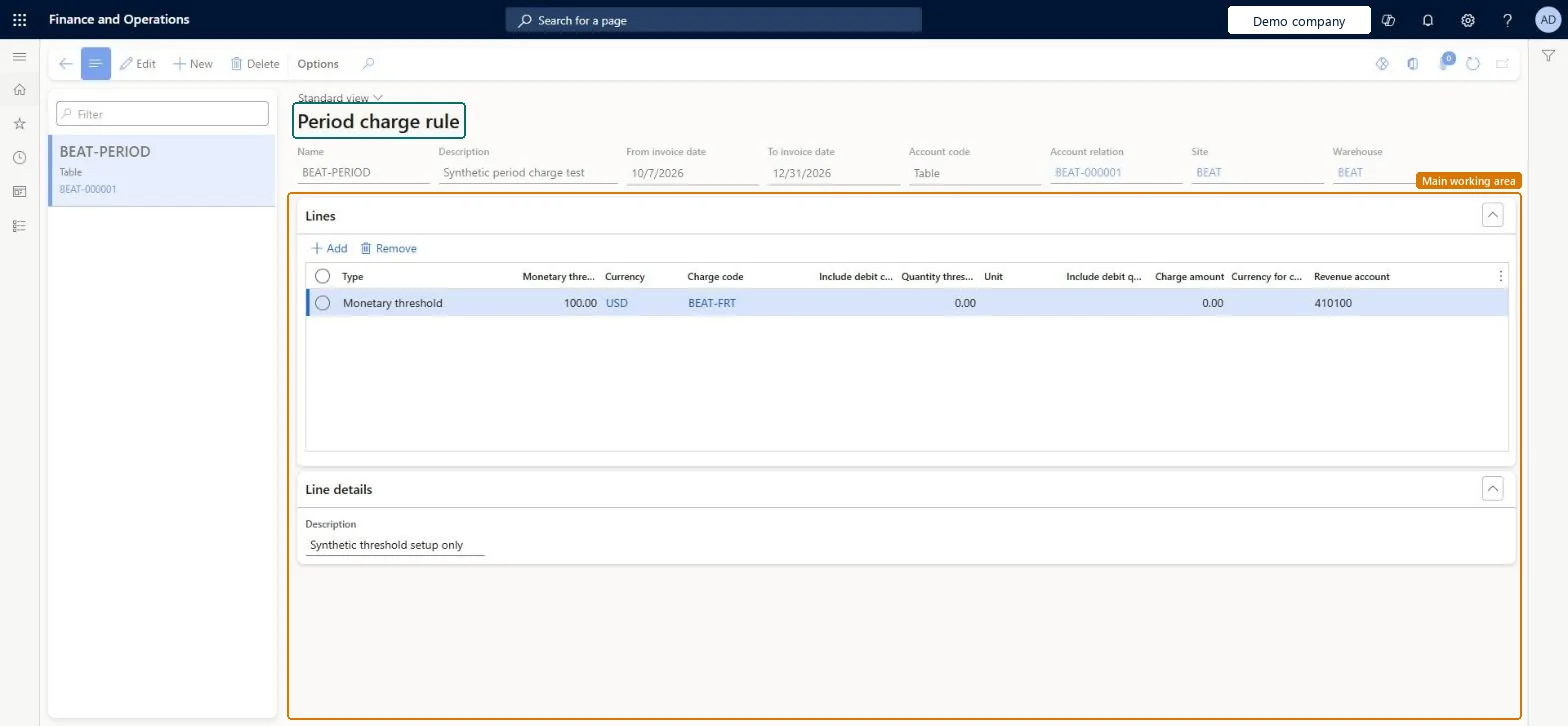
Defines rules that identify customers whose invoiced orders over a period fell short of a minimum amount or quantity so that a free text invoice charge can be generated for the shortfall.
Screen 1
Create the period charge rule
Go to Accounts receivable > Charges setup > Period charge rule
- Select New and fill in the rule header
- On the Lines FastTab, select Add
- Add a Monetary threshold line with the charge code and revenue account
1Name BEAT-PERIOD Description Synthetic period charge test From invoice date 10/7/2026 To invoice date 12/31/2026 Account code Table Account relation BEAT-000001 Site BEAT Warehouse BEAT Type Monetary threshold Monetary threshold 100.00 Currency USD Charge code BEAT-FRT Revenue account 410100 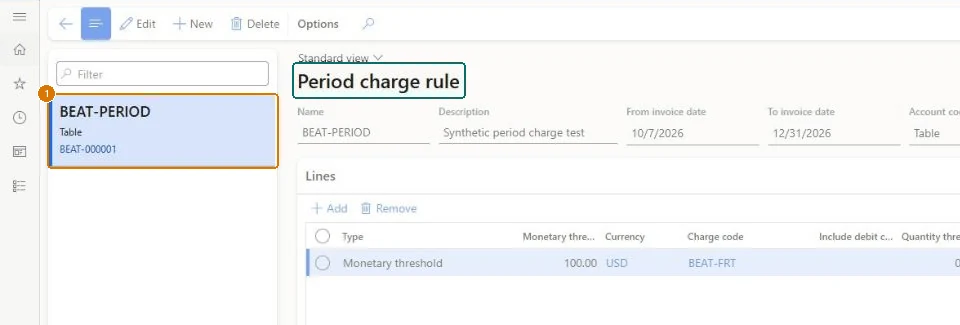
Show the full screen
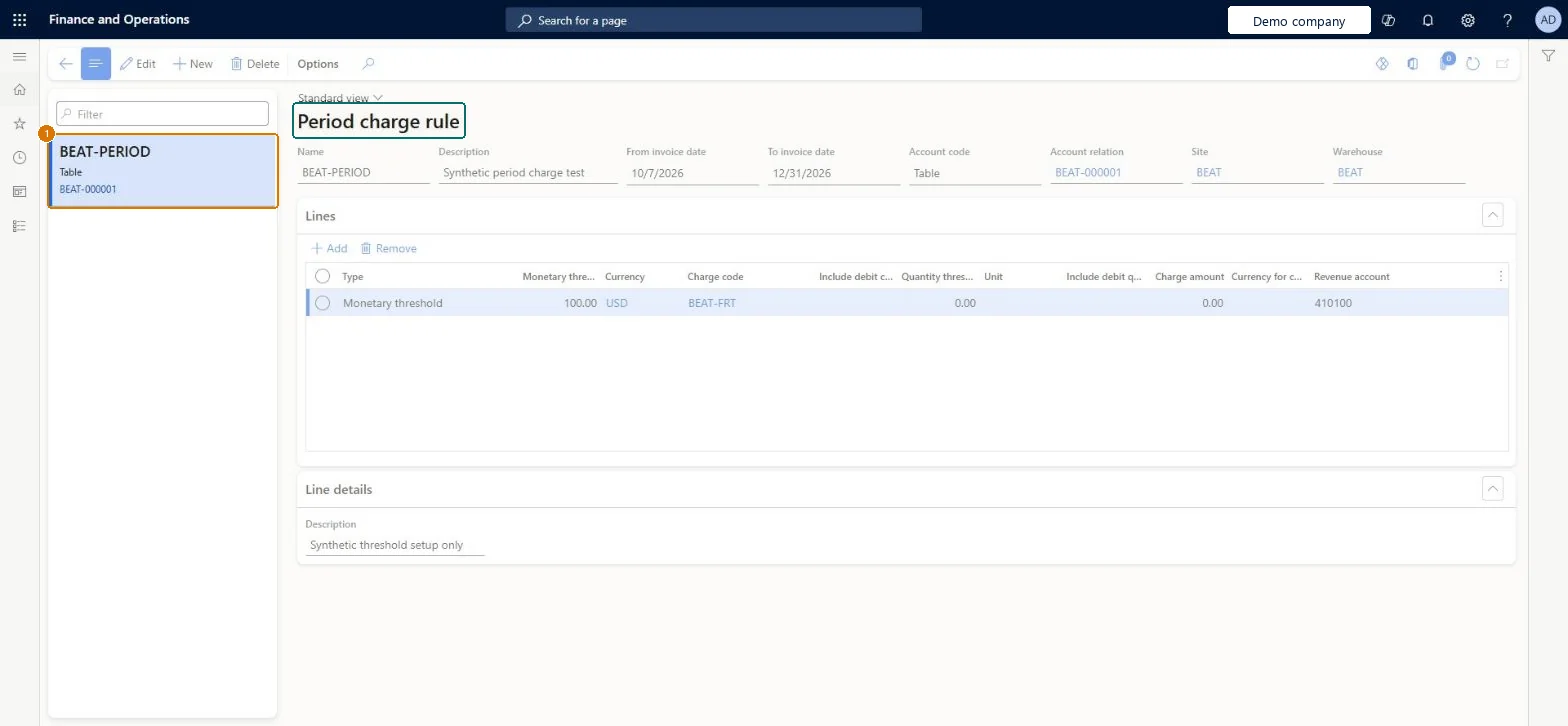
page title tab to open what to set or check
Microsoft's steps
- Go to Accounts receivable > Charges setup > Period charge rule.
- Select New, or select a rule and then Edit.
- Enter a Name, a Description, and the From invoice date and To invoice date.
- In the Account code field, select Table or All, and for Table select the customer in Account relation.
- Optionally, select a Site and a Warehouse.
- On the Lines FastTab, add a line and select its Type: Monetary threshold, Quantity threshold or Quantity threshold minimum amount.
- Enter the thresholds, currency or unit, Charge code, Charge amount and Revenue account the line needs.
- On the Line details FastTab, enter a description for the free text invoice line.
Source: Microsoft Learn ↗
Field guide
| Field | What it means | Worked example | Table column |
|---|---|---|---|
| From invoice date | The first date the rule is valid.Microsoft Learn ↗ | 10/7/2026 | — |
| To invoice date | The last date the rule is valid.Microsoft Learn ↗ | 12/31/2026 | — |
| Account code | Whether the rule applies to one customer (Table) or all customers (All).Microsoft Learn ↗ | Table | — |
| Site | The site the rule applies to; blank for all sites.Microsoft Learn ↗ | BEAT | — |
| Warehouse | The warehouse the rule applies to; blank for all warehouses.Microsoft Learn ↗ | BEAT | — |
| Type | The kind of charge the rule line creates: based on money, on quantity, or on both.Microsoft Learn ↗ | Monetary threshold | — |
| Monetary threshold | If qualifying charges in the period total less than this, the customer is charged the shortfall.Microsoft Learn ↗ | 100.00 | — |
| Quantity threshold | If the quantity ordered in the period is below this, the customer is charged the charge amount.Microsoft Learn ↗ | — | — |
| Charge code | The type of charge the rule line applies to, such as freight.Microsoft Learn ↗ | BEAT-FRT | — |
| Charge amount | The fixed fee charged when a quantity threshold isn't met.Microsoft Learn ↗ | — | — |
| Revenue account | The revenue account on the free text invoice line the rule creates.Microsoft Learn ↗ | 410100 | — |
| Name | — | BEAT-PERIOD | — |
| Description | — | Synthetic period charge test | — |
| Account relation | — | BEAT-000001 | — |
| Currency | — | USD | — |
Functional consultant
4Setup decisions
| Setup step | Recommended value and why | Decision · common mistake · test |
|---|---|---|
| Set up Period charge rule | — | — |
Solution architect
5Design impact
| Shared or per company | — |
|---|---|
| Can it be undone | — |
| Feature or country | — |
| If you change it later | — |
Technical architect
6Technical
| Menu item | MarkupPeriodChargeRule Checked in Dynamics 365 |
|---|---|
| Form | MarkupPeriodChargeRule Checked in Dynamics 365 |
| Table | MarkupPeriodChargeRuleShown as “Period charge rule” in Record infoKey field: RuleNameChecked in Dynamics 365 |
| Data entities | — |
| Who can open it | PrivilegesMaintain period charge rules MarkupPeriodChargeRuleCustomerMaintainView period charge rules MarkupPeriodChargeRuleCustomerViewDutiesInquire into sales order progress SalesOrderProgressInquireEnable quotation to sales order process SalesQuotationToSalesOrderProcessEnable19 security rolesCredit management clerkCredManClerkAccounts receivable clerk CustInvoiceAccountsReceivableClerkAccounts receivable manager CustInvoiceAccountsReceivableManager MCRTestUserRoleAccounts receivable centralized payments clerk PaymAccountsReceivableCentralPaymClerkAccounts receivable payments clerk PaymAccountsReceivablePaymentsClerkProject manager ProjProjectManagerRental clerk RentalClerkRental coordinator agent RentalCoordinatorAgentRental manager RentalManagerRental purchasing manager RentalPurchasingManagerRental representative RentalRepresentativeProduction planner ReqProductionPlannerRetail service RetailServiceRetail store manager RetailStoreManagerCustomer service representative TradeCustomerServiceRepresentativeSales clerk TradeSalesClerkSales manager TradeSalesManagerSales representative TradeSalesRepresentative |
| Actions on the page | — |
Developer
7Developer
| Open it directly | https://<your-environment>/?mi=MarkupPeriodChargeRule |
|---|---|
| Integrate with | — |
| Table definition | — |
Everyone
8Sources and checks
- learn.microsoft.com/dynamics365/supply-chain/sales-marketing/period-charges
- learn.microsoft.com/dynamics365/supply-chain/sales-marketing/period-charges#manage-period-charge-rules
- learn.microsoft.com/dynamics365/supply-chain/sales-marketing/period-charges
- Checked in a working Dynamics 365 system, version 10.0.49: the menu item, form, table and security, the page, the demo records and the values in the screenshots.