BeyondERP.Newsletter
Menu

Setup step on the Wave attributes page · Warehouse management

Set up Wave attributes

Use this page to create the attributes that wave templates and waves use as additional criteria.

Used by
Warehouse planner, Warehouse manager
Business process
Manage warehouse operations
Menu item
WHSWaveAttributes
Main table
WHSWaveAttributes
Data entity
WHSFirstWarehouseWaveAttributeEntity
Setup steps
1 on this page
Show what matters for
SETUP GUIDEHow to set it up7 sections. Choose a role to highlight what matters to you.
Everyone

1What it is and why

What it isA list page where you define wave attributes, each with an attribute value, an attribute name and a description.
What you do hereUse this page to create the attributes that wave templates and waves use as additional criteria.
ExampleFor example, a wave attribute can hold a specific customer name as an additional criterion for a wave template.
Wave attributes page in Dynamics 365
The page in Dynamics 365. page title tab to open what to set or check
Functional consultant · Solution architect

2Where it fits

Business processManage warehouse operations
Menu pathWarehouse management › Setup › Waves › Wave attributes
Used next byWave templates Microsoft Learn
In this process Set up Number sequence extensions · Set up Location formats
End user · Functional consultant

3How to do it

About the examples: Examples and screenshots in this guide use BEAT, a demo company in a Dynamics 365 test environment. Use your own company's codes and values instead of copying them.

Setup steps on this page

Set up Wave attributes

Use this page to create the attributes that wave templates and waves use as additional criteria.

How to use it

  1. Go to Warehouse management > Setup > Waves > Wave attributes.
  2. Select New to add an attribute.
  3. Enter the attribute value, the Attribute name and a Description.
  4. Select Save.

Source: Checked in Dynamics 365

Solution architect

4Design impact

Shared or per companyPer company: each legal entity has its own records. Microsoft data model
Technical architect

5Technical

Menu itemWHSWaveAttributes Checked in Dynamics 365
FormWHSWaveAttributes Checked in Dynamics 365
TableWHSWaveAttributesShown as “WAVE ATTRIBUTES” in Record infoKey field: AttributeNumChecked in Dynamics 365
Data entitiesWHSFirstWarehouseWaveAttributeEntityWave attributes 1 Microsoft data model WHSFourthWarehouseWaveAttributeEntityWave attributes 4 Microsoft data model WHSSecondWarehouseWaveAttributeEntityWave attributes 2 Microsoft data model WHSThirdWarehouseWaveAttributeEntityWave attributes 3 Microsoft data model
Who can open itPrivilegesMaintain wave attributes WHSWaveAttributesMaintainView wave attributes WHSWaveAttributesViewDutiesInquire into warehouse planning master data WHSWarehousePlanningMasterInquireRecord warehouse planning masters WHSWarehousePlanningMasterMaintain
2 security rolesWarehouse planner WHSWarehousePlannerWarehouse manager WMSWarehouseManager
Checked in Dynamics 365
Roles to set it up and use itTo set it up or change itWarehouse manager WMSWarehouseManagerWarehouse planner WHSWarehousePlannerGive people one of these roles. On this system, 2 roles can open this page.Checked in Dynamics 365
Developer

6Developer

Open it by URLhttps://<your-environment>/?mi=WHSWaveAttributes
Integrate withWHSFirstWarehouseWaveAttributeEntity data entity Microsoft data model
Data migrationWHSFirstWarehouseWaveAttributeEntity (Wave attributes 1): loaded for each company, in Microsoft's default template 400 - Warehouse management.WHSFourthWarehouseWaveAttributeEntity (Wave attributes 4): loaded for each company, in Microsoft's default template 400 - Warehouse management.WHSSecondWarehouseWaveAttributeEntity (Wave attributes 2): loaded for each company, in Microsoft's default template 400 - Warehouse management.Load order: Microsoft's default template 400 - Warehouse management loads Wave attributes 1 at execution unit 1, level 30, sequence 10. Lower levels load first, and entities at the same level load in sequence order.Load first: the default templates at lower levels (System setup to General ledger)Microsoft Learn
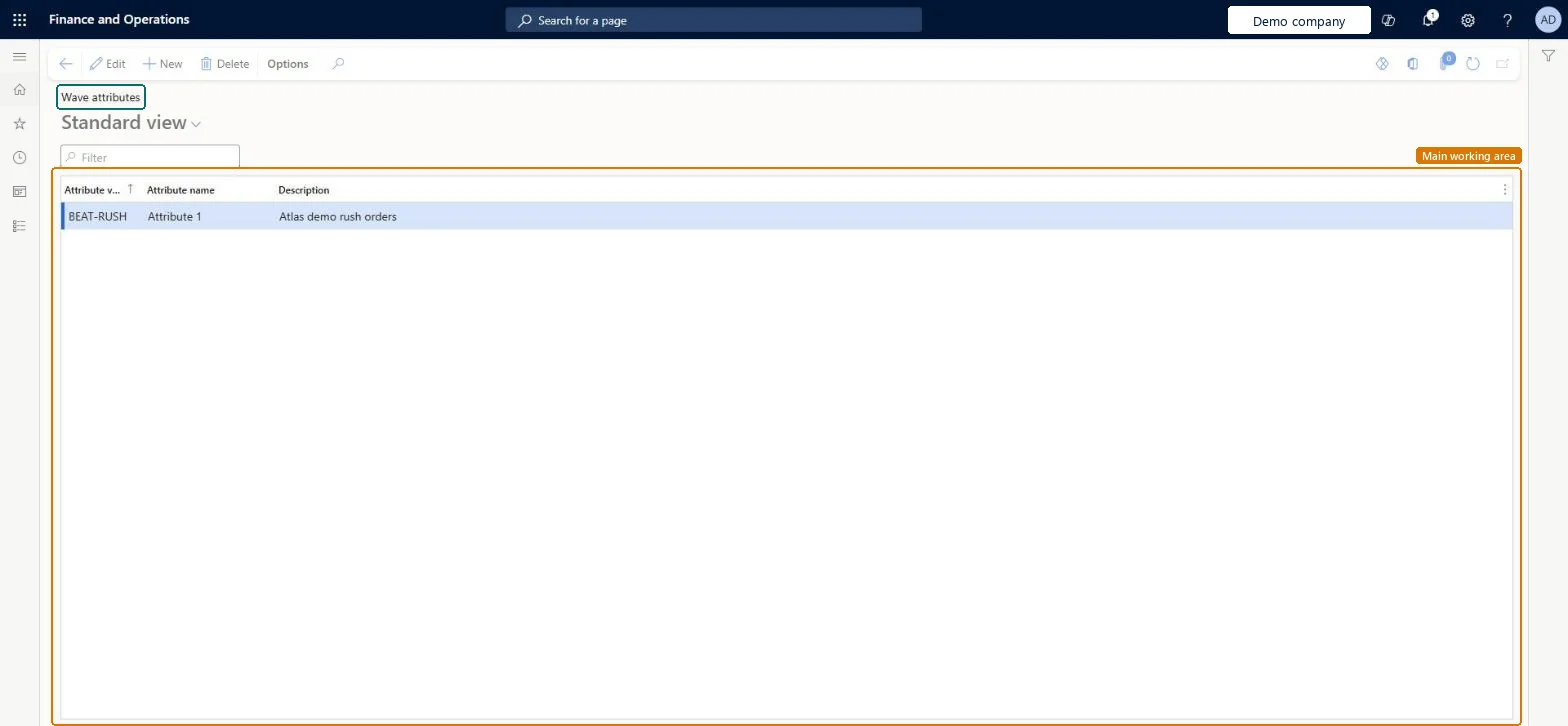
Table definitionWHSWaveAttributes columns and relations Microsoft data model
Everyone

7Sources

To cite this step: WM-WAVE-040, Set up Wave attributes. Beyond ERP Atlas Hub, 2026-11-11. https://www.beyonderp.cloud/atlas/step/WM-WAVE-040