BeyondERP.Newsletter
Menu

Setup step on the Wave load building templates page · Warehouse management

Set up Wave load building templates

Use this page to set up the templates that advanced wave load building uses to combine or separate shipments on loads.

Used by
Logistics manager, Transportation coordinator, Warehouse planner and 1 more role
Business process
Manage warehouse operations
Menu item
WHSLoadBuildTemplate
Main table
WHSLoadBuildTemplate
Data entity
WHSWarehouseWaveLoadBuildingTemplateV2Entity
Setup steps
1 on this page
Show what matters for
SETUP GUIDEHow to set it up8 sections. Choose a role to highlight what matters to you.
Everyone

1What it is and why

What it isA setup page where you define the load build templates that control which load, existing or new, the load lines being waved are added to.
What you do hereUse this page to set up the templates that advanced wave load building uses to combine or separate shipments on loads.
ExampleFor example, shipments can be combined or separated based on the load template, the equipment or other field values on the load line.
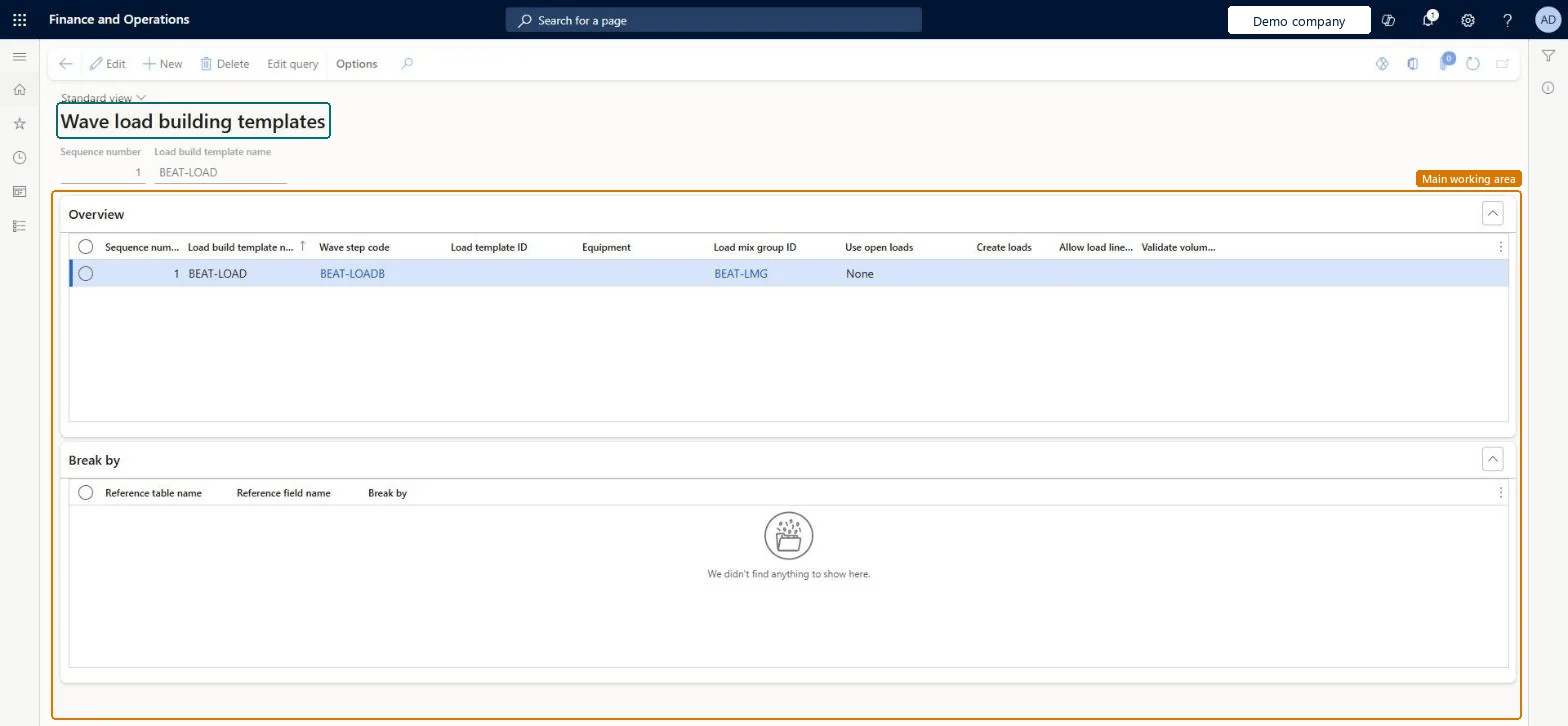
Wave load building templates page in Dynamics 365
The page in Dynamics 365. page title tab to open what to set or check
Functional consultant · Solution architect

2Where it fits

Business processManage warehouse operations
Menu pathWarehouse management › Setup › Load › Wave load building templates
Set up firstLoad mix groups Microsoft Learn Wave step codes Microsoft Learn
In this process Set up Document routing layouts · Set up Mobile device menu items
End user · Functional consultant

3How to do it

About the examples: Examples and screenshots in this guide use BEAT, a demo company in a Dynamics 365 test environment. Use your own company's codes and values instead of copying them.

Setup steps on this page

Set up Wave load building templates

Use this page to set up the templates that advanced wave load building uses to combine or separate shipments on loads.

Steps from Microsoft

  1. Go to Warehouse management > Setup > Load > Wave load building templates.
  2. Select New to add a row to the grid.
  3. Set the sequence number, the load build template name, the wave step code and the load template ID.
  4. Set the equipment, load mix group ID, use open loads, create loads, allow load line split and validate volumetrics options as the template requires.
  5. Select Save, then select Edit query to define the sorting rules.
  6. On the Break by FastTab, set the rules that control how your loads are split up.

Source: Microsoft Learn

Fields on the page

FieldWhat it meansTable column
Sequence numberThe order that the template will be evaluated in.Microsoft Learn SequenceNumber
Wave step codeThe wave step code that links the template to a wave method.Microsoft Learn WaveStepCode
Load template IDThe load template to use when new loads are created and to match against when assigning to existing loads.Microsoft Learn LoadTemplateId
EquipmentThe equipment to match against when assigning to existing loads and to enter on new loads that are created.Microsoft Learn EquipmentCode
Load mix group IDThe load mix group to use if the item is allowed on the load.Microsoft Learn LoadMixGroupId
Use open loadsWhether existing open loads should be added.Microsoft Learn UseOpenLoads
Create loadsWhether new loads should be created if no existing loads match the criteria.Microsoft Learn CreateLoads
Validate volumetricsWhether load building checks the weight and volume as each load line is added, so that the limits of the load template are respected.Microsoft Learn ValidateVolumetrics

Test checklist

  1. Check that buildLoads is listed on Wave process methods; if not, select Regenerate methods.
  2. Add buildLoads with a wave step code to the shipping wave template.
  3. Create a load build template with that wave step code, a load template, Use open loads = Any and Create loads selected.
  4. Release two sales order lines for the same order to the warehouse and check the second shipment joins the existing load.

Source: Microsoft Learn

Functional consultant

4Setup decisions

Setup stepRecommended value and whyDecision, common mistake and test
Set up Wave load building templatesAt least one template per load building wave step code, linked to the buildLoads method on the wave template, with a load template and load mix groupAdvanced wave load building needs a wave template with the buildLoads method and at least one load build template linked to it by wave step code.Turning on Allow load line split to keep loads within weight or volume. It splits only on a quantity limit, not on volume or weight.
Solution architect

5Design impact

Shared or per companyPer company: each legal entity has its own records. Microsoft data model
Can it be undoneReversible: Templates are evaluated at wave execution; changes affect later waves.
Technical architect

6Technical

Menu itemWHSLoadBuildTemplate Checked in Dynamics 365
FormWHSLoadBuildTemplate Checked in Dynamics 365
TableWHSLoadBuildTemplateShown as “LOAD BUILD TEMPLATES” in Record infoKey field: LoadBuildTemplateNameChecked in Dynamics 365
Data entitiesWHSWarehouseWaveLoadBuildingTemplateV2EntityWave load building templates V2 Microsoft data model
Who can open itPrivilegesMaintain load build templates WHSLoadBuildTemplateMaintainView load build templates WHSLoadBuildTemplateViewDutiesMaintain load planning WHSLoadPlanningMaintainInquire into load planning progress WHSLoadPlanningProgressInquire
4 security rolesLogistics manager TMSLogisticsManagerTransportation coordinator TMSTransportationCoordinatorWarehouse planner WHSWarehousePlannerWarehouse manager WMSWarehouseManager
Checked in Dynamics 365
Roles to set it up and use itTo set it up or change itTransportation coordinator TMSTransportationCoordinatorTo use itWarehouse planner WHSWarehousePlannerWarehouse manager WMSWarehouseManagerLogistics manager TMSLogisticsManagerGive people one of these roles. On this system, 4 roles can open this page.Checked in Dynamics 365
Actions on the page(Action Pane without tabs): Edit queryChecked in Dynamics 365
Developer

7Developer

Open it by URLhttps://<your-environment>/?mi=WHSLoadBuildTemplate
Integrate withWHSWarehouseWaveLoadBuildingTemplateV2Entity data entity Microsoft data model
Data migrationWHSWarehouseWaveLoadBuildingTemplateV2Entity (Wave load building templates V2): loaded for each company.Microsoft Learn
Table definitionWHSLoadBuildTemplate columns and relations Microsoft data model
Everyone

8Sources

To cite this step: WM-LOAD-020, Set up Wave load building templates. Beyond ERP Atlas Hub, 2026-11-11. https://www.beyonderp.cloud/atlas/step/WM-LOAD-020