BeyondERP.Newsletter
Menu

Setup step on the Statistical balance setup page · Time and attendance

Set up Statistical balance setup

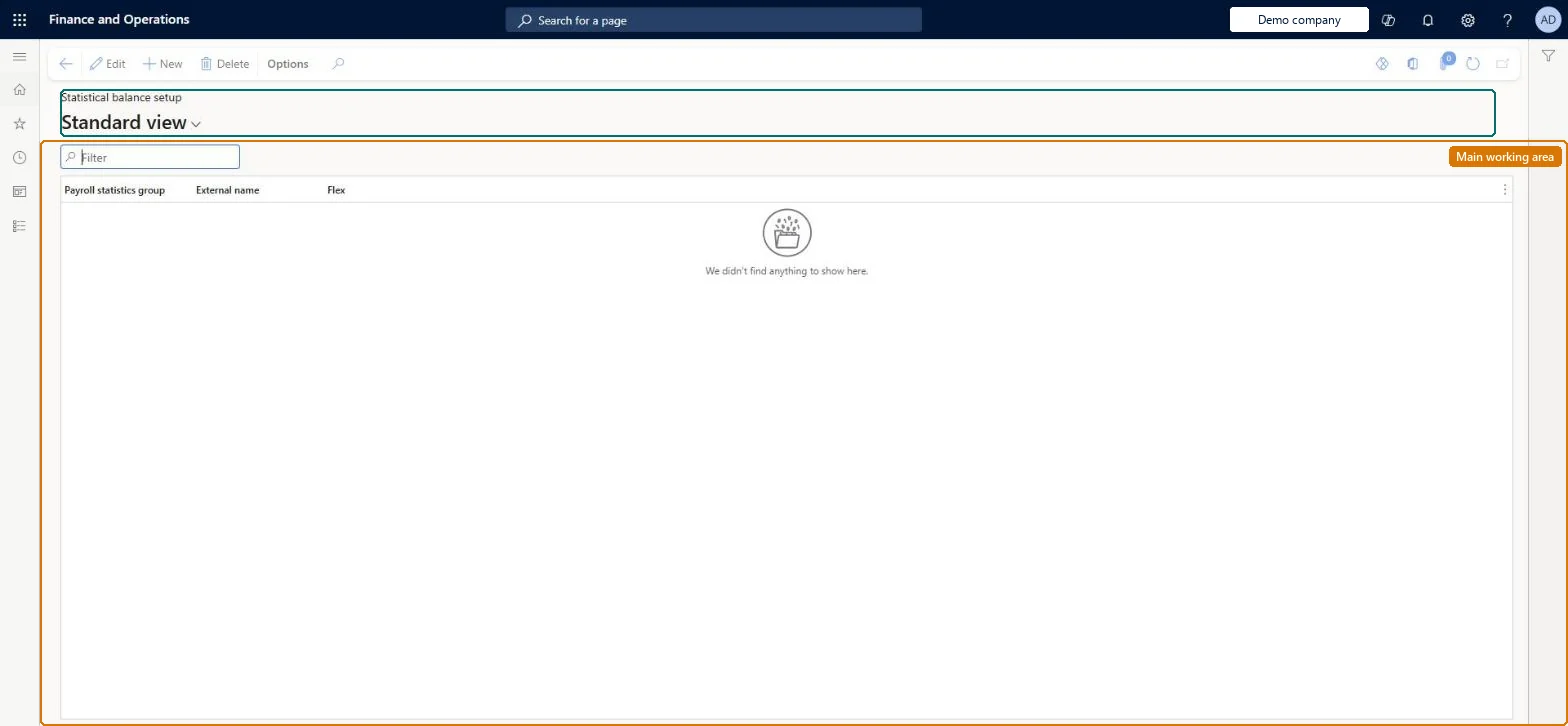
Use this page to make balances such as vacation days visible to workers in the My day view of the production floor execution interface.

Used by
Payroll administrator
Business process
Manage time and attendance
Menu item
JmgTermRegPayStatDownload
Main table
JmgTermTexts
Setup steps
1 on this page
Show what matters for
SETUP GUIDEHow to set it up8 sections. Choose a role to highlight what matters to you.
Everyone

1What it is and why

What it isA setup page where you choose which payroll statistics groups, or the flex balance, are shown to workers as balances, under an external name.
What you do hereUse this page to make balances such as vacation days visible to workers in the My day view of the production floor execution interface.
ExampleFor example, a worker opens My day on the production floor execution interface and sees a balance of nine vacation days.
Statistical balance setup page in Dynamics 365
The page in Dynamics 365. page title tab to open what to set or check
Functional consultant · Solution architect

2Where it fits

Business processManage time and attendance
Menu pathTime and attendance › Setup › Payroll › Statistical balance setup
Set up firstPayroll statistics groups Microsoft Learn
Used next byConfigure production floor execution Microsoft Learn
Related pagesPayroll statistics groups Microsoft Learn
In this process Set up Piecework groups · Set up Time and attendance configuration wizard
End user · Functional consultant

3How to do it

About the examples: Examples and screenshots in this guide use BEAT, a demo company in a Dynamics 365 test environment. Use your own company's codes and values instead of copying them.

Setup steps on this page

Set up Statistical balance setup

Use this page to make balances such as vacation days visible to workers in the My day view of the production floor execution interface.

Steps from Microsoft

  1. Go to Time and attendance > Setup > Payroll > Statistical balance setup.
  2. Select New.
  3. Select the Payroll statistics group.
  4. Enter the External name.
  5. Set Flex as required.

Source: Microsoft Learn

Fields on the page

FieldWhat it meansTable column
Payroll statistics groupThe payroll statistics group whose balance is shown.Microsoft Learn PayStatGroupId
External nameThe name workers see for the balance.Microsoft Learn BalanceText
FlexShows the flexible hours balance instead of a payroll statistics group.Microsoft Learn BalanceFlex

Common errors and fixes

MessageWhat to do
Workers don't see the balance in My dayAdd My day to the production floor execution configuration and a line here with an External name. Microsoft Learn

Test checklist

  1. Create a line for the vacation payroll statistics group with an External name and Flex = No.
  2. Add My day to the secondary toolbar in Configure production floor execution.
  3. Give the worker a starting balance with a manual premium and register one vacation day, then transfer.
  4. Sign in to production floor execution as the worker, open My day and check the Balances section shows the remaining days.

Source: Microsoft Learn

Functional consultant

4Setup decisions

Setup stepRecommended value and whyDecision, common mistake and test
Set up Statistical balance setupOne line per balance workers should see, such as a vacation payroll statistics group with an External name like Vacation balance, plus a My day button on the production floor execution configurationThe statistical balance setup links a payroll statistics group (or the flex balance) to the My day view, where workers see it under the external name.Which balances do workers see?Setting up the balance but not adding My day to the production floor execution tab. Workers then can't open the balance.Test: Vacation balance in My day

Feature management and licence

Licence or add-inTime and attendance roles come from the security read in the Technical section. On this system the page is opened with roles such as Payroll administrator. The Microsoft Learn article for this page names no Feature management feature to turn on.

Microsoft Learn

Solution architect

5Design impact

Shared or per companyPer company: each legal entity has its own statistical balance setup. Checked in Dynamics 365
Can it be undoneReversible: This only controls what balances are shown to workers in My day.
If you change it laterEach line shows either a payroll statistics group or the flex balance, not both. Microsoft Learn
Technical architect

6Technical

Menu itemJmgTermRegPayStatDownload Checked in Dynamics 365
FormJmgTermRegPayStatSetup Checked in Dynamics 365
TableJmgTermTextsShown as “SEND STATISTICS” in Record infoChecked in Dynamics 365
Who can open itPrivilegesMaintain pay statistics balance setup JmgTermRegPayStatDownloadMaintainView pay statistics balance setup JmgTermRegPayStatDownloadViewDutiesEnable time and attendance payroll process JmgTimeAttendancePayrollProcessEnableInquire into time and attendance payroll reference data JmgTimeAttendancePayrollRefDataInquire
1 security rolePayroll administrator HcmPayrollAdministrator
Checked in Dynamics 365
Roles to set it up and use itTo set it up or change itPayroll administrator HcmPayrollAdministratorGive people one of these roles. On this system, 1 role can open this page.Checked in Dynamics 365
Developer

7Developer

Open it by URLhttps://<your-environment>/?mi=JmgTermRegPayStatDownload
Data migrationLoad order: Statistical balance setup has no data entity in Data management, so it can't be loaded from a file or a configuration template. Re-create the lines by hand after the payroll statistics groups exist.Checked in Dynamics 365
Table definitionJmgTermTexts columns and relations Microsoft data model
Everyone

8Sources

To cite this step: TA-SETUP-200, Set up Statistical balance setup. Beyond ERP Atlas Hub, 2026-11-11. https://www.beyonderp.cloud/atlas/step/TA-SETUP-200