SETUP GUIDEHow to set it up8 sections. Choose a role to highlight what matters to you.
Everyone
1What it is and why
What it is
A periodic job that creates or updates a customer's item list from the items the customer ordered recently.
What you do here
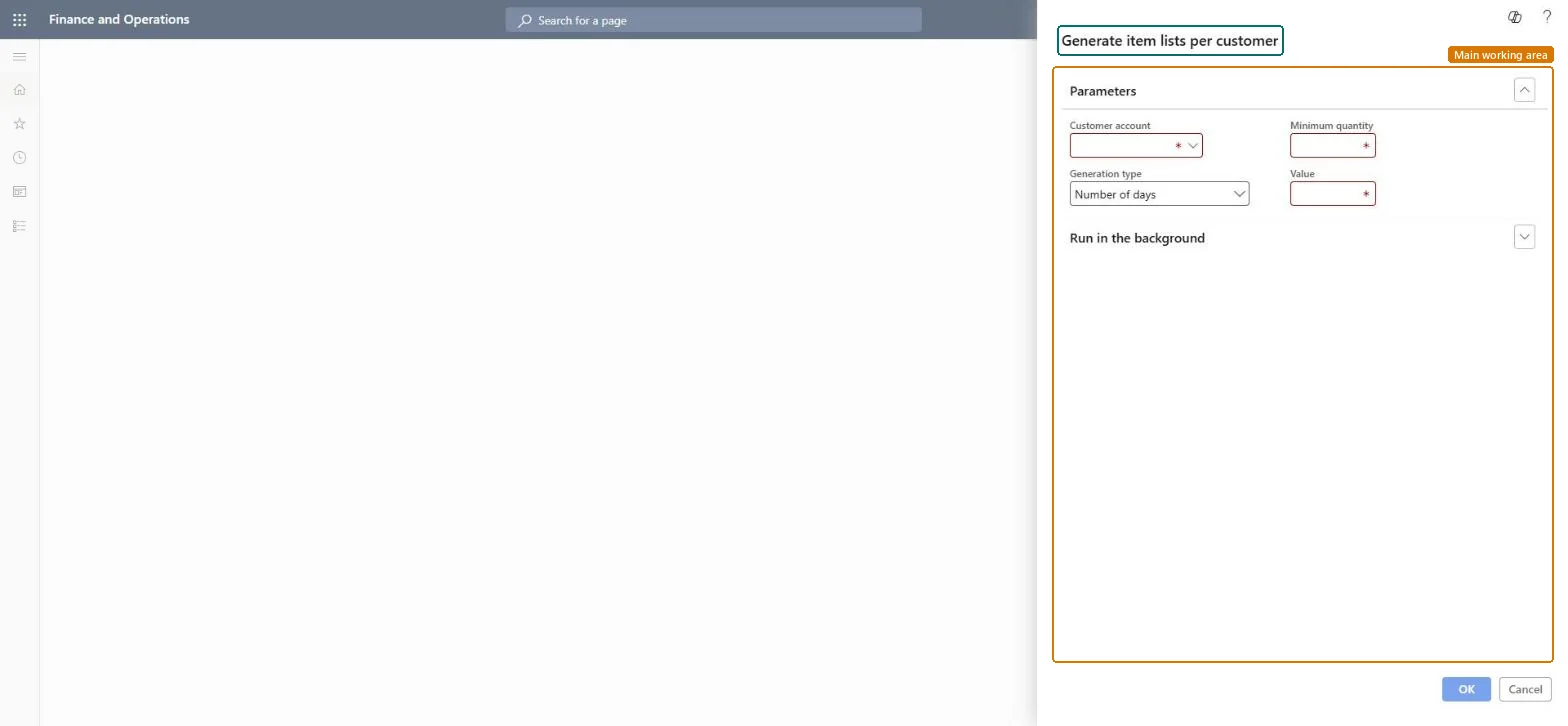
Use this periodic task to build item lists per customer based on a number of recent days or orders and a minimum quantity.
Example
For example, BEAT runs the job for customer BEAT-000456 on Number of days with value 30 and Minimum quantity 5, and the item list gets the 7 items the cafe ordered at least 5 of in the last 30 days.
The page in Dynamics 365. page title tab to open what to set or check
About the examples: Examples and screenshots in this guide use BEAT, a demo company in a Dynamics 365 test environment. Use your own company's codes and values instead of copying them.
When to run it
When to run it
After customers have enough order history, and again when their buying pattern changes (for example each quarter).
Builds the list from sales orders created within the number of days you enter.Microsoft Learn
30
Number of orders
Builds the list from the number of previous orders you enter.Microsoft Learn
4
Minimum quantity
The smallest quantity an order line must have to be included in the list.Microsoft Learn
5.00
Common errors and fixes
Message
What to do
The job runs but the customer's item list stays empty.
Select Enable item list on the customer's Sales order defaults FastTab, and check that order lines reach the Minimum quantity in the chosen days or orders. Microsoft Learn
Run per customer on a number of days that covers one buying cycle (for example 30), with a minimum quantity that leaves out one-off small lines.The list is built from orders within the days or orders you enter, and only lines at or above the minimum quantity are added, so these two values decide which items appear.
To use itSales manager TradeSalesManagerSales clerk TradeSalesClerkSales representative TradeSalesRepresentativeGive people one of these roles. On this system, 3 roles can run this page.Checked in Dynamics 365
MCRSalesProductSetEntity Load item lists directly instead of running the job when history isn't migrated.Load order: Run the job after sales history exists, or load item lists through the entity after customers and released products.Load first: Customers, Released productsMicrosoft Learn