Collections agent, Collections manager, Accounts receivable clerk and 6 more roles
Business process
Manage sales order holds
Menu item
MCROMHoldsListPage
Main table
MCRHoldCodeTrans
Setup steps
1 on this page
Show what matters for
SETUP GUIDEHow to set it up8 sections. Choose a role to highlight what matters to you.
Everyone
1What it is and why
What it is
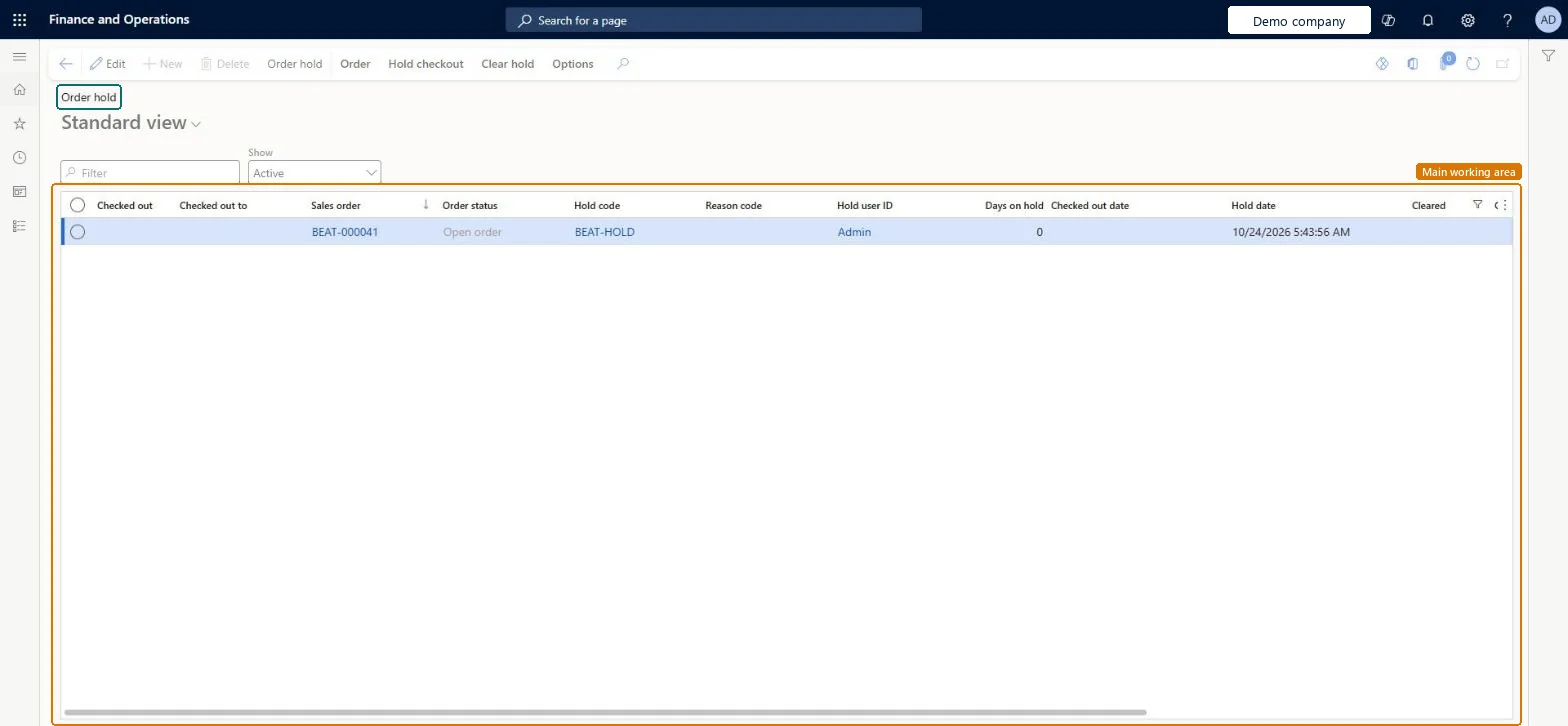
A workbench page that gives an overview of all current and processed order holds, where you handle the holds and their sales orders.
What you do here
Use this page to check holds in and out and to clear holds so that orders can move on to the next fulfillment step.
Example
For example, SO-001234 for BEAT-000123 gets hold code CREDIT because the order total of 12,400.00 needs review; a collections agent checks out the hold, the manager approves, and the agent selects Clear holds so the warehouse can pick it.
The page in Dynamics 365. page title tab to open what to set or check
About the examples: Examples and screenshots in this guide use BEAT, a demo company in a Dynamics 365 test environment. Use your own company's codes and values instead of copying them.
Setup steps on this page
Work the order holds queue
Check out, review and clear holds so orders can move on.
Steps from Microsoft
Go to Sales and marketing > Sales orders > Open orders > Order holds.
Use the Filter field or the Show list to filter by value or hold status, and select the hold.
On the Hold checkout tab, select Check out so other users can't clear the hold while you work on it.
Use Override checkout to hand a checked-out hold to another user.
When the order is ready, on the Clear hold tab select Clear holds, or Clear and modify if the order needs changes.
Check out a hold before working on it and clear it with Clear and modify when the order needs changes.A checked-out hold can't be cleared by others, so two users don't release the same order with different decisions.
While a hold is checked out to you, other users can't clear it. Microsoft Learn
Technical architect
6Technical
Menu item
MCROMHoldsListPageChecked in Dynamics 365
Form
MCRHoldCodeTransChecked in Dynamics 365
Table
MCRHoldCodeTransShown as “Hold codes” in Record infoChecked in Dynamics 365
Who can open it
PrivilegesCustomer credit and collections CustomerCollectionManagerWorkspaceViewMaintain holds for sales orders MCROMHoldsListPageMaintainDutiesCustomer credit and collections CustomerCollectionManagerWorkspaceViewMaintain sales order holds MCRSalesHoldMaintain10 security rolesCollections agent CollectionLetterCollectionsAgentCollections manager CollectionLetterCollectionsManagerAccounts receivable clerk CustInvoiceAccountsReceivableClerkAccounts receivable manager CustInvoiceAccountsReceivableManagerMCRTestUserRoleCustomer service manager TradeCustomerServiceManagerCustomer service representative TradeCustomerServiceRepresentativeSales clerk TradeSalesClerkSales manager TradeSalesManagerSales representative TradeSalesRepresentativeChecked in Dynamics 365
Roles to set it up and use it
To set it up or change itSales manager TradeSalesManagerSales representative TradeSalesRepresentativeAccounts receivable manager CustInvoiceAccountsReceivableManagerSales clerk TradeSalesClerkCustomer service representative TradeCustomerServiceRepresentativeTo use itCollections manager CollectionLetterCollectionsManagerCollections agent CollectionLetterCollectionsAgentGive people one of these roles. On this system, 9 roles can open this page.Checked in Dynamics 365
Actions on the page
Order: OrderHold checkout: Hold checkoutClear hold: Clear holdOptions: Personalize, Page options, ShareChecked in Dynamics 365
Developer
7Developer
Open it by URL
https://<your-environment>/?mi=MCROMHoldsListPage
Data migration
Load order: Order holds has no data entity in Data management. No entity in the Common Data Model is built on its table (MCRHoldCodeTrans); holds are working data, so clear or re-create them on the migrated orders. Hold codes load with Sales order hold codes (MCRSalesOrderHoldCodeEntity).Checked in Dynamics 365