SETUP GUIDEHow to set it up8 sections. Choose a role to highlight what matters to you.
Everyone
1What it is and why
What it is
A batch job that deletes the records left in the mass termination tables after the mass termination data entity has been used to change terminations in bulk.
What you do here
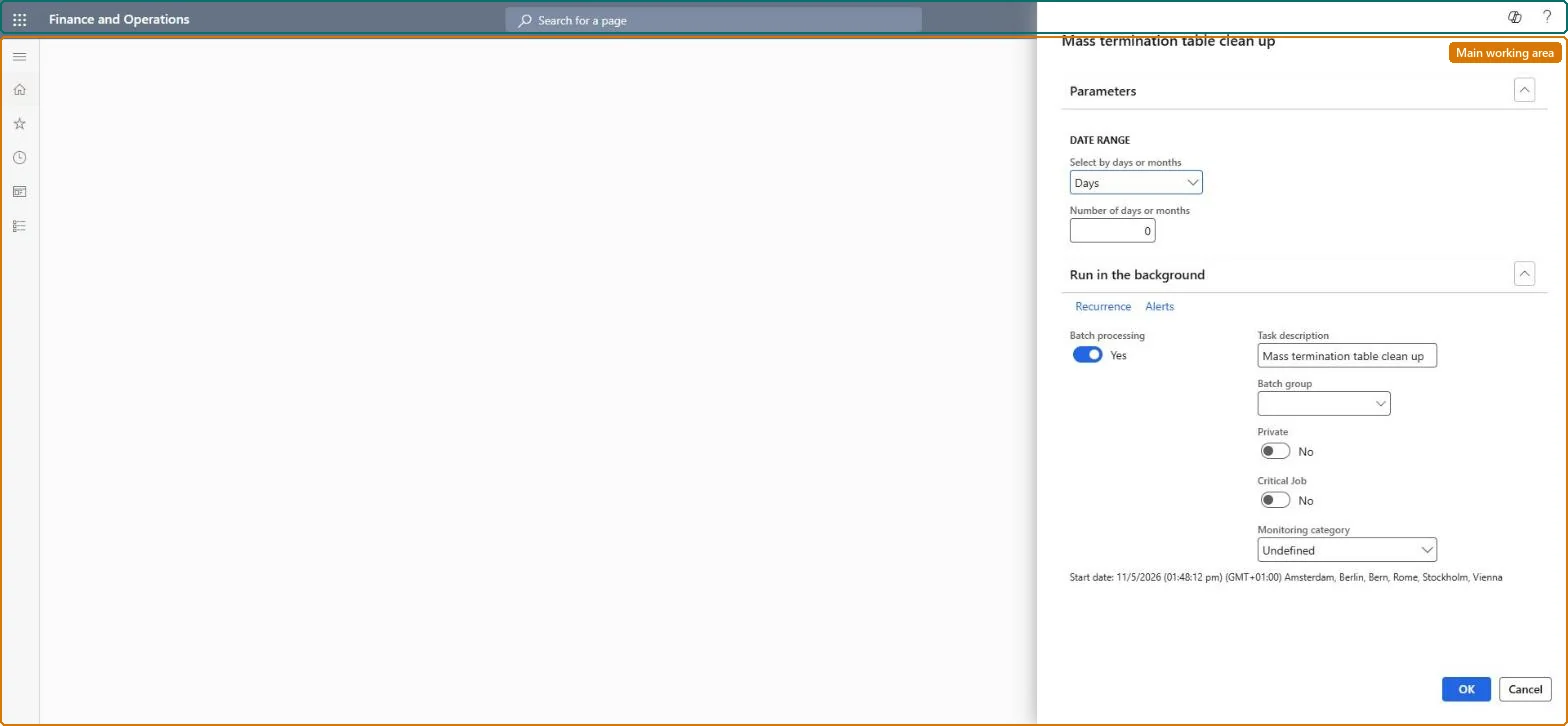
Use this page to keep the mass termination tables small by deleting their records older than the number of days or months you enter.
Example
For example, BEAT runs it monthly with Days and 30, so mass termination records more than 30 days old are deleted once each bulk change has been processed.
The page in Dynamics 365. page title tab to open what to set or check
About the examples: Examples and screenshots in this guide use BEAT, a demo company in a Dynamics 365 test environment. Use your own company's codes and values instead of copying them.
When to run it
When to run it
After mass terminations imported through the mass termination entity are fully processed.
How often
On demand after mass termination imports, or as a recurring batch job.
Batch settings
Batch processing is Yes by default; schedule it as a recurring background job so the staging tables don't grow.
What the output shows
Mass termination table records older than the period you entered are cleared. Billing schedules and their terminations aren't affected.
Delete old staging records without losing ones still in use.
Steps from Microsoft
Go to Subscription billing > Recurring contract billing > Periodic tasks > Mass termination table clean up.
Under Parameters, choose Days or Months and enter the Number of days or months, which sets how old the mass termination records must be before they are cleared.
Use a period long enough that terminations still in progress through the mass termination entity aren't cleared.
After the run, confirm that the old mass termination records are gone and new imports through the entity still work.
A recurring monthly batch job with an age of at least 30 days.The job deletes records older than the age you set; a short age can delete records of a bulk import that hasn't been processed.
Subscription billing (Must be on)Recurring contract billing (Must be on)
Licence or add-in
Turn off the Revenue recognition feature first: Subscription billing can't be used while it is on. Then, in Feature management, turn on Subscription billing and after it Recurring contract billing. Revenue recognition was deprecated in January 2024 and replaced by Subscription billing. Subscription billing managers run this task.
Irreversible: Deleted mass termination records can't be restored; the billing schedules aren't changed.
If you change it later
Deletes records from the mass termination tables; terminated billing schedules stay as they are. Microsoft Learn
Technical architect
6Technical
Menu item
SubBillMassTerminationTableCleanupBatchProcessingChecked in Dynamics 365
Form
SysOperationTemplateFormChecked in Dynamics 365
Roles to set it up and use it
To use itSubscription billing manager SubBillBillingMaintainSubscription billing allocation, deferral, and billing manager SubBillMaintainGive people one of these roles. On this system, 2 roles can run this page.Checked in Dynamics 365
Load order: Mass termination table clean up has no data entity in Data management, so there is nothing to load from a file or a configuration template. It deletes staging records only; set up its recurring batch job in each environment.Microsoft Learn
Checked in a working Dynamics 365 system, version 10.0.49: the menu item, form, table and security, the page.
To cite this step: SB-PER-070, Set how long mass termination records are kept. Beyond ERP Atlas Hub, 2026-11-11. https://www.beyonderp.cloud/atlas/step/SB-PER-070