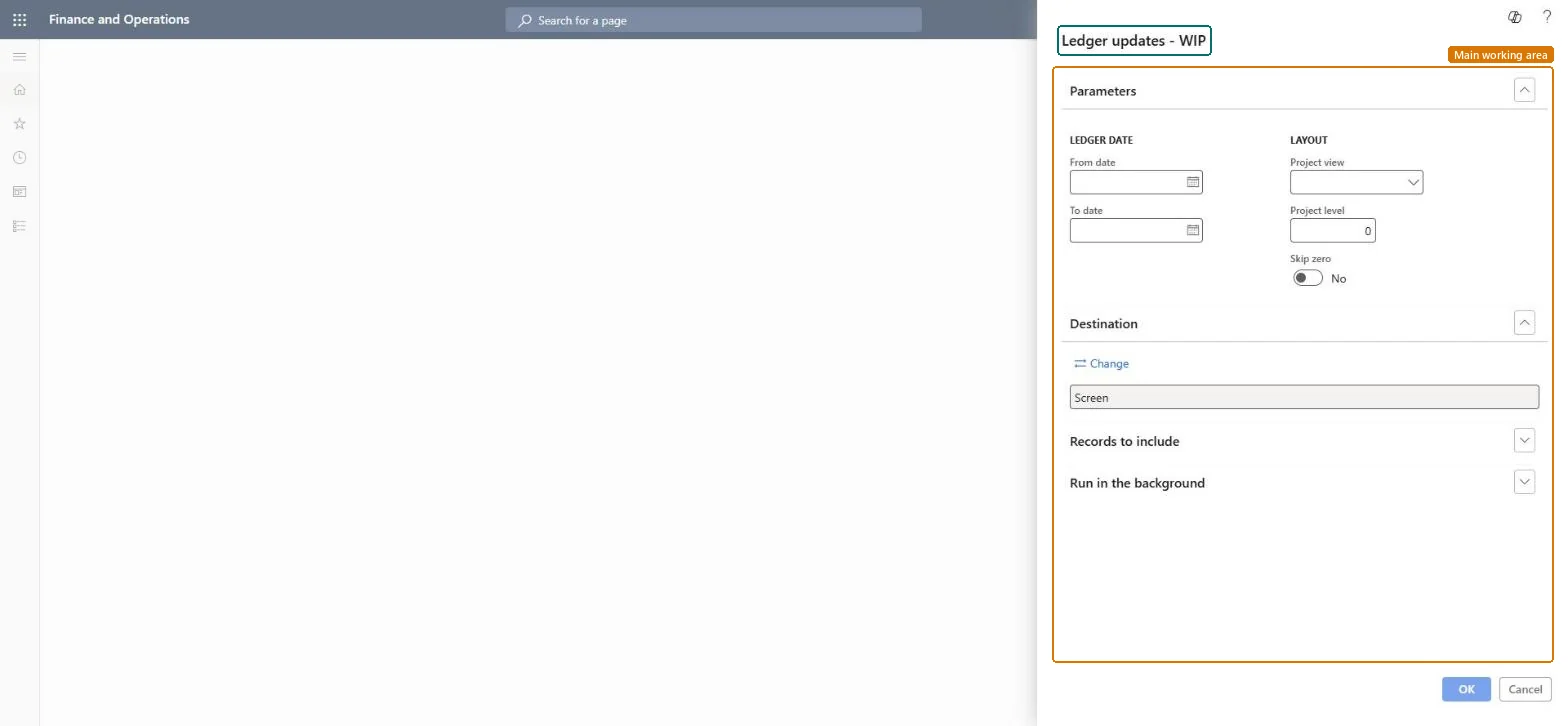
Set the ledger dates and layout for Ledger updates - WIP
Project management and accountingInquiries and reportsGeneral ledger reconciliation reports
output:ProjListLedgerUpdatesWIP
Business process
Manage project financials
Menu item
output:ProjListLedgerUpdatesWIP
Setup steps
1 on this page
Show what matters for
SETUP GUIDEHow to set it up8 sections. Choose a role to highlight what matters to you.
Everyone
1What it is and why
What it is
A report that lists the general ledger updates that projects made on work in progress (balance sheet) accounts, per project for a ledger date range.
What you do here
Use it before Post costs and at period close to see which project costs and accrued revenue sit on WIP accounts.
Example
For October 2026 BEAT's project accountant sees PRJ-0057 with 41,800.00 debited to WIP cost value and PRJ-0042 with 4,500.00 of WIP sales value from accrued revenue.
The page in Dynamics 365. page title tab to open what to set or check
About the examples: Examples and screenshots in this guide use BEAT, a demo company in a Dynamics 365 test environment. Use your own company's codes and values instead of copying them.
When to run it
When to run it
At period close, to review project postings to work in progress (balance sheet) accounts, for example before you run Post costs.
How often
On demand, at period close.
What the output shows
Costs posted under a Balance profile stay on WIP cost value until Post costs moves them to profit and loss; accrued revenue stays on WIP sales value until it is reversed at invoicing. The report changes nothing; it only lists amounts.
First ledger date of the postings to include.Checked in Dynamics 365
2026-10-01
To date
Last ledger date of the postings to include.Checked in Dynamics 365
2026-10-31
Project view
Groups the rows of the report, for example by project.Checked in Dynamics 365
Project
Project level
How many levels of subprojects are shown; 0 shows the project level as grouped.Checked in Dynamics 365
0
Skip zero
Leave out rows whose amounts are zero.Checked in Dynamics 365
Yes
Common errors and fixes
Message
What to do
A posted transaction has no WIP ledger update.
Check its ledger date against the range and the cost and revenue profile of the project: with No ledger the cost is posted later by Post costs, with Never ledger never. Microsoft Learn
Use the ledger date range of the period and group by Project so that each voucher can be traced to one project.The report lists the ledger updates of WIP postings; grouping by project lets you match them with the project reports of the same family.
On the live system, Project manager, Project supervisor, Chief executive officer and Chief financial officer can run this page.
Checked in Dynamics 365
Solution architect
5Design impact
Shared or per company
Per legal entity: the report reads only the project data of the company you are signed in to, so run it in each company you close. Checked in Dynamics 365
Can it be undone
Reversible: Running or rerunning the report changes no data.
If you change it later
Costs posted under a Balance profile stay on WIP cost value until Post costs moves them to profit and loss; accrued revenue stays on WIP sales value until it is reversed at invoicing. Microsoft Learn
Technical architect
6Technical
Menu item
output:ProjListLedgerUpdatesWIPChecked in Dynamics 365
Form
SysOperationTemplateFormChecked in Dynamics 365
Roles to set it up and use it
To use itProject manager ProjProjectManagerProject supervisor ProjProjectSupervisorChief executive officer CompanyChiefExecutiveOfficerChief financial officer CompanyChiefFinancialOfficerGive people one of these roles. On this system, 4 roles can run this page.Checked in Dynamics 365
Load order: Ledger updates - WIP has no data entity in Data management: the menu item ProjListLedgerUpdatesWIP opens a report that only reads posted project data. There is nothing to migrate for the report itself; load the project data it reads, for example opening balances through Journals > Beginning balance, then run the report in the new system and compare its totals with the old one.Checked in Dynamics 365
Checked in a working Dynamics 365 system, version 10.0.49: the menu item, form, table and security, the page.
To cite this step: PM-RC-340, Set the ledger dates and layout for Ledger updates - WIP. Beyond ERP Atlas Hub, 2026-11-11. https://www.beyonderp.cloud/atlas/step/PM-RC-340