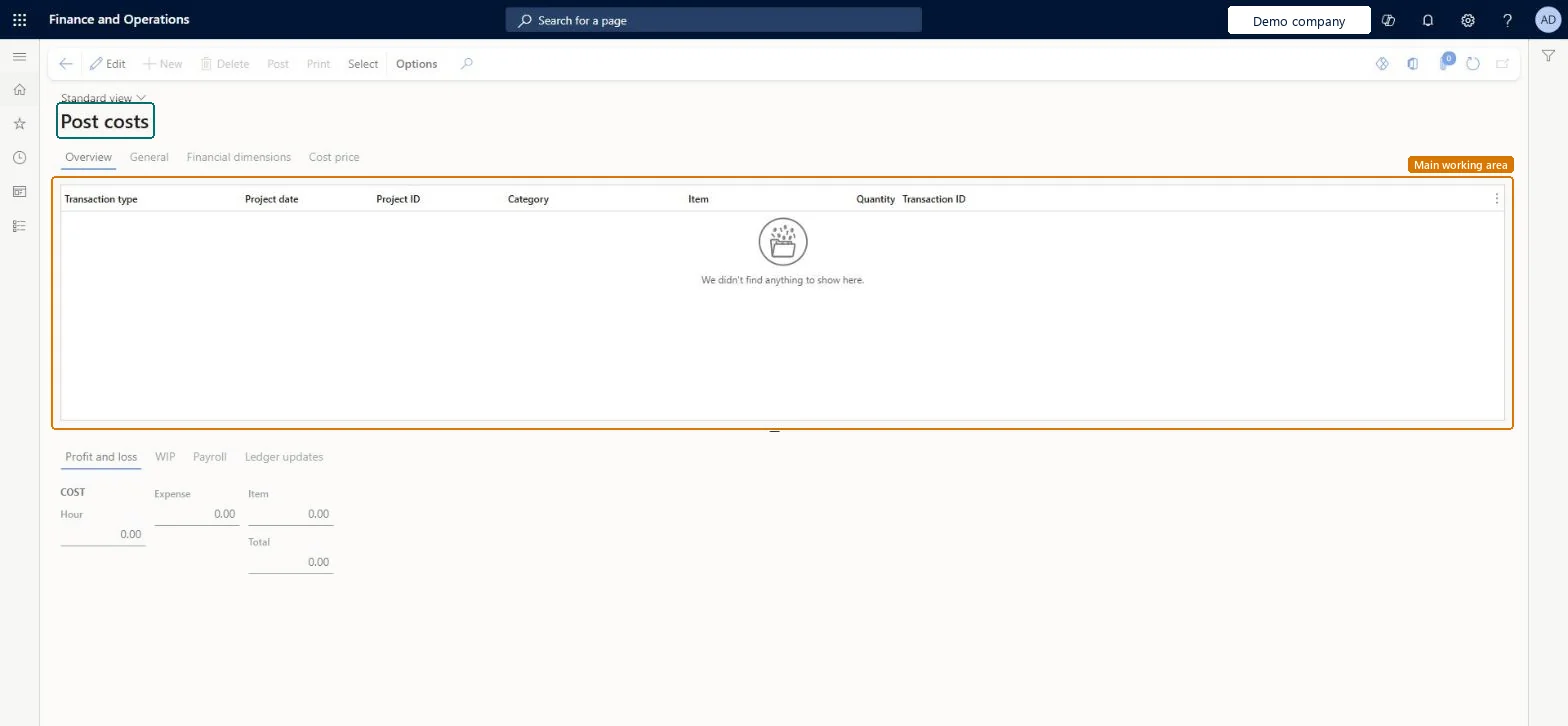
A periodic page that moves project costs between balance sheet (work in progress) accounts and profit and loss accounts, for time and material projects and internal projects.
Project management and accountingPeriodicTime and material
ProjPeriodicPostingCost
Used by
Chief executive officer, Project accountant, Project assistant and 2 more roles
Business process
Manage project financials
Menu item
ProjPeriodicPostingCost
Main table
TmpProjPeriodic
Setup steps
1 on this page
Show what matters for
PAGE GUIDEWhat the page does and how to use it8 sections. Choose a role to highlight what matters to you.
Everyone
1What it is and why
What it is
A periodic page that moves project costs between balance sheet (work in progress) accounts and profit and loss accounts, for time and material projects and internal projects.
What you do here
Use it to recognize project costs in the same period as the related revenue, or to move costs back to the balance sheet. It doesn't apply to fixed price or investment projects, where revenue recognition moves the costs.
Example
BEAT's time and material project PRJ-0042 posts costs to WIP. When October 2026 revenue is recognized, the project accountant selects 312 cost transactions worth 28,640.00 and posts them, so they move from WIP - cost value to the project cost account.
The page in Dynamics 365. page title tab to open what to set or check
About the examples: Examples and screenshots in this guide use BEAT, a demo company in a Dynamics 365 test environment. Use your own company's codes and values instead of copying them.
When to run it
When to run it
At period end, for projects that post costs to the balance sheet, when the related revenue is recognized.
How often
Monthly, at period end.
Batch settings
Select and post on the page; review the totals before posting.
What the output shows
Costs moved between WIP and profit and loss accounts. Only costs move; revenue is posted separately at invoicing. Costs whose revenue is already accrued or invoiced aren't listed in integrated deployments.
Column in the list: hour, expense or item cost transaction selected for posting.Checked in Dynamics 365
Project ID
Column: the project of the cost transaction; only time and material and internal projects are listed.Microsoft Learn
PRJ-0042
Hour
On the Profit and loss tab: total hour cost that will move; Expense, Item and Total work the same way.Checked in Dynamics 365
18,400.00
Common errors and fixes
Message
What to do
Post costs isn't on the menu, or a fixed price project's costs aren't listed.
In Project Operations integrated with ERP, turn on the feature Enable posting costs from the balance sheet to the income statement. Fixed price and investment projects are never listed; revenue recognition moves their costs. Microsoft Learn
Test checklist
Note the WIP - cost value balance of PRJ-0042 (for example 28,640.00).
Select its October cost transactions and post.
WIP - cost value drops by 28,640.00.
Project cost in profit and loss rises by 28,640.00.
Run at period end for time and material and internal projects that post costs to the balance sheet.Costs then reach profit and loss in the period the revenue is recognized.
Enable posting costs from the balance sheet to the income statement
Licence or add-in
On the live system, Project manager, Project accountant, Project supervisor, Chief executive officer and Project assistant use this page. In Project Operations integrated with ERP deployments, this menu item appears only after the Preview feature "Enable posting costs from the balance sheet to the income statement" is turned on in Feature management.
Per company: it moves the project costs of the legal entity you run it in. Microsoft Learn
Can it be undone
Partly: The job doesn't reverse a posting, but it can also move costs from profit and loss back to the balance sheet; otherwise correct with Adjust transactions. Microsoft Learn
If you change it later
Moves project costs between WIP and profit and loss accounts in the general ledger; the WIP reconciliation reports and the project statement change. Microsoft Learn
Technical architect
6Technical
Menu item
ProjPeriodicPostingCostChecked in Dynamics 365
Form
ProjPeriodicPostingChecked in Dynamics 365
Table
TmpProjPeriodicShown as “Project - periodic, temporary” in Record infoKey field: TransDate, ProjId, ActivityNumber, CategoryId, ProjIdentId, ProjLinePropertyIdChecked in Dynamics 365
To set it up or change itProject manager ProjProjectManagerProject accountant ProjProjectAccountantTo use itProject supervisor ProjProjectSupervisorChief executive officer CompanyChiefExecutiveOfficerProject assistant ProjProjectClerkGive people one of these roles. On this system, 5 roles can open this page.Checked in Dynamics 365
Actions on the page
Options: Personalize, Page options, ShareChecked in Dynamics 365
Load order: Post costs has no data entity in Data management: it works on posted cost transactions and keeps only temporary lines. Migrate WIP balances and run Post costs in the target system.Microsoft Learn