Clean up worker assignments after staffing changes
Project management and accountingInquiries and reportsValidation reports
output:ProjListValEmployeeProj
Business process
Manage project delivery
Menu item
output:ProjListValEmployeeProj
Setup steps
1 on this page
Show what matters for
SETUP GUIDEHow to set it up8 sections. Choose a role to highlight what matters to you.
Everyone
1What it is and why
What it is
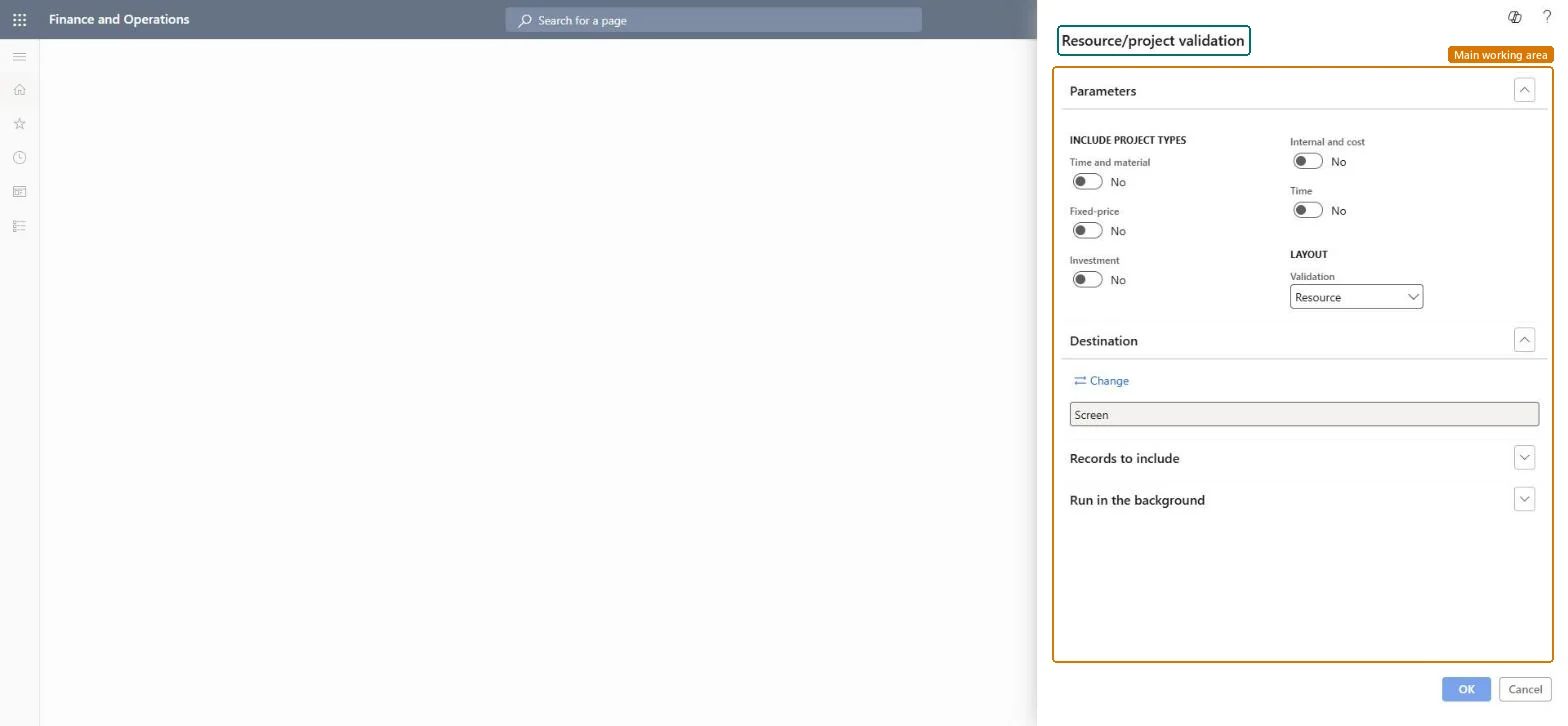
A report that lists resource/project validation groups with the workers and projects they combine, for the project types you choose.
What you do here
Use it to answer 'which projects may each worker post to?' after staffing changes, and to clean up workers who left a project.
Example
After moving 6 BEAT consultants from PRJ-0024 to PRJ-0042 in October, the project accountant runs the report for Time and material and finds R-0118 still allowed on the closed project PRJ-0024 and not yet on PRJ-0042.
The page in Dynamics 365. page title tab to open what to set or check
About the examples: Examples and screenshots in this guide use BEAT, a demo company in a Dynamics 365 test environment. Use your own company's codes and values instead of copying them.
When to run it
When to run it
After you assign workers to projects, and at month end to clean up assignments on closed projects.
How often
On demand; monthly.
What the output shows
Worker and project combinations that validation allows.
Which project types to report on; the dialog toggles Time and material, Fixed-price, Investment, Internal and cost (Internal and Cost project types) and Time.Checked in Dynamics 365
Time and material and Fixed-price on
Validation
Under Layout: how the report groups the setup; the dialog suggests Resource, so each worker is listed with the projects they may post to.Checked in Dynamics 365
Resource
Common errors and fixes
Message
What to do
A worker who left a project can still post to it.
Remove the project from the worker's Resource validation project assignments. Microsoft Learn
Test checklist
Assign R-0118 to PRJ-0042 and remove it from PRJ-0024.
Run the report for Time and material filtered on R-0118.
Filter Records to include on the workers who moved and turn on the project types involved.Assignments stay until removed, so workers keep posting rights on projects they left.
Load order: The Resource/project validation report has no data entity in Data management: it prints validation setup. Load the validation groups with ProjValEmplProjEntity after workers, projects and categories, then run the report to compare.Load first: ProjValEmplProjEntityMicrosoft data model
Checked in a working Dynamics 365 system, version 10.0.49: the menu item, form, table and security, the page.
To cite this step: PM-RA-290, Clean up worker assignments after staffing changes. Beyond ERP Atlas Hub, 2026-11-11. https://www.beyonderp.cloud/atlas/step/PM-RA-290