BeyondERP.Newsletter
Menu

Setup step on the Expiring project quotations page · Project management and accounting

Close expiring quotations with a decision

Keep the pipeline true.

Used by
Project manager, Sales clerk, Sales representative
Business process
Manage project contracts
Menu item
SalesQuotationsListPage_ExpiringProj
Main table
SalesQuotationTable
Data entity
ProjQuotationHeaderEntity
Setup steps
1 on this page
Show what matters for
SETUP GUIDEHow to set it up8 sections. Choose a role to highlight what matters to you.
Everyone

1What it is and why

What it isThe list of project quotations close to their expiration date, for the whole company, so offers are followed up before they lapse.
What you do hereUse it each week to find quotations about to expire and get a decision from the customer: confirm, lose or replace with a new quotation.
ExampleFor example, on 18/01/2027 BEAT's sales manager finds 4 quotations expiring before 31/01/2027 worth 62,400.00; two are confirmed after calls, one is lost to price and one is replaced by a new quotation.
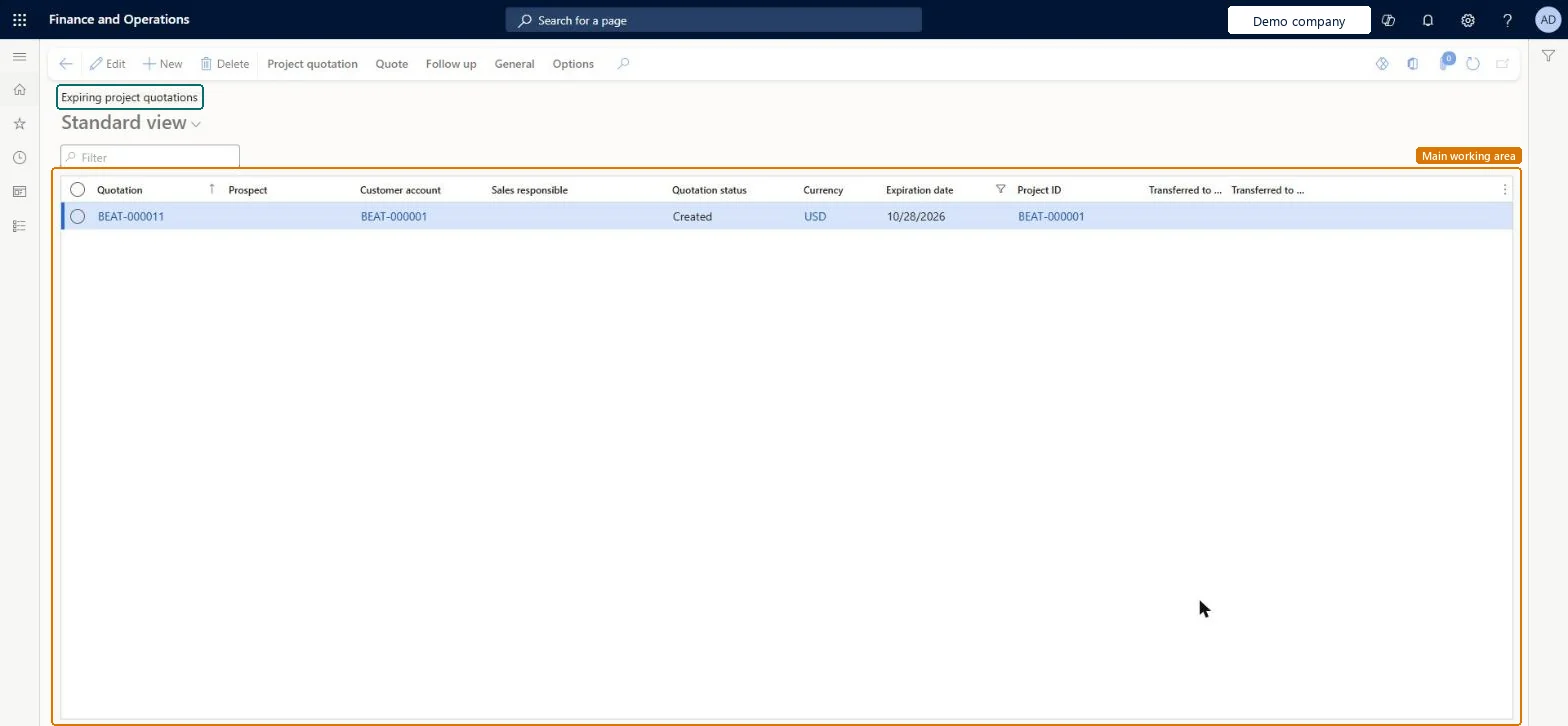
Expiring project quotations page in Dynamics 365
The page in Dynamics 365. page title tab to open what to set or check
Functional consultant · Solution architect

2Where it fits

Business processManage project contracts
Menu pathProject management and accounting › Quotations › Expiring project quotations
Set up firstProject quotations Microsoft Learn
Used next byLose quotation Microsoft Learn
Related pagesConfirm quotation Microsoft Learn
In this process Work your quotation list by status · Call customers before your quotations expire
End user · Functional consultant

3How to do it

About the examples: Examples and screenshots in this guide use BEAT, a demo company in a Dynamics 365 test environment. Use your own company's codes and values instead of copying them.

Setup steps on this page

Close expiring quotations with a decision

Keep the pipeline true.

Steps from Microsoft

  1. Go to Project management and accounting > Quotations > Expiring project quotations.
  2. Sort on Expiration date and check the Sales responsible and Quotation status columns.
  3. Ask each sales responsible for the customer's decision.
  4. For accepted quotations, open the quotation and on the Follow up tab select Confirm.
  5. For refused ones, run Lose quotation with the reason, so the pipeline analysis records why.

Source: Microsoft Learn

Fields on the page

FieldWhat it meansExample
Expiration dateThe date the offer stops being valid; the list is filtered on it.Checked in Dynamics 36531/01/2027
Sales responsibleWho follows up the quotation with the customer.Checked in Dynamics 365Account manager
Quotation statusCreated quotations can still be changed; Sent ones can only be confirmed, lost or canceled.Microsoft Learn Sent
PrognosisReference data that rates how likely the quotation is to be won.Microsoft Learn Likely

Common errors and fixes

MessageWhat to do
Won and lost reasons are missing from the quotation pipeline analysis.Close expiring quotations with Confirm or Lose quotation and the reason, instead of leaving them to expire. Microsoft Learn

Test checklist

  1. Create a quotation with an expiration date within the expiring window.
  2. Open Expiring project quotations and check it is listed.
  3. Confirm it.
  4. Check it no longer counts among the open expiring quotations.

Source: Microsoft Learn

Functional consultant

4Setup decisions

Setup stepRecommended value and whyDecision, common mistake and test
Close expiring quotations with a decisionReview the list weekly and close each quotation with Confirm or Lose quotation and a reason before it expires.An expired quotation with no decision stays in the pipeline and hides why offers are won or lost.Who follows up expiring quotations?Reading expired as lost: without Lose quotation the reason isn't recorded.Test: Expiring quotation is listed

Feature management and licence

Licence or add-inOn the live system, Project manager, Sales clerk and Sales representative use this page.

Checked in Dynamics 365

Solution architect

5Design impact

Shared or per companyPer company: each legal entity has its own project quotations. Microsoft Learn
Can it be undoneReversible: Reversible: the list changes no data.
If you change it laterConfirming or losing a quotation updates the pipeline that quotation types, origin, prognosis and probability help analyze. Microsoft Learn
Technical architect

6Technical

Menu itemSalesQuotationsListPage_ExpiringProj Checked in Dynamics 365
FormSalesQuotationProjTable Checked in Dynamics 365
TableSalesQuotationTableShown as “Sales quotation” in Record infoChecked in Dynamics 365
Data entitiesProjQuotationHeaderEntityProject quotation headers Microsoft data model SalesQuotationHeaderV2EntitySales quotation headers V2 Microsoft data model
Who can open itPrivilegesMaintain project quotation details ProjQuotationMaintainView project quotation details ProjQuotationViewDutiesMaintain project quotation ProjProjectQuotationMaintain
4 security roles MCRTestUserRoleProject manager ProjProjectManagerSales clerk TradeSalesClerkSales representative TradeSalesRepresentative
Checked in Dynamics 365
Roles to set it up and use itTo set it up or change itProject manager ProjProjectManagerSales clerk TradeSalesClerkSales representative TradeSalesRepresentativeGive people one of these roles. On this system, 3 roles can open this page.Checked in Dynamics 365
Actions on the pageProject quotation: Maintain, Copy, ViewQuote: Tax, Process, Accounts, Sales prices, Journals, Bank documentFollow up: Generate, ModifyGeneral: Set up, Customer, Activities, Manage, Related informationOptionsChecked in Dynamics 365
Developer

7Developer

Open it by URLhttps://<your-environment>/?mi=SalesQuotationsListPage_ExpiringProj
Integrate withProjQuotationHeaderEntity data entity Microsoft data model
Data migrationProjQuotationHeaderEntity (Project quotation headers): loaded for each company.Load order: Load customers or prospects, quotation types and project categories first, then the open project quotation headers and their lines.Load first: Customers, Quotation template groups, Project categoriesMicrosoft Learn
Table definitionSalesQuotationTable columns and relations Microsoft data model
Everyone

8Sources

To cite this step: PM-OPS-320, Close expiring quotations with a decision. Beyond ERP Atlas Hub, 2026-11-11. https://www.beyonderp.cloud/atlas/step/PM-OPS-320