Chief executive officer, Accounts receivable clerk, Accounts receivable centralized payments clerk and 6 more roles
Business process
Manage project financials
Menu item
ProjInvoiceListPage
Main table
ProjInvoiceJour
Setup steps
1 on this page
Show what matters for
SETUP GUIDEHow to set it up8 sections. Choose a role to highlight what matters to you.
Everyone
1What it is and why
What it is
The list of posted project invoices and credit notes, recorded in the general ledger and in the customer and project subledgers.
What you do here
Use it to find a posted project invoice, check its amount and due date, print a copy or start a credit note.
Example
For example, customer C-1001 asks for a copy of invoice PINV-000318 of 5,940.00 for contract PC-0017; the BEAT accountant finds it here and reprints it, and credits 240.00 for 2.00 hours billed twice.
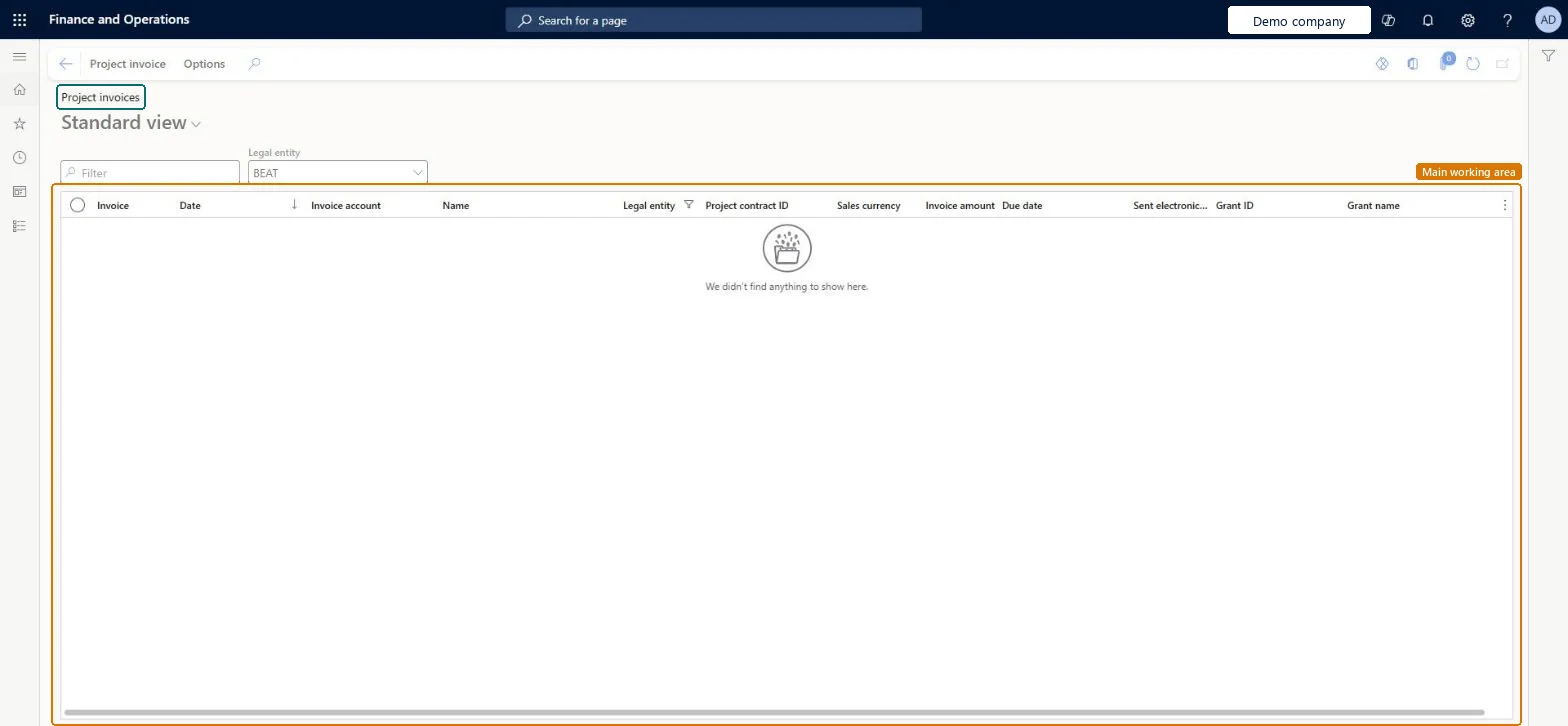
The page in Dynamics 365. page title tab to open what to set or check
About the examples: Examples and screenshots in this guide use BEAT, a demo company in a Dynamics 365 test environment. Use your own company's codes and values instead of copying them.
Setup steps on this page
Correct posted project invoices with credit notes
Keep invoices and ledgers in step.
Steps from Microsoft
Go to Project management and accounting > Project invoices > Project invoices.
Set the Legal entity field to choose which invoices to list.
Filter on Invoice, Invoice account or Project contract ID to find the invoice.
Check the Date, Invoice amount and Due date columns.
On the Project invoice tab, reprint the invoice or start a credit note for wrong lines.
Correct a posted project invoice with a credit note for the wrong lines, then invoice the corrected transactions again.The invoice is already in the ledger and the customer and project subledgers; only a credit note reverses it there.
Posting recorded the invoice in the general ledger and the customer and project subledgers; a credit note reverses those amounts. Microsoft Learn
Technical architect
6Technical
Menu item
ProjInvoiceListPageChecked in Dynamics 365
Form
ProjInvoiceListPageChecked in Dynamics 365
Table
ProjInvoiceJourShown as “Project invoice” in Record infoChecked in Dynamics 365
Who can open it
PrivilegesMaintain invoice proposals ProjInvoiceProposalMaintainView invoice proposals ProjInvoiceProposalViewDutiesMaintain project invoice proposal ProjInvoiceProposalMaintainInquire into project invoices ProjProjectInvoiceInquireMaintain project invoices ProjProjectInvoiceMaintainApprove project transactions ProjProjectTransactionApproveReview service order process performance SMAServiceOrderProcessPerfReviewApprove posting of service orders SMAServiceOrdersJournalize9 security rolesChief executive officer CompanyChiefExecutiveOfficerAccounts receivable clerk CustInvoiceAccountsReceivableClerkAccounts receivable centralized payments clerk PaymAccountsReceivableCentralPaymClerkAccounts receivable payments clerk PaymAccountsReceivablePaymentsClerkProject accountant ProjProjectAccountantProject assistant ProjProjectClerkProject manager ProjProjectManagerProject supervisor ProjProjectSupervisorService delivery manager SMAServiceDeliveryManagerChecked in Dynamics 365
Roles to set it up and use it
To set it up or change itProject manager ProjProjectManagerProject accountant ProjProjectAccountantProject assistant ProjProjectClerkService delivery manager SMAServiceDeliveryManagerAccounts receivable clerk CustInvoiceAccountsReceivableClerkTo use itProject supervisor ProjProjectSupervisorChief executive officer CompanyChiefExecutiveOfficerAccounts receivable centralized payments clerk PaymAccountsReceivableCentralPaymClerkAccounts receivable payments clerk PaymAccountsReceivablePaymentsClerkGive people one of these roles. On this system, 9 roles can open this page.Checked in Dynamics 365
Actions on the page
Project invoice: View, Document, Functions, Related information, PropertiesOptions: Personalize, Page options, ShareChecked in Dynamics 365
Load order: Project invoices has no data entity in Data management. Posted project invoices are created by posting invoice proposals. Bring open customer balances over as customer open transactions and invoiced project amounts through the Beginning balance journal.Load first: Customers, Beginning balance journalChecked in Dynamics 365