BeyondERP.Newsletter
Menu

Setup step on the Reverse revenue recognition page · Project management and accounting

Correct a posted revenue recognition period

Fix a posted period without breaking later ones.

Business process
Manage project financials
Menu item
action:ProjControlPeriodRevEstimateV2
Setup steps
1 on this page
Show what matters for
SETUP GUIDEHow to set it up8 sections. Choose a role to highlight what matters to you.
Everyone

1What it is and why

What it isA periodic job that reverses posted work in progress or accruals of a revenue recognition period, so the period can be created and posted again.
What you do hereUse it to correct a posted period. Because each period builds on the one before, reversing a period in the middle means reversing and reposting all later periods too.
ExampleIn December 2026 BEAT finds that September for PRJ-0042 was posted without 9,600.00 of subcontractor cost. The project accountant reverses November, October and September in that order, then creates, calculates and posts the three periods again.
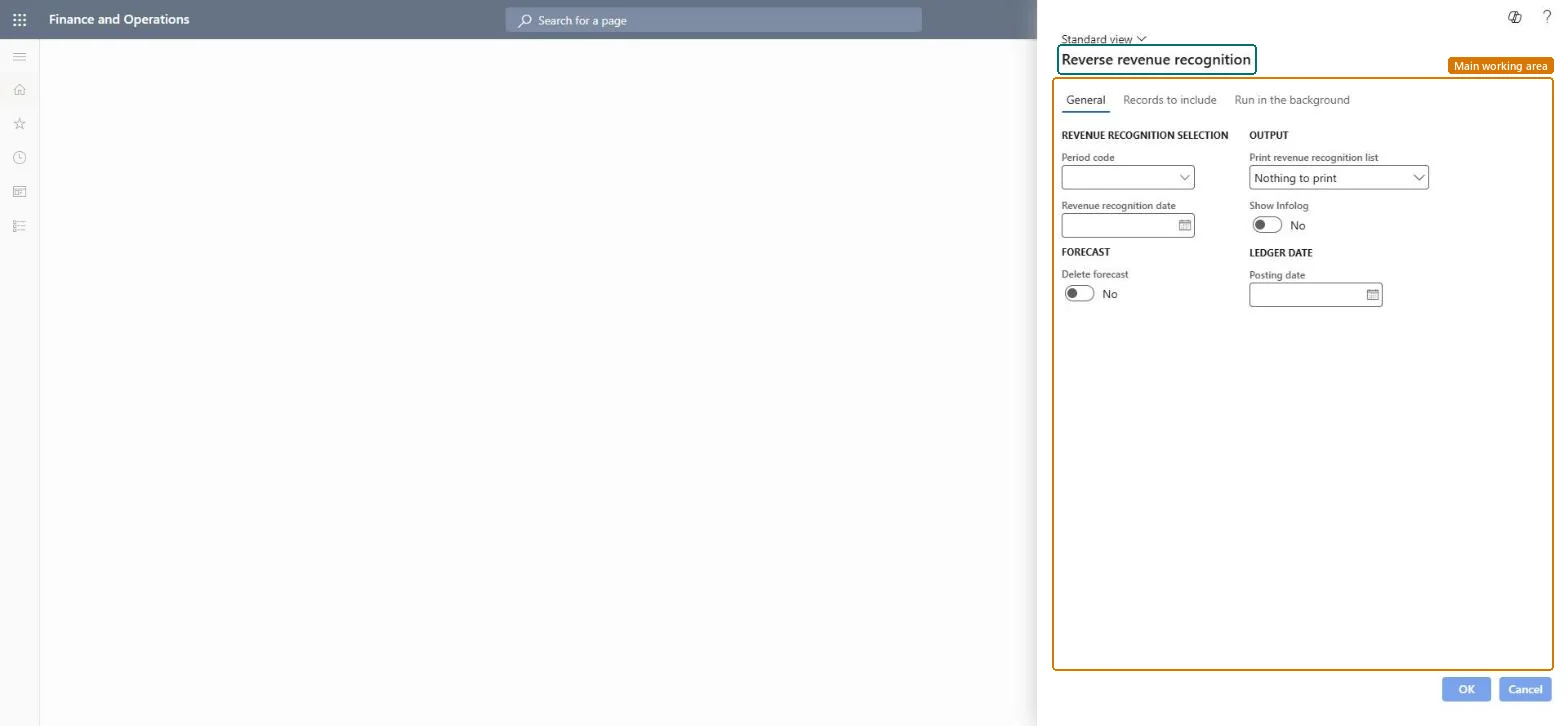
Reverse revenue recognition page in Dynamics 365
The page in Dynamics 365. page title tab to open what to set or check
Functional consultant · Solution architect

2Where it fits

Business processManage project financials
Menu pathProject management and accounting › Periodic › Revenue recognition › Reverse revenue recognition
Set up firstPost revenue recognition Microsoft Learn
Used next byCreate revenue recognition Microsoft Learn
Related pagesRevenue recognition inquiry Microsoft Learn
In this process Post the period's revenue recognition · Eliminate completed fixed price projects
End user · Functional consultant

3How to do it

About the examples: Examples and screenshots in this guide use BEAT, a demo company in a Dynamics 365 test environment. Use your own company's codes and values instead of copying them.

When to run it

When to run itWhen a posted period turns out to be wrong.
How oftenOn demand, only for corrections.
Batch settingsRun interactively, one period at a time from the latest.
What the output showsReversal vouchers that credit the posted WIP or accruals, so the period can be created again.

Source: Microsoft Learn

Setup steps on this page

Correct a posted revenue recognition period

Fix a posted period without breaking later ones.

Steps from Microsoft

  1. Go to Project management and accounting > Periodic > Revenue recognition > Reverse revenue recognition.
  2. Choose the Period code and the Revenue recognition date of the latest posted period.
  3. Enter the Posting date of the reversal and decide on Delete forecast.
  4. Run the job; repeat for each earlier period back to the one to correct, without skipping a period.
  5. Create, calculate and post each reversed period again, oldest first.

Source: Microsoft Learn

Fields on the page

FieldWhat it meansExample
Period codeThe period code of the posted period to reverse.Checked in Dynamics 365
Revenue recognition dateThe date of the posted period to reverse.Checked in Dynamics 36511/30/2026
Delete forecastWhen on, the forecast of the period is deleted too.Checked in Dynamics 365No
Posting dateThe ledger date of the reversal.Checked in Dynamics 36512/04/2026

Common errors and fixes

MessageWhat to do
A middle period can't be corrected on its own.Reverse every later period first, newest to oldest, without skipping; then repost them oldest to newest. Microsoft Learn

Test checklist

  1. Reverse November, October and September for PRJ-0042.
  2. The inquiry shows no posted periods after August.
  3. Recreate and post September with the added 9,600.00.
  4. Repost October and November and check their status Posted.

Source: Microsoft Learn

Functional consultant

4Setup decisions

Setup stepRecommended value and whyDecision, common mistake and test
Correct a posted revenue recognition periodReverse from the latest posted period back to the wrong one, then repost oldest first.Later periods are calculated from earlier ones, so skipping a period leaves wrong balances.Correct a past period or adjust in the current one?Reversing only the wrong middle period.Test: Reverse three periods

Feature management and licence

Licence or add-inOn the live system, Project manager uses this page.

Checked in Dynamics 365

Solution architect

5Design impact

Shared or per companyPer company: it reverses revenue recognition of the legal entity you run it in. Microsoft data model
Can it be undoneReversible with effort: Repost each reversed period.
If you change it laterEach period depends on the one before, so reversing a period in the middle means reversing and reposting all later periods, without skipping any. Microsoft Learn
Technical architect

6Technical

Menu itemaction:ProjControlPeriodRevEstimateV2 Checked in Dynamics 365
FormProjControlPeriod_RevEstimate Checked in Dynamics 365
Roles to set it up and use itTo use itProject manager ProjProjectManagerGive people one of these roles. On this system, 1 role can run this page.Checked in Dynamics 365
Developer

7Developer

Open it by URLhttps://<your-environment>/?mi=action:ProjControlPeriodRevEstimateV2
Data migrationLoad order: Reverse revenue recognition has no data entity in Data management, and the revenue recognition period table (ProjControlPeriodTable) has none either. Migrate WIP and accrual balances, then create revenue recognition in the target system from the first open period.Microsoft data model
Everyone

8Sources

To cite this step: PM-JOB-290, Correct a posted revenue recognition period. Beyond ERP Atlas Hub, 2026-11-11. https://www.beyonderp.cloud/atlas/step/PM-JOB-290