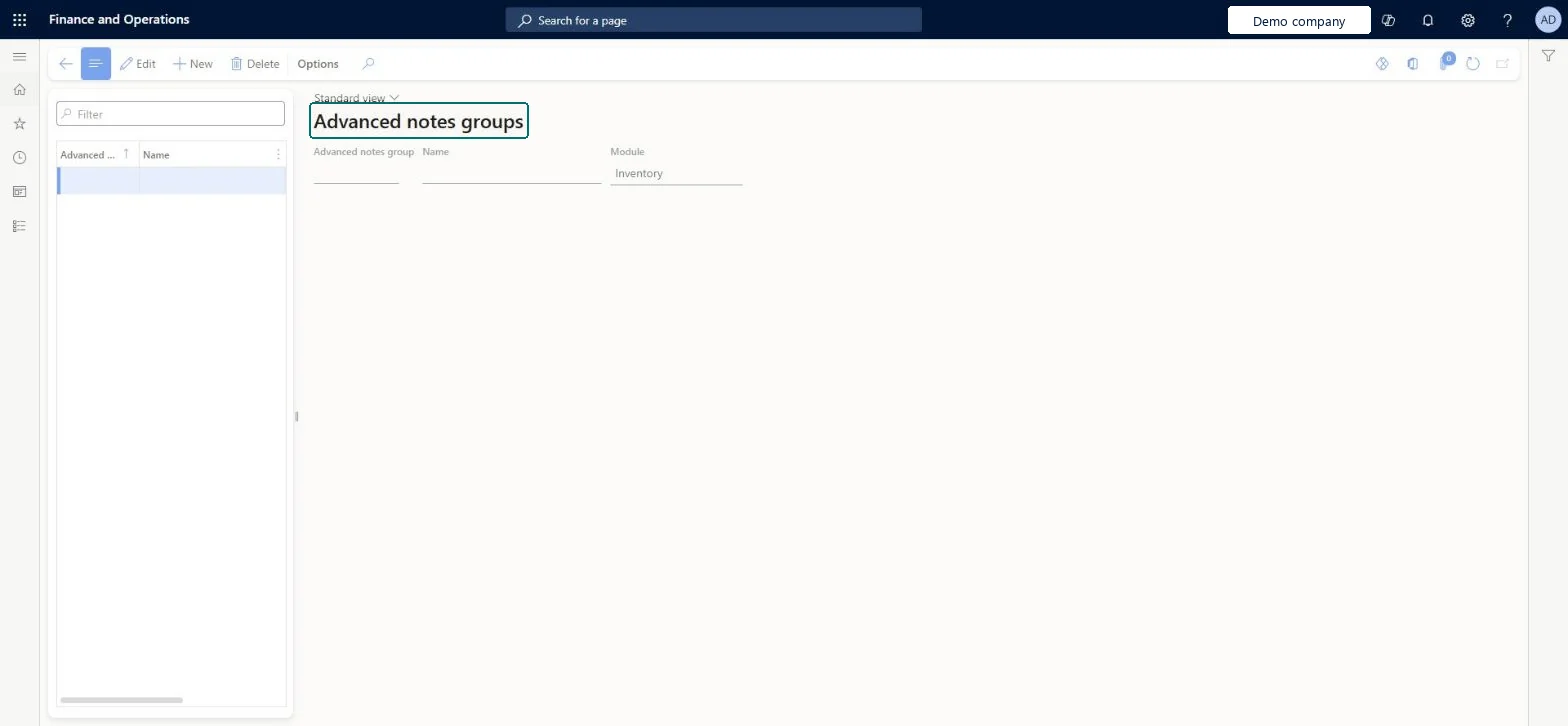
Setup step on the Products advanced notes groups page · Product information management
Set up Products advanced notes groups
Use this page to create advanced notes groups for products and then assign products to them, so that the same predefined notes can apply to a group of products.
Accounts payable clerk, Accounts payable manager, Auditor and 21 more roles
Business process
Develop product strategy
Menu item
InventNotesGroup_IT
Main table
FreeNotesGroupsTable_IT
Setup steps
1 on this page
Show what matters for
SETUP GUIDEHow to set it up8 sections. Choose a role to highlight what matters to you.
Everyone
1What it is and why
What it is
A setup page where you define the product groups used by the Advanced notes management feature to apply predefined notes to business documents.
What you do here
Use this page to create advanced notes groups for products and then assign products to them, so that the same predefined notes can apply to a group of products.
The page in Dynamics 365. page title tab to open what to set or check
About the examples: Examples and screenshots in this guide use BEAT, a demo company in a Dynamics 365 test environment. Use your own company's codes and values instead of copying them.
Setup steps on this page
Set up Products advanced notes groups
Use this page to create advanced notes groups for products and then assign products to them, so that the same predefined notes can apply to a group of products.
Steps from Microsoft
Go to Product information management > Setup > Advanced notes > Products advanced notes groups.
Select New, and then enter a code in the Advanced notes group field and a name in the Name field.
After you create the groups, go to Product information management > Products > Released products.
On the General FastTab, in the Administration section, assign the required products to the new groups.
Groups only for sets of products that need the same notes, assigned on the released product's General FastTab, Administration sectionAdvanced notes groups exist so that similar notes can be set up once and applied to a group of products on business documents.
Expecting notes to print just because the group is set. Only notes marked External print, and printing depends on Forms setup and a document type with Class set to Simple note.
Reversible: Notes are generated as attachments when orders and documents are created, so a group change affects documents created after it.
Technical architect
6Technical
Menu item
InventNotesGroup_ITChecked in Dynamics 365
Form
FreeNotesGroups_ITChecked in Dynamics 365
Table
FreeNotesGroupsTable_ITShown as “ADVANCED NOTES GROUP” in Record infoChecked in Dynamics 365
Who can open it
PrivilegesManagement of document notes FreeNotesMaintainFreeNotesViewDutiesInquire into invoice and cash policies CustInvoiceInvoiceAndCashPoliciesInquirEnable invoice and cash process CustInvoiceInvoiceAndCashProcessEnableInquire into shipping policies InventShippingPoliciesInquireEnable shipping process InventShippingProcessEnableInquire into quotation to sales order policies SalesQuotationToSalesOrderPolInquireEnable quotation to sales order process SalesQuotationToSalesOrderProcessEnableInquire into invoice and payment policies VendInvoiceInvoicePaymentPoliciesInquirEnable invoice and payment process VendInvoiceInvoicePaymentProcessEnableMaintain vendor invoices VendInvoiceVendorInvoicesMaintainInquire into vendor invoice status VendInvoiceVendorInvoiceStatusInquire24 security rolesAuditor AuditPolicyManagerCollections manager CollectionLetterCollectionsManagerChief financial officer CompanyChiefFinancialOfficerAccounts receivable clerk CustInvoiceAccountsReceivableClerkAccounts receivable manager CustInvoiceAccountsReceivableManagerLanded cost agent ITMAgentAccountant LedgerAccountantAccounting manager LedgerAccountingManagerAccounting supervisor LedgerAccountingSupervisorFinancial controller LedgerFinancialControllerAccounts payable centralized payments clerk PaymAccountsPayableCentralPaymClerkAccounts payable payments clerk PaymAccountsPayablePaymentsClerkAccounts receivable centralized payments clerk PaymAccountsReceivableCentralPaymClerkAccounts receivable payments clerk PaymAccountsReceivablePaymentsClerkRental coordinator agent RentalCoordinatorAgentRental manager RentalManagerRental purchasing manager RentalPurchasingManagerRental sales manager RentalSalesManagerRetail service RetailServiceSales manager TradeSalesManagerAccounts payable clerk VendInvoiceAccountsPayableClerkAccounts payable manager VendInvoiceAccountsPayableManagerWarehouse planner WHSWarehousePlannerWarehouse manager WMSWarehouseManagerChecked in Dynamics 365
Roles to set it up and use it
To set it up or change itRetail service RetailServiceSales manager TradeSalesManagerAccounting manager LedgerAccountingManagerWarehouse manager WMSWarehouseManagerCollections manager CollectionLetterCollectionsManagerTo use itFinancial controller LedgerFinancialControllerAuditor AuditPolicyManagerAccountant LedgerAccountantWarehouse planner WHSWarehousePlannerChief financial officer CompanyChiefFinancialOfficerGive people one of these roles. On this system, 24 roles can open this page.Checked in Dynamics 365
Checked in a working Dynamics 365 system, version 10.0.49: the menu item, form, table and security, the page.
To cite this step: PIM-NOTE-010, Set up Products advanced notes groups. Beyond ERP Atlas Hub, 2026-11-11. https://www.beyonderp.cloud/atlas/step/PIM-NOTE-010