About the examples: Examples and screenshots in this guide use BEAT, a demo company in a Dynamics 365 test environment. Use your own company's codes and values instead of copying them.
Step by step, with screenshots
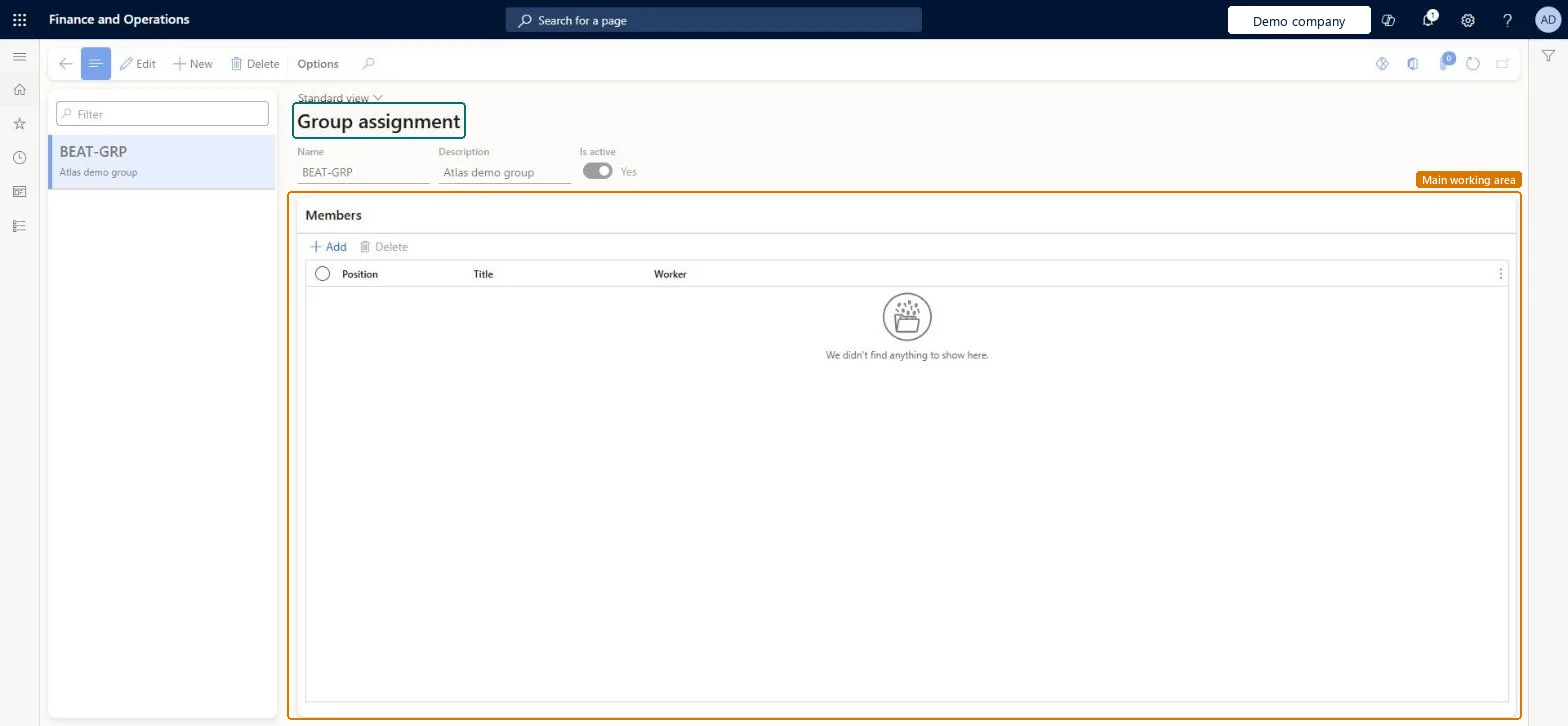
Set up Group assignment1 screen
Use this page to set up groups so that a task can be assigned to everyone in a set of positions.
Screen 1
Create a business process group
Go to Organization administration > Setup > Business process > Group assignment
Select New
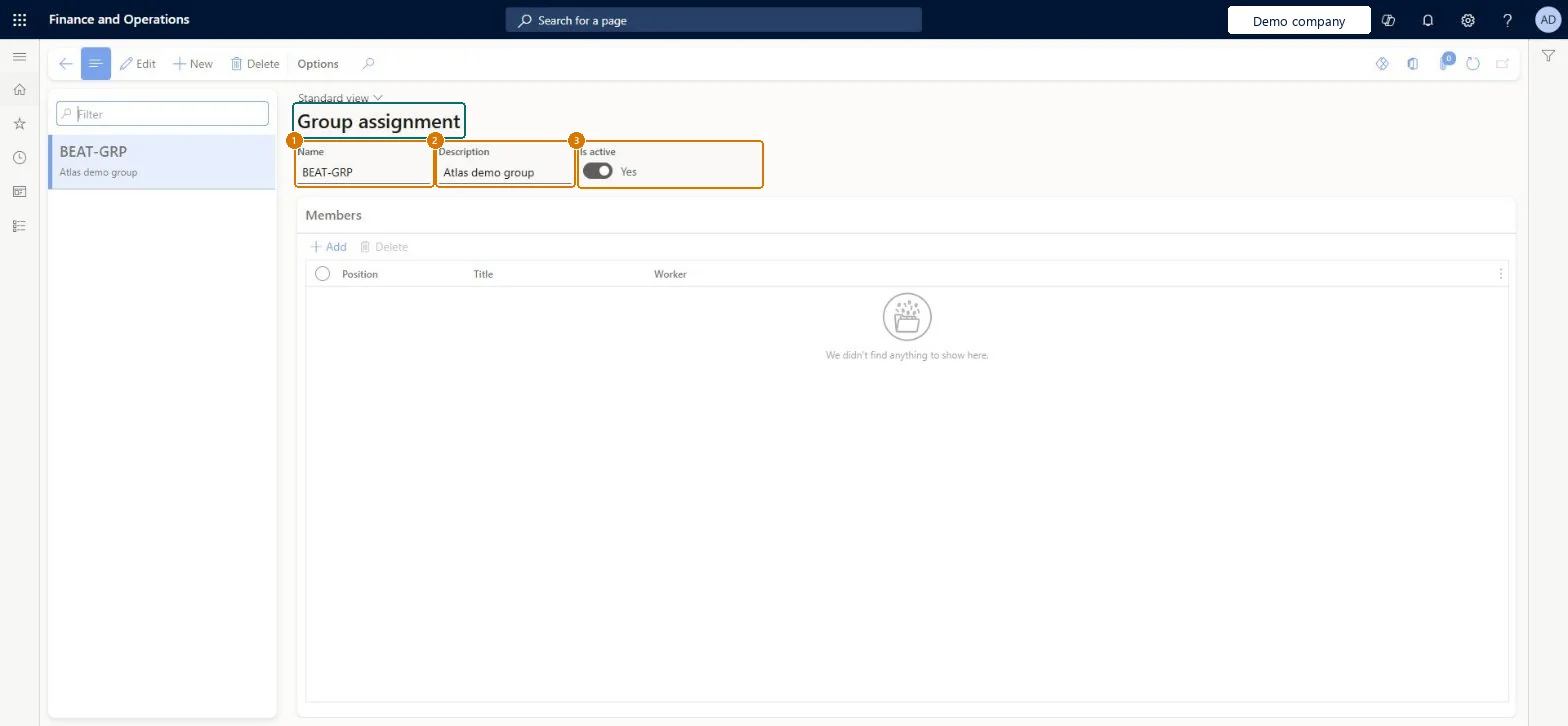
Enter the group name and description
Leave Is active set to Yes
Select Save; use Add under Members to add positions
1Name
BEAT-GRP
2Description
Group
3Is active
Yes
Show the full screen page title tab to open what to set or check
Steps from Microsoft
Go to Organization administration > Setup > Business process > Group assignment.
Select New.
Enter a name, for example IT Laptop, and a description.
Select Save.
On the Members FastTab, select Add.
In the Positions field, select all positions that are responsible for the task.
A group only where a set of positions shares a task and any one of them can complete it (for example an IT laptop team)A task assigned to a group is created for the users in the group's positions and is marked completed as soon as one person completes it.
Groups whose positions are empty when the hire, termination or transition is completed. The task then goes to the checklist owner instead.
Solution architect
5Design impact
Can it be undone
Reversible: Change members or Is active at any time. Tasks already created at hire, termination or transition aren't regenerated; only later checklists use the new members.
If you change it later
A task assigned to a group is marked as completed as soon as one person in the group completes it. Microsoft Learn
Technical architect
6Technical
Menu item
BusinessProcessGroupAssignmentChecked in Dynamics 365
Form
BusinessProcessGroupAssignmentChecked in Dynamics 365
Table
BusinessProcessGroupAssignmentShown as “Group assignment” in Record infoChecked in Dynamics 365
Data entities
BusinessProcessGroupAssignmentEntityGroup assignment Checked in Dynamics 365
Who can open it
PrivilegesMaintain business process group assignments BusinessProcessGroupAssignmentMaintainDutiesMaintain generic business processes. BusinessProcessGenericMaintainMaintain onboarding task configuration HcmOnboardConfigurationMaintain5 security rolesHuman resource assistant HcmHumanResourceAssistantHuman resource manager HcmHumanResourceManagerPayroll administrator HcmPayrollAdministratorPayroll manager HcmPayrollManagerRetail task manager RetailTaskManagerChecked in Dynamics 365
Roles to set it up and use it
To set it up or change itHuman resource manager HcmHumanResourceManagerHuman resource assistant HcmHumanResourceAssistantPayroll administrator HcmPayrollAdministratorPayroll manager HcmPayrollManagerRetail task manager RetailTaskManagerGive people one of these roles. On this system, 5 roles can open this page.Checked in Dynamics 365
Actions on the page
Options: Personalize, Page options, ShareChecked in Dynamics 365
Checked in a working Dynamics 365 system, version 10.0.49: the menu item, form, table and security, the page, the demo records and the values in the screenshots.
To cite this step: OA-SETUP-350, Set up Group assignment. Beyond ERP Atlas Hub, 2026-11-11. https://www.beyonderp.cloud/atlas/step/OA-SETUP-350