SETUP GUIDEHow to set it up8 sections. Choose a role to highlight what matters to you.
Everyone
1What it is and why
What it is
A page where you set up offboarding checklists, which are named groups of tasks, each with an owner and a calendar, that are applied to an employee who is leaving.
What you do here
Use this page to group offboarding tasks into reusable checklists so that, when an employee is terminated, the tasks are created and assigned with due dates.
Example
For example, BEAT keeps All leavers (6 tasks) and Executives only (2 tasks), owned by Ana Bowman; when an executive leaves on June 30, both checklists are applied with June 30 as target date and 8 tasks are created on working days.
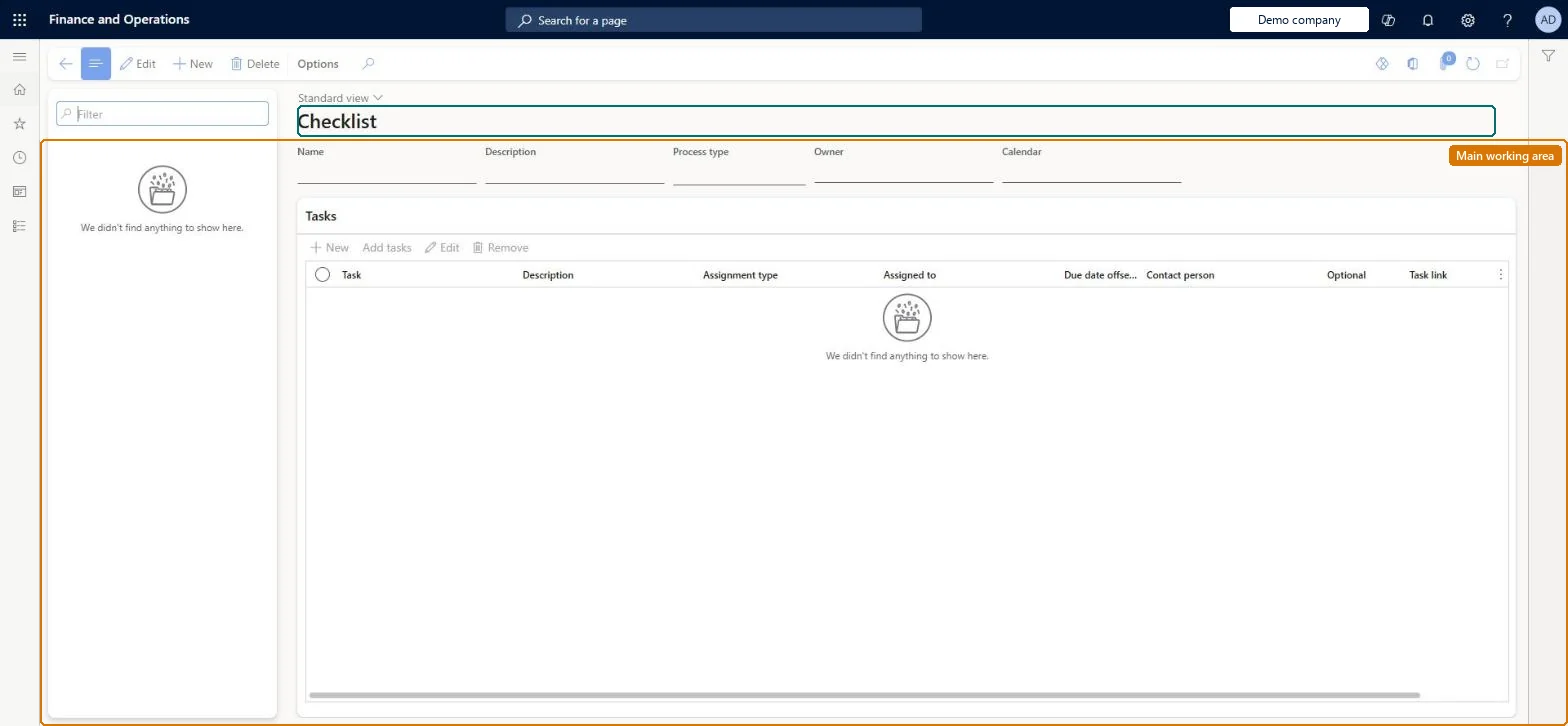
The page in Dynamics 365. page title tab to open what to set or check
About the examples: Examples and screenshots in this guide use BEAT, a demo company in a Dynamics 365 test environment. Use your own company's codes and values instead of copying them.
Setup steps on this page
Set up offboarding checklists
Group leaver tasks into checklists with an owner and a calendar.
Steps from Microsoft
Go to Human resources > Task management > Offboarding checklists.
Select New to create a checklist.
Specify the owner and the calendar for the checklist.
On the Tasks menu bar, select New to add a task, or add tasks from the task library.
Set Apply task to library to Yes if the task should be reusable in other checklists.
The person who receives tasks when no individual can be derived from the task's assignment type.Microsoft Learn
Ana Bowman
Name
Calendar
The calendar used to calculate task due dates, counting only working days.Microsoft Learn
BEAT working days
CalendarId
Apply task to library
Adds a task created in the checklist to the shared task library so other checklists can reuse it.Microsoft Learn
Yes
Common errors and fixes
Message
What to do
Tasks for the manager or a position go to the checklist owner
No person could be found: the employee has no position (so no manager), or the position or group was vacant when the tasks were created. Assign a position before applying the checklist. Microsoft Learn
A task's due date falls on a weekend or holiday
The checklist's calendar doesn't mark those days as nonworking. Correct the calendar; adjust the due dates of tasks already created by hand. Microsoft Learn
Offboarding task due dates are one day early
Learn lists this for checklists selected in the Terminate worker slider. Apply the checklist from Checklists on the Worker page, with the termination date as target date, instead. Microsoft Learn
Test checklist
Create an offboarding checklist with an owner and a calendar.
Add a new task with Apply task to library set to Yes and check it appears in the task library.
Terminate a worker, select the checklist and check tasks are created with due dates that skip nonworking days.
Check any task that can't be routed to a person is assigned to the checklist owner.
A base checklist for all leavers plus add-ons for special cases, each with an owner and a calendar; apply it with the termination date as target date.Tasks and due dates are created from the checklist when the termination is completed, and unrouted tasks go to the owner.
On BEAT the page is maintained by Human resource assistant and Human resource manager; the full list is under the page's security roles. No Feature management feature is needed for this page.
Shared: checklists are not per company. Data management lists the Business process template entity as shared. Checked in Dynamics 365
Can it be undone
Hard to reverse: Tasks are created at termination; later changes to the checklist or calendar don't change them.
If you change it later
The checklist's calendar decides task due dates: working days count and nonworking days such as weekends and holidays are skipped, so changing the calendar changes the due dates of tasks created from the checklist. Microsoft Learn
Technical architect
6Technical
Menu item
HcmOffboardProcessTemplateListPageChecked in Dynamics 365
Form
HcmOnboardProcessTemplateListPageChecked in Dynamics 365
Table
BusinessProcessTemplateHShown as “BUSINESS PROCESS TEMPLATE” in Record infoChecked in Dynamics 365
Data entities
BusinessProcessTemplateHeaderEntityBusiness process template (Checklist templates of every process type; offboarding checklists are one type.) BusinessProcessTemplateTaskEntityBusiness process template task (The task lines of the checklists.)
To set it up or change itHuman resource assistant HcmHumanResourceAssistantHuman resource manager HcmHumanResourceManagerGive people one of these roles. On this system, 2 roles can open this page.Checked in Dynamics 365
BusinessProcessTemplateHeaderEntity Business process template: the checklist header. Shared.BusinessProcessTemplateTaskEntity Business process template task: the checklist's tasks.Load order: Load with the Task management template in its order: Business calendar, Business calendar days, Group assignment, Group assignment member, Business process library task, task group and task grouping, then Business process template and template task.Load first: BusinessProcessCalendarEntity, BusinessProcessLibraryTaskEntityMicrosoft Learn