SETUP GUIDEHow to set it up8 sections. Choose a role to highlight what matters to you.
Everyone
1What it is and why
What it is
A report that lists a person's skills and competencies.
What you do here
Run this report to see the skills recorded for a worker, applicant or contact.
Example
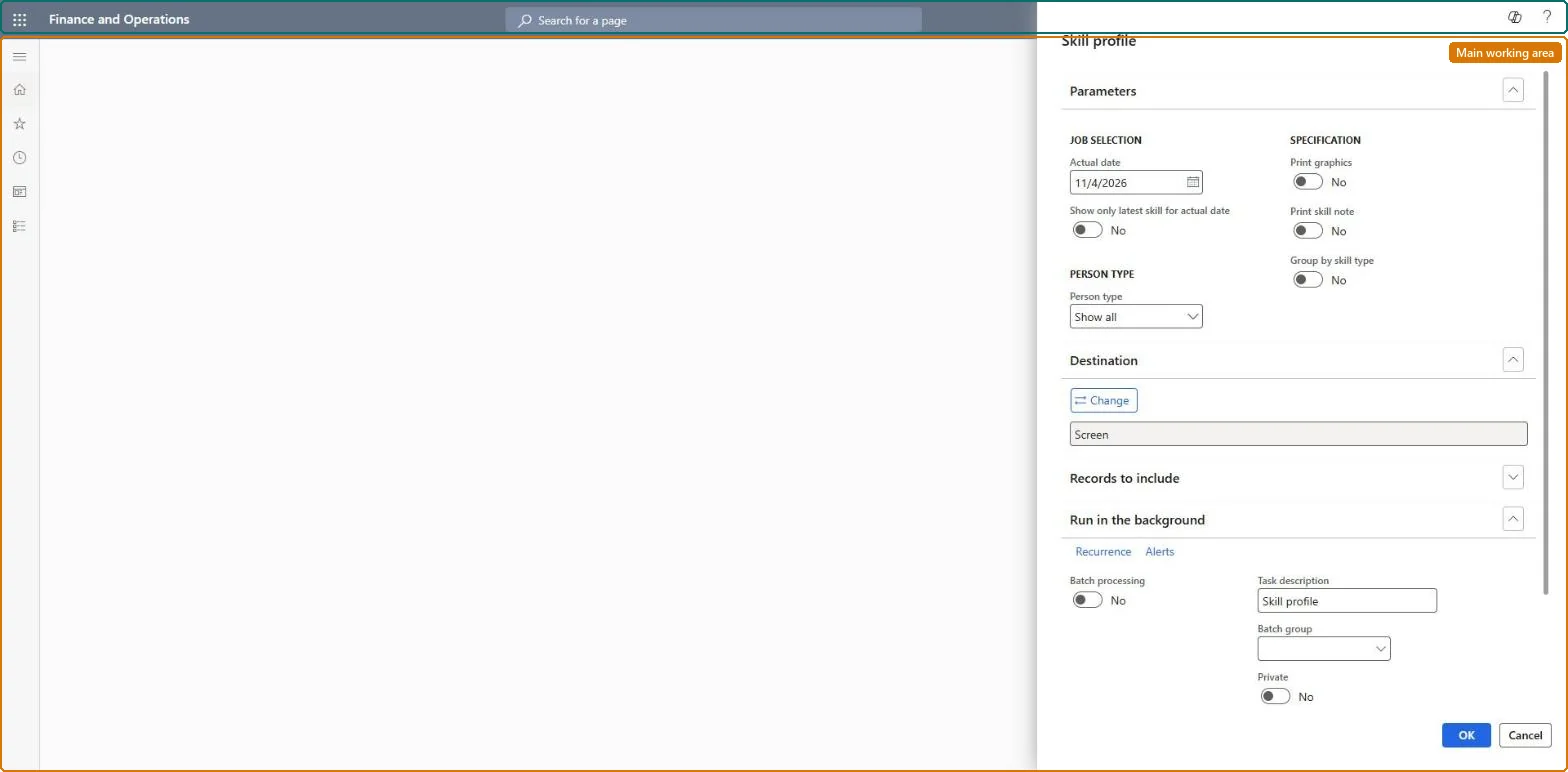
For example, ahead of the mid-year reviews HR prints the skill profiles of the 9 workers in the Customer service team as of 2026-06-30 with Group by skill type, for the managers' review packs.
The page in Dynamics 365. page title tab to open what to set or check
About the examples: Examples and screenshots in this guide use BEAT, a demo company in a Dynamics 365 test environment. Use your own company's codes and values instead of copying them.
When to run it
When to run it
When you need a list of a person's competencies, for example for a staffing decision.
How often
On demand, when a skill profile is requested.
What the output shows
Each person's skills and levels on the date. A skill that is missing or too low usually has a level date after the Actual date.
The date the skills are read as of.Checked in Dynamics 365
2026-06-30
Show only latest skill for actual date
Prints one level per skill, the latest on or before the Actual date.Checked in Dynamics 365
Yes
Group by skill type
Groups the skills on the report by skill type.Checked in Dynamics 365
Yes
Common errors and fixes
Message
What to do
A worker who holds the skill is missing from the result
Only workers, applicants and contacts with Include in skill mapping set to Yes are searched and profiled. Set it to Yes on the Worker (or Employee, Applicant, Contacts) page and run again. Microsoft Learn
A skill a worker entered in Employee self service doesn't show
Skills that workers enter for themselves need manager approval. Approve the work item, or have the manager enter the skill; a Worker skills workflow can auto-approve skills entered by managers. Microsoft Learn
Run it for the team at the review cut-off date with Show only latest skill for actual date and Group by skill type on.A skill profile lists a person's competencies; one latest level per skill keeps the pack short.
HR and training staff run it when they plan development, training and succession for current workers. No Feature management feature is needed for this page.
Shared data: the skills, certificates and education recorded for people (the Skill competency, Certificate competency and Education competency entities) and the skills setup are shared in Data management, so the analysis reads the same data from any legal entity. Checked in Dynamics 365
Can it be undone
Nothing to undo: The report only reads skills.
If you change it later
Only people with Include in skill mapping set to Yes appear in a skill profile, so changing that setting on a person adds or removes them on the next run. Microsoft Learn
Technical architect
6Technical
Menu item
HcmSkillProfileChecked in Dynamics 365
Form
SysOperationTemplateFormChecked in Dynamics 365
Roles to set it up and use it
To use itHuman resource assistant HcmHumanResourceAssistantRecruiter HcmRecruiterGive people one of these roles. On this system, 2 roles can run this page.Checked in Dynamics 365
Developer
7Developer
Open it by URL
https://<your-environment>/?mi=HcmSkillProfile
Data migration
Load order: The Skill profile report has no data entity in Data management, so it can't be loaded from a file or a configuration template. It reads the skills, certificates and education recorded for people; load those with the Employee development template (Skill competency, Certificate competency, Education competency) and run it in each environment.Microsoft Learn