Compensation and benefits manager, Human resource manager, Payroll administrator and 1 more role
Business process
Analyze and reconcile compensation and benefits
Menu item
HcmACAWorkerCoverageInquiry
Main table
HcmACAWorkerCoverageInqu
Setup steps
1 on this page
Show what matters for
SETUP GUIDEHow to set it up8 sections. Choose a role to highlight what matters to you.
Everyone
1What it is and why
What it is
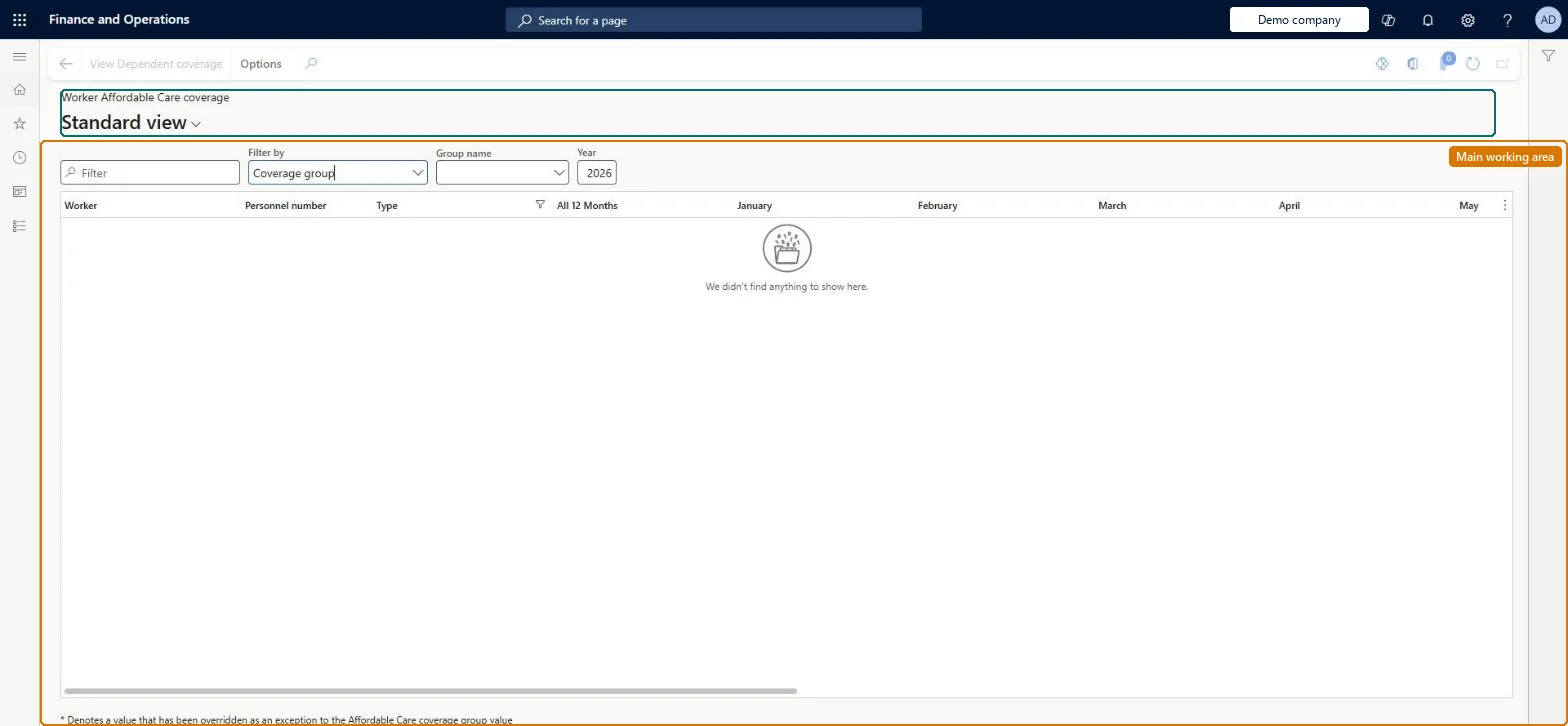
An inquiry for US legal entities that shows each employee's Affordable Care Act (ACA) coverage group assignment, by year and month.
What you do here
Use this page to see which employees are assigned to each coverage group, which are not ACA reportable, and which are unassigned or on an expired group, and to export those lists to Excel.
Example
For example, for the Year 2026 BEAT filters on the unassigned or expired group list and finds 3 of its 210 employees, assigns them to the group Full-time offered, and then lists 18 part-time employees as Not ACA reportable, who get no 1095-C.
The page in Dynamics 365. page title tab to open what to set or check
About the examples: Examples and screenshots in this guide use BEAT, a demo company in a Dynamics 365 test environment. Use your own company's codes and values instead of copying them.
Setup steps on this page
Check ACA coverage before year end
Make sure every US employee is assigned to a valid coverage group or marked not reportable before the forms are generated.
Steps from Microsoft
Go to Human resources > Benefits > Inquiries and reports > Worker Affordable Care coverage.
In the Year field, select the year to review.
In the Filter by field, select the list you want, such as Not ACA reportable.
Export the list to Excel if needed.
To see covered dependents, select View Dependent coverage on the Action Pane.
Selects which group of employees to list, such as those not ACA reportable.Microsoft Learn
Not ACA reportable
Year
The year for which assignments, including expired coverage groups, are shown.Microsoft Learn
2026
All 12 months
Shows the value when it is the same, and not overridden, for every month.Microsoft Learn
1E
Common errors and fixes
Message
What to do
An employee has no 1095-C, or the form's values are incomplete
The employee has Report coverage set to No, isn't assigned to an Affordable Care coverage group, or the group is expired for the year. On Worker Affordable Care coverage, filter on Not ACA reportable and on the unassigned or expired list, fix the assignments and generate again. Microsoft Learn
A dependent isn't shown under View Dependent coverage
Only benefit plans marked ACA reportable show, and the dependent's covered dates must be entered on Dependent coverage date manager from the worker's Maintain benefits page. Microsoft Learn
The ACA forms don't reflect changes made in the legacy Benefits pages
After the switch to Benefits management, ACA reporting runs only from the Benefits management workspace. Set up the employee data for the whole enrollment year there and generate the forms from that workspace. Microsoft Learn
Test checklist
Select a Year and check employees are listed by coverage group.
Set Filter by to Not ACA reportable and check part-time employees with Report coverage set to No appear.
Override one month for an employee and check an asterisk appears next to that value.
Check employees with the same value for all months show it in the All 12 months column, then export the list to Excel.
Set Year to the reporting year first, then filter on the unassigned or expired group list, and then on Not ACA reportable.Learn names these lists as the way to find employees with no assignment, an expired group or no 1095-C; each one needs fixing before 1095-C forms are generated.
Benefits management (Off: once it is on, ACA reporting runs only from the Benefits management workspace)
Licence or add-in
ACA reporting is US only: it is enabled only for legal entities in the United States. It runs from either this legacy Benefits workspace or the Benefits management workspace, not both: once you switch to Benefits management, ACA reporting is available only from the Benefits management workspace. Compensation and benefits managers, HR managers and payroll managers in US legal entities use it.
Shared data: the coverage groups and assignments it shows are shared entities in Data management (Affordable Care coverage groups, ACA coverage group assignment); ACA reporting itself is enabled only for legal entities in the United States. Checked in Dynamics 365
Can it be undone
Nothing to undo: The page only reads; fix assignments on the coverage group or the worker's Affordable Care Coverage link.
Feature or country
US
If you change it later
What this page lists is what the 1095-C forms will carry: employees marked Not ACA reportable get no 1095-C, and employees who are unassigned or on a group expired for the year have no coverage values to report. Only benefit plans marked ACA reportable show here. Microsoft Learn
Technical architect
6Technical
Menu item
HcmACAWorkerCoverageInquiryChecked in Dynamics 365
Form
HcmACAWorkerCoverageInquiryChecked in Dynamics 365
Table
HcmACAWorkerCoverageInquShown as “HCM HUMAN RESOURCES TEMPORARY TABLE FOR INTERNAL USE” in Record infoChecked in Dynamics 365
Who can open it
PrivilegesMaintain Affordable Care coverage for each worker HcmAffordableCareCoverageMaintainView Affordable Care coverage for each worker HcmAffordableCareCoverageViewDutiesSet up Affordable Care coverage information for workers HcmAffordableCareCoverageEnableView Affordable Care coverage for workers HcmAffordableCareCoverageInquire4 security rolesCompensation and benefits manager HcmCompensationAndBenefitsManagerHuman resource manager HcmHumanResourceManagerPayroll administrator HcmPayrollAdministratorPayroll manager HcmPayrollManagerChecked in Dynamics 365
Roles to set it up and use it
To set it up or change itCompensation and benefits manager HcmCompensationAndBenefitsManagerPayroll administrator HcmPayrollAdministratorTo use itHuman resource manager HcmHumanResourceManagerPayroll manager HcmPayrollManagerGive people one of these roles. On this system, 4 roles can open this page.Checked in Dynamics 365
Actions on the page
(Action Pane without tabs): View Dependent coverageChecked in Dynamics 365
Load order: Worker Affordable Care coverage has no data entity in Data management, so it can't be loaded from a file or a configuration template. It reads the coverage group assignments; load those with the Legacy benefits template (ACA coverage group assignment, Affordable Care coverage groups and versions) and check the page per year.Microsoft Learn
Checked in a working Dynamics 365 system, version 10.0.49: the menu item, form, table and security, the page.
To cite this step: HR-RBEN-050, Check ACA coverage before year end. Beyond ERP Atlas Hub, 2026-11-11. https://www.beyonderp.cloud/atlas/step/HR-RBEN-050