Chief executive officer, Compensation and benefits manager, Human resource assistant and 6 more roles
Business process
Develop people strategy
Menu item
HcmPositionType
Main table
HcmPositionType
Data entity
HcmPositionTypeEntity
Setup steps
1 on this page
Show what matters for
SETUP GUIDEHow to set it up8 sections. Choose a role to highlight what matters to you.
Everyone
1What it is and why
What it is
A setup page where you define the position type values, such as full-time or part-time, used to categorise positions.
What you do here
Use this page to create the list of position types that can be selected on a position.
Example
For example, BEAT keeps Full-time and Part-time position types; its medical plan's eligibility rule uses Eligible position type Full-time, so the 120 employees in full-time positions are eligible and the 14 in part-time positions are not.
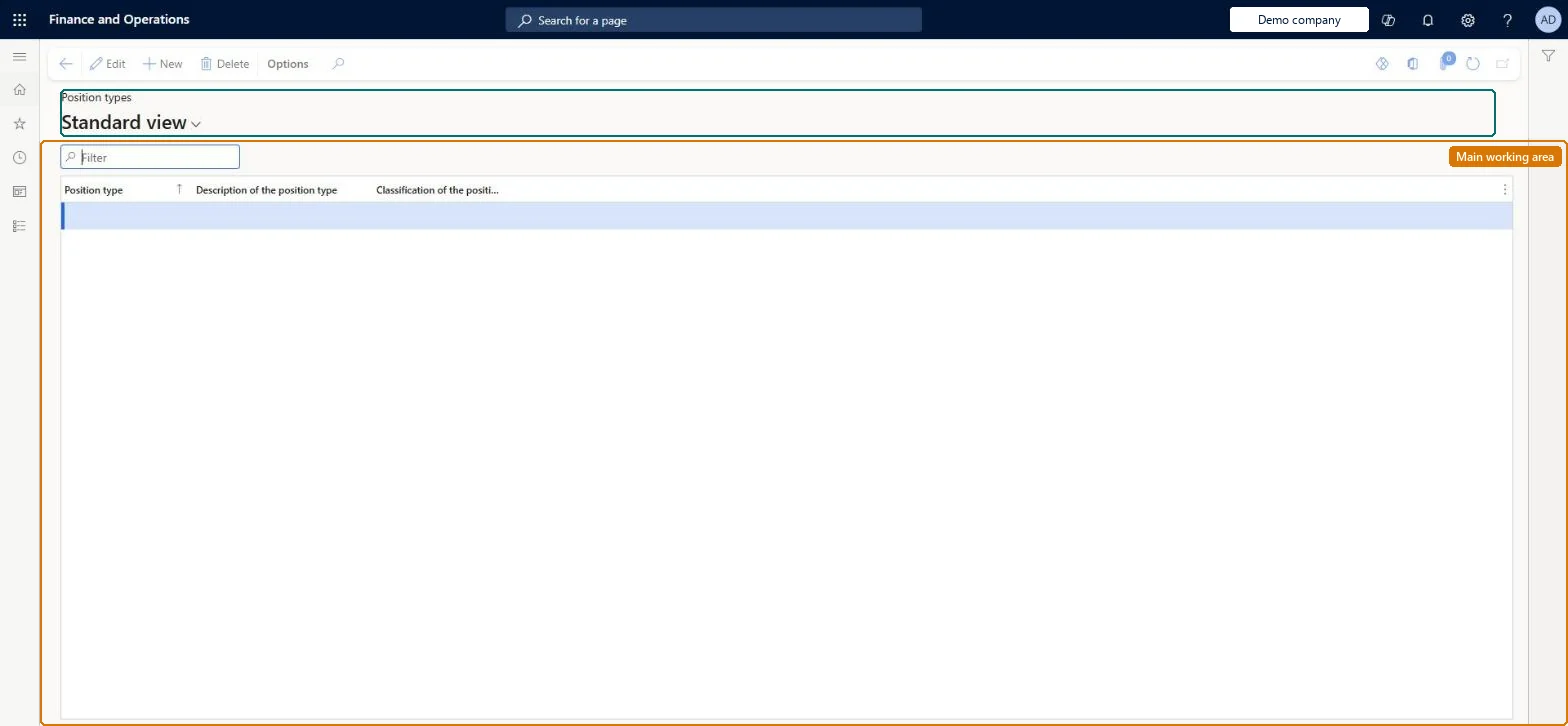
The page in Dynamics 365. page title tab to open what to set or check
About the examples: Examples and screenshots in this guide use BEAT, a demo company in a Dynamics 365 test environment. Use your own company's codes and values instead of copying them.
Setup steps on this page
Set up Position types
Use this page to create the list of position types that can be selected on a position.
Steps from Microsoft
Go to Human resources > Positions > Position types.
Use the Filter box to find a row.
Select New and enter the Position type code, its description and classification.
Review the Position type, Description of the position type and Classification of the position type columns.
Select Save; select Delete to remove a selected row.
An employee in a full-time position isn't eligible for a plan
The rule filters on Eligible position type and the position has no type, or another type. Set Position type on the position and process eligibility again. Microsoft Learn
Test checklist
Create Full-time and Part-time position types.
Assign Full-time to a position held by an employee.
Create a benefit eligibility rule with Eligible position type = Full-time and process enrollment eligibility.
Check the employee in the full-time position is eligible and an employee in a part-time position is not.
At least Full-time and Part-time, set up before positions are createdPosition types say whether a position is full-time, part-time or something else, and benefit eligibility rules can filter on Eligible position type.
On BEAT the page is maintained by Human resource assistant; viewed by Human resource manager, Compensation and benefits manager, Recruiter, Payroll administrator and Payroll manager; the full list is under the page's security roles. No Feature management feature is needed for this page.
Shared: position types are not per company. Data management lists the Position type entity as shared. Checked in Dynamics 365
Can it be undone
Hard to reverse: Position types are referenced by positions and by benefit eligibility rules; renaming or removing one means updating every position and rule that uses it.
If you change it later
Benefit eligibility rules can use Eligible position type, so changing a position's type changes which plans its employee is eligible for the next time eligibility is processed. Microsoft Learn
Technical architect
6Technical
Menu item
HcmPositionTypeChecked in Dynamics 365
Form
HcmPositionTypeChecked in Dynamics 365
Table
HcmPositionTypeShown as “POSITION TYPE” in Record infoKey field: TypeIdChecked in Dynamics 365
PrivilegesMaintain position types HcmPositionTypeMaintainView position types HcmPositionTypeViewDutiesEnable organizational process HcmOrganizationalProcessEnableInquire into organizational process HcmOrganizationalProcessInquireReview organizational information HcmOrganizationalReview9 security rolesChief executive officer CompanyChiefExecutiveOfficerCompensation and benefits manager HcmCompensationAndBenefitsManagerHuman resource assistant HcmHumanResourceAssistantHuman resource manager HcmHumanResourceManagerPayroll administrator HcmPayrollAdministratorPayroll manager HcmPayrollManagerRecruiter HcmRecruiterTraining manager HcmTrainingManagerAccounting manager LedgerAccountingManagerChecked in Dynamics 365
Roles to set it up and use it
To set it up or change itHuman resource assistant HcmHumanResourceAssistantTo use itHuman resource manager HcmHumanResourceManagerCompensation and benefits manager HcmCompensationAndBenefitsManagerRecruiter HcmRecruiterPayroll administrator HcmPayrollAdministratorPayroll manager HcmPayrollManagerGive people one of these roles. On this system, 9 roles can open this page.Checked in Dynamics 365
HcmPositionTypeEntity Position type. Shared by all companies.Load order: Load Position type before Positions V2, as in the Jobs and positions template.Microsoft Learn