Setup step on the Posting definitions page · General ledger
Set up Posting definitions
Used to specify match criteria and the entries to generate when a match occurs, with priorities, a test wizard, and versions with effective dates.
- Used by
- Accountant, Accounting manager, Accounting supervisor and 9 more roles
- Business process
- Set up posting definitions in Dynamics 365 Finance
- Menu item
JournalizingDefinition- Main table
JournalizingDefinition- Data entity
- —
- Setup steps
- 1 on this page
Show what matters for
Everyone
1What it is and why
| What it is | Rules with match criteria and generated entries that classify main accounts and financial dimensions on accounting entries, used instead of posting profiles for supported transactions. |
|---|---|
| What you do here | Used to specify match criteria and the entries to generate when a match occurs, with priorities, a test wizard, and versions with effective dates. |
| Example | Create a future version of a posting definition to post to a different ledger account in a new fiscal year. |
Functional consultant · Solution architect
2Where it fits
| Business process | Define accounting policies › Define posting policies › Set up posting definitions in Dynamics 365 Finance |
|---|---|
| Menu path | General ledger › Posting setup › Posting definitions |
| Set up first | General ledger parameters Microsoft Learn ↗ |
| Used next by | Transaction posting definitions Microsoft Learn ↗Purchase order year-end process Microsoft Learn ↗ |
| Related pages | — |
| In this process | ← Set up Transaction posting definitions |
End user · Functional consultant
3How to do it
Step by step, with screenshots
Set up Posting definitions1 screen
Used to specify match criteria and the entries to generate when a match occurs, with priorities, a test wizard, and versions with effective dates.
Screen 1
Create the posting definition
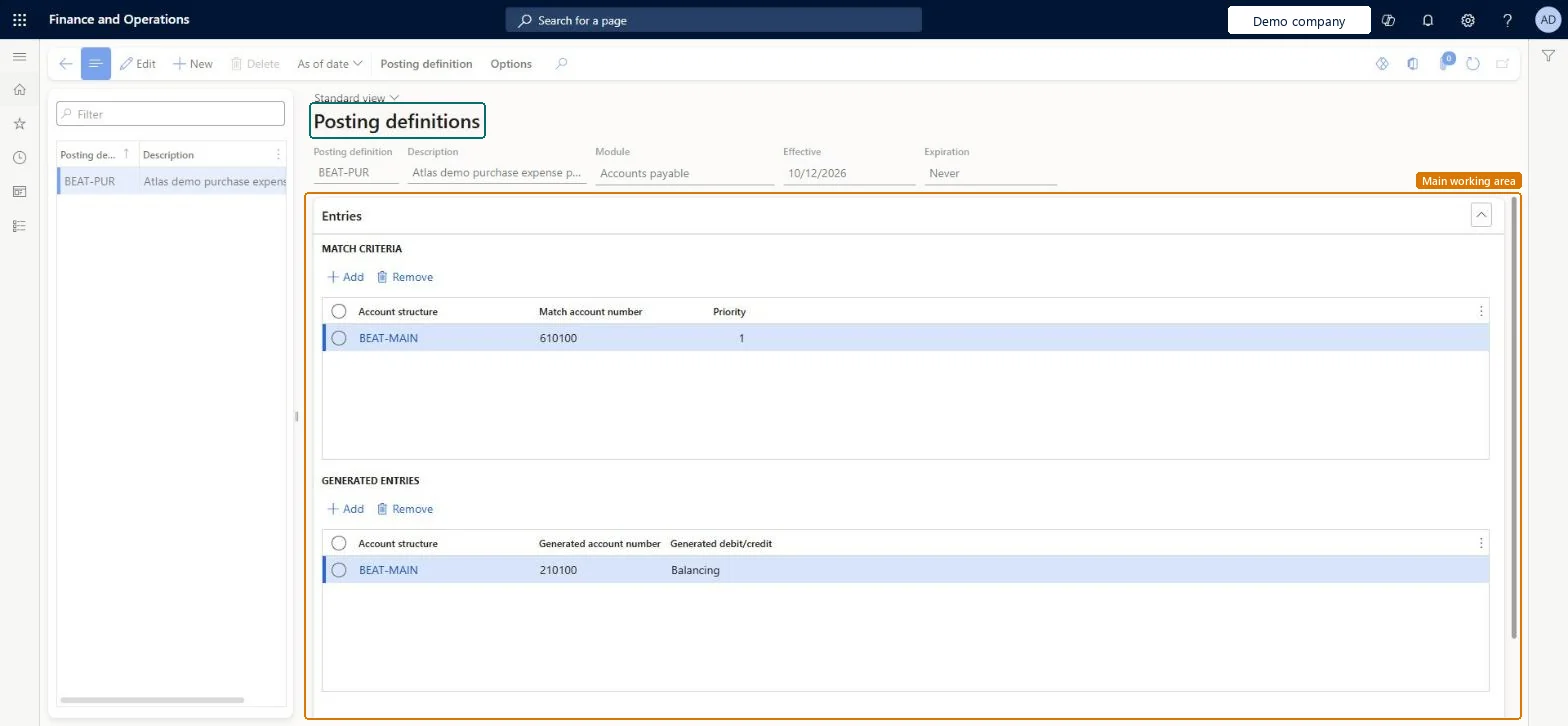
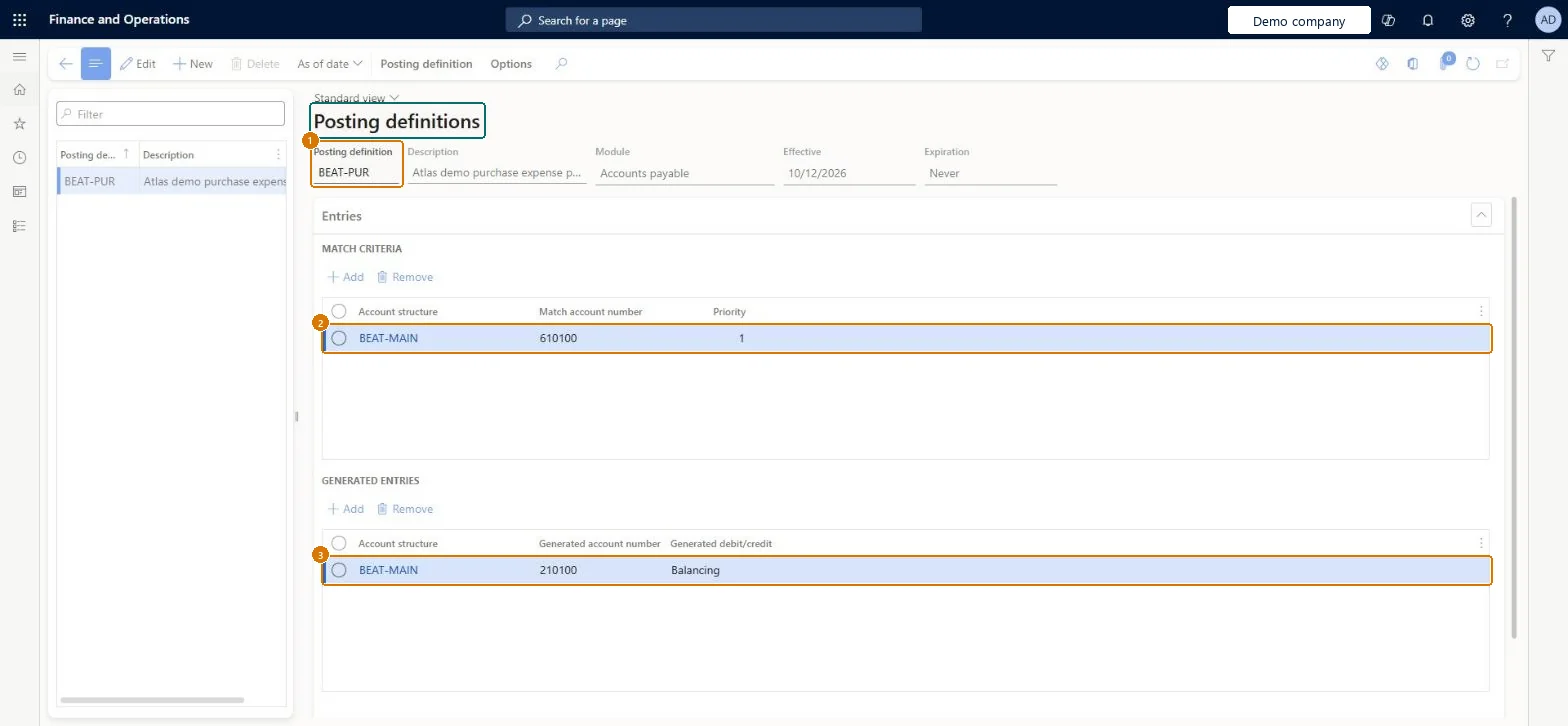
Go to General ledger > Posting setup > Posting definitions
- Select New and enter the posting definition code
- Under MATCH CRITERIA, select Add and enter the account structure and match account
- Under GENERATED ENTRIES, select Add and enter the generated account and debit/credit
1Posting definition BEAT-PUR 2Match account number 610100 3Generated account number 210100 Module Accounts payable Account structure BEAT-MAIN Generated debit/credit Balancing 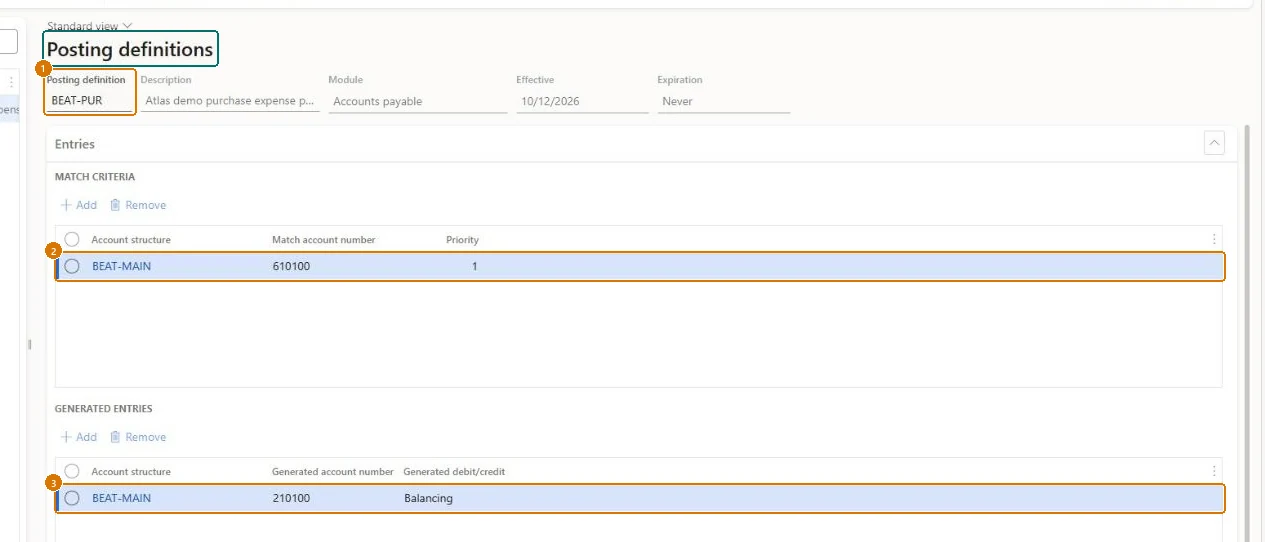
Show the full screen
page title tab to open what to set or check
Microsoft's steps
—
Field guide
| Field | What it means | Worked example | Table column |
|---|---|---|---|
| Module | The module the posting definition belongs to, such as Purchasing or Bank; linked definitions must share a module.Microsoft Learn ↗ | Accounts payable | — |
| Match criteria | The accounts and dimension values that an originating entry must match for the definition to apply.Microsoft Learn ↗ | — | — |
| Generated entries | The ledger entries created when a transaction matches the criteria.Microsoft Learn ↗ | — | — |
| Priority | The order in which entry lines are checked; the lowest number is checked first and the first match wins.Microsoft Learn ↗ | — | — |
| Posting definition | — | BEAT-PUR | — |
| Account structure | — | BEAT-MAIN | — |
| Match account number | — | 610100 | — |
| Generated account number | — | 210100 | — |
| Generated debit/credit | — | Balancing | — |
Functional consultant
4Setup decisions
| Setup step | Recommended value and why | Decision · common mistake · test |
|---|---|---|
| Set up Posting definitions | — | — |
Solution architect
5Design impact
| Shared or per company | Per company: each legal entity has its own records. Microsoft data model ↗ |
|---|---|
| Can it be undone | — |
| Feature or country | — |
| If you change it later | Posting definitions can have dated versions, so a change, such as posting to a different account, can take effect from a future date like the start of a new fiscal year. Microsoft Learn ↗ |
Technical architect
6Technical
| Menu item | JournalizingDefinition Checked in Dynamics 365 |
|---|---|
| Form | JournalizingDefinition Checked in Dynamics 365 |
| Table | JournalizingDefinitionShown as “Posting definition” in Record infoKey field: JournalizingDefinitionCodeChecked in Dynamics 365 |
| Data entities | — |
| Who can open it | PrivilegesMaintain posting definitions JournalizingDefinitionMaintainView posting definitions JournalizingDefinitionViewDutiesInquire into general ledger policies LedgerGeneralLedgerPoliciesInquireEnable general ledger process LedgerGeneralLedgerProcessEnableInquire into general ledger policies RentalLedgerGeneralLedgerPolicieInquireEnable general ledger process RentalLedgerGeneralLedgerProcessEnable12 security rolesAuditorAuditPolicyManagerChief financial officer CompanyChiefFinancialOfficerInventory accountant InventCostAccountantInventory accountant clerk InventCostCostClerkAccountant LedgerAccountantAccounting manager LedgerAccountingManagerAccounting supervisor LedgerAccountingSupervisorFinancial controller LedgerFinancialControllerRental coordinator agent RentalCoordinatorAgentRental manager RentalManagerRental purchasing manager RentalPurchasingManagerRental sales manager RentalSalesManager |
| Actions on the page | Posting definition: Version, View, TestButtons: As of dateChecked in Dynamics 365 |
Developer
7Developer
| Open it directly | https://<your-environment>/?mi=JournalizingDefinition |
|---|---|
| Integrate with | — |
| Table definition | JournalizingDefinition columns and relations Microsoft data model ↗ |
Everyone
8Sources and checks
- learn.microsoft.com/dynamics365/finance/general-ledger/posting-definitions
- learn.microsoft.com/common-data-model/schema/core/operationscommon/tables/finance/accountingfoundation/main/journalizingdefinition
- learn.microsoft.com/dynamics365/finance/general-ledger/posting-definitions
- learn.microsoft.com/dynamics365/finance/public-sector/posting-definitions-public-sector
- learn.microsoft.com/dynamics365/finance/general-ledger/example-posting-definitions
- learn.microsoft.com/dynamics365/finance/budgeting/purchase-order-year-end-process
- Checked in a working Dynamics 365 system, version 10.0.49: the menu item, form, table and security, the page, the demo records and the values in the screenshots.
GL-POSTING-040 — Set up Posting definitions. Beyond ERP Atlas Hub, snapshot 2026-10-16, partly verified. https://www.beyonderp.cloud/atlas/step/GL-POSTING-040