Setup step on the Financial dimension default templates page · General ledger
Set up Financial dimension default templates
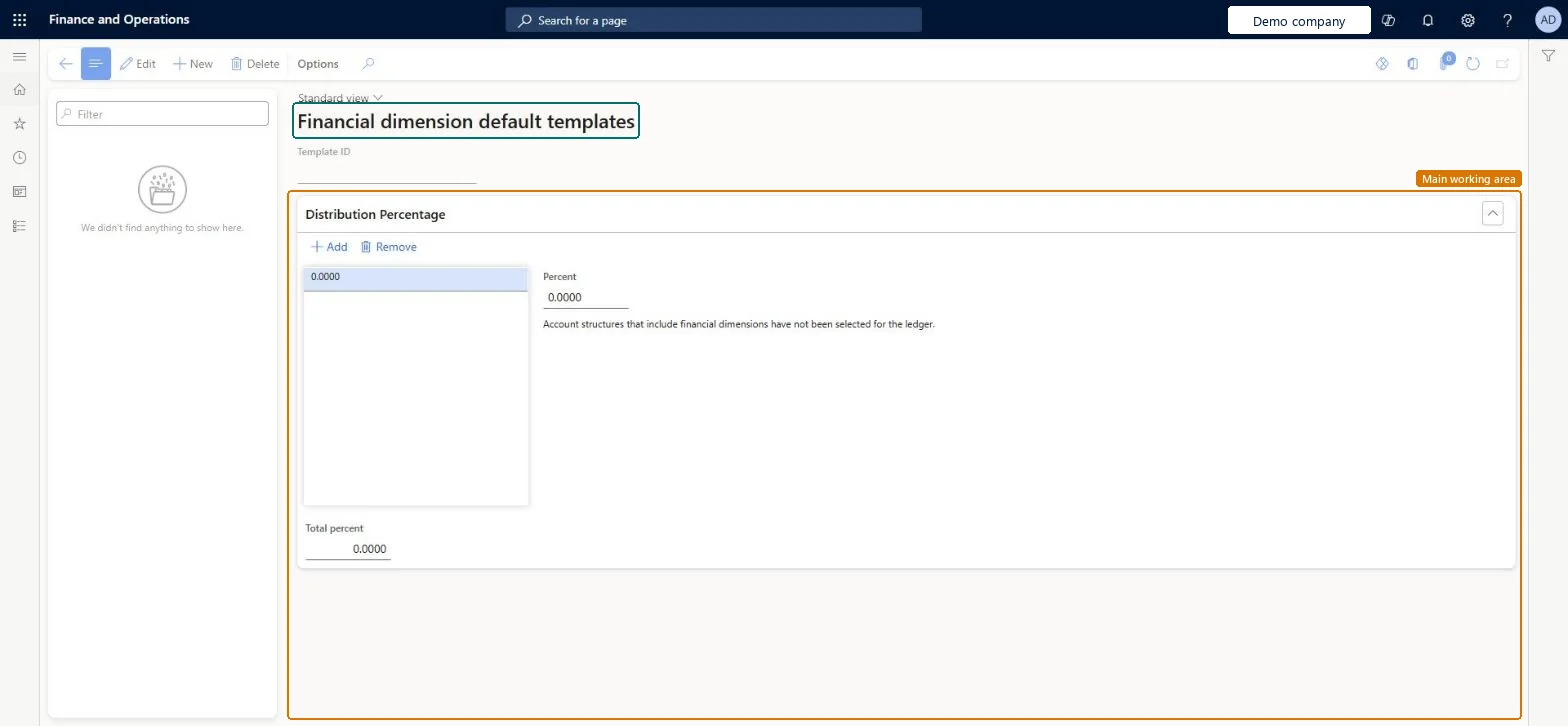
Used to set up templates, with percentages and matching dimension values that total 100 percent, to quickly distribute amounts on source documents.
- Used by
- Accountant, Accounting manager, Accounting supervisor and 14 more roles
- Business process
- Process allocations
- Menu item
FinancialDimensionDefaultTemplate- Main table
AccountingDistributionTemplate- Data entity
FinancialDimensionDefaultTemplateEntity- Setup steps
- 1 on this page
Show what matters for
Everyone
1What it is and why
| What it is | Templates that split amounts across financial dimension values by percentage. |
|---|---|
| What you do here | Used to set up templates, with percentages and matching dimension values that total 100 percent, to quickly distribute amounts on source documents. |
| Example | — |
Functional consultant · Solution architect
2Where it fits
| Business process | Record financial transactions › Process allocations |
|---|---|
| Menu path | General ledger › Chart of accounts › Dimensions › Financial dimension default templates |
| Set up first | Financial dimensions Microsoft Learn ↗ |
| Used next by | All free text invoices Microsoft Learn ↗ |
| Related pages | Ledger allocation rules Microsoft Learn ↗ |
| In this process | — |
End user · Functional consultant
3How to do it
Setup steps on this page
Set up Financial dimension default templatesNo screenshots yet
Used to set up templates, with percentages and matching dimension values that total 100 percent, to quickly distribute amounts on source documents.
Microsoft's steps
- Go to General ledger > Chart of accounts > Dimensions > Financial dimension default templates.
- Select New.
- In the Template ID field, enter an ID.
- Enter the percentage for the first set of dimension values, and then enter those dimension values.
- Select Add.
- Repeat for each further percentage and its dimension values until the total is 100%.
- Select Save.
Source: Microsoft Learn ↗
Field guide
| Field | What it means | Worked example | Table column |
|---|---|---|---|
| Template ID | The ID of the template that is picked on source documents to split amounts.Microsoft Learn ↗ | — | Name |
Functional consultant
4Setup decisions
| Setup step | Recommended value and why | Decision · common mistake · test |
|---|---|---|
| Set up Financial dimension default templates | — | — |
Solution architect
5Design impact
| Shared or per company | — |
|---|---|
| Can it be undone | — |
| Feature or country | — |
| If you change it later | On a free text invoice line, an allocation account's own definition is used first; the template is used only when the main account isn't an allocation account, and it takes priority over the line's default dimensions. Microsoft Learn ↗ |
Technical architect
6Technical
| Menu item | FinancialDimensionDefaultTemplate Checked in Dynamics 365 |
|---|---|
| Form | FinancialDimensionDefaultTemplates Checked in Dynamics 365 |
| Table | AccountingDistributionTemplateShown as “Accounting distribution template” in Record infoKey field: NameChecked in Dynamics 365 |
| Data entities | FinancialDimensionDefaultTemplateEntityFinancial dimension default templates Microsoft data model ↗ |
| Who can open it | PrivilegesMaintain financial dimension default templates FinancialDimensionDefaultTemplaMaintainView financial dimension default templates FinancialDimensionDefaultTemplateViewDutiesEnable invoice and cash process CustInvoiceInvoiceAndCashProcessEnableInquire into invoice and cash reference data CustInvoiceInvoiceAndCashRefDataInquireInquire into chart of account master LedgerChartOfAccountsInquireMaintain chart of accounts master LedgerChartOfAccountsMaintain17 security rolesBudget clerkBudgetBudgetClerkBudget contributor BudgetBudgetContributorBudget manager BudgetBudgetManagerCollections manager CollectionLetterCollectionsManagerChief executive officer CompanyChiefExecutiveOfficerChief financial officer CompanyChiefFinancialOfficerAccounts receivable clerk CustInvoiceAccountsReceivableClerkAccounts receivable manager CustInvoiceAccountsReceivableManagerAccountant LedgerAccountantAccounting manager LedgerAccountingManagerAccounting supervisor LedgerAccountingSupervisorFinancial controller LedgerFinancialControllerAccounts receivable centralized payments clerk PaymAccountsReceivableCentralPaymClerkAccounts receivable payments clerk PaymAccountsReceivablePaymentsClerkRental coordinator agent RentalCoordinatorAgentRental manager RentalManagerAccounts payable manager VendInvoiceAccountsPayableManager |
| Actions on the page | — |
Developer
7Developer
| Open it directly | https://<your-environment>/?mi=FinancialDimensionDefaultTemplate |
|---|---|
| Integrate with | FinancialDimensionDefaultTemplateEntity data entity Microsoft data model ↗ |
| Table definition | AccountingDistributionTemplate columns and relations Microsoft data model ↗ |
Everyone
8Sources and checks
- learn.microsoft.com/dynamics365/finance/general-ledger/tasks/maintain-financial-dimension-default-templates
- learn.microsoft.com/dynamics365/finance/general-ledger/tasks/maintain-financial-dimension-default-templates
- learn.microsoft.com/dynamics365/finance/accounts-receivable/accounting-distributions-subledger-journal-entries-free-text-invoices
- learn.microsoft.com/dynamics365/finance/general-ledger/process-allocations
- Checked in a working Dynamics 365 system, version 10.0.49: the menu item, form, table and security, the page.
GL-COA-130 — Set up Financial dimension default templates. Beyond ERP Atlas Hub, snapshot 2026-10-16, partly verified. https://www.beyonderp.cloud/atlas/step/GL-COA-130