Setup step on the Financial dimension sets page · General ledger
Set up Financial dimension sets
Used to create and manage dimension sets and their balances, including creating, updating, rebuilding, and clearing balances.
- Used by
- Accountant, Accounting manager, Accounting supervisor and 9 more roles
- Business process
- View the online trial balance in Dynamics 365 Finance
- Menu item
DimensionFocusTable- Main table
DimensionHierarchy- Data entity
DimensionHierarchyBaseEntity- Setup steps
- 1 on this page
Show what matters for
Everyone
1What it is and why
| What it is | An ordered list of financial dimensions used to summarize General ledger data in a user-defined way. |
|---|---|
| What you do here | Used to create and manage dimension sets and their balances, including creating, updating, rebuilding, and clearing balances. |
| Example | Define a dimension set to use for a trial balance. |
Functional consultant · Solution architect
2Where it fits
| Business process | Analyze financial performance › Audit financial results › View the online trial balance in Dynamics 365 Finance |
|---|---|
| Menu path | General ledger › Chart of accounts › Dimensions › Financial dimension sets |
| Set up first | Financial dimensions Microsoft Learn ↗ |
| Used next by | Trial balance Microsoft Learn ↗ |
| Related pages | — |
| In this process | — |
End user · Functional consultant
3How to do it
Step by step, with screenshots
Set up Financial dimension sets1 screen
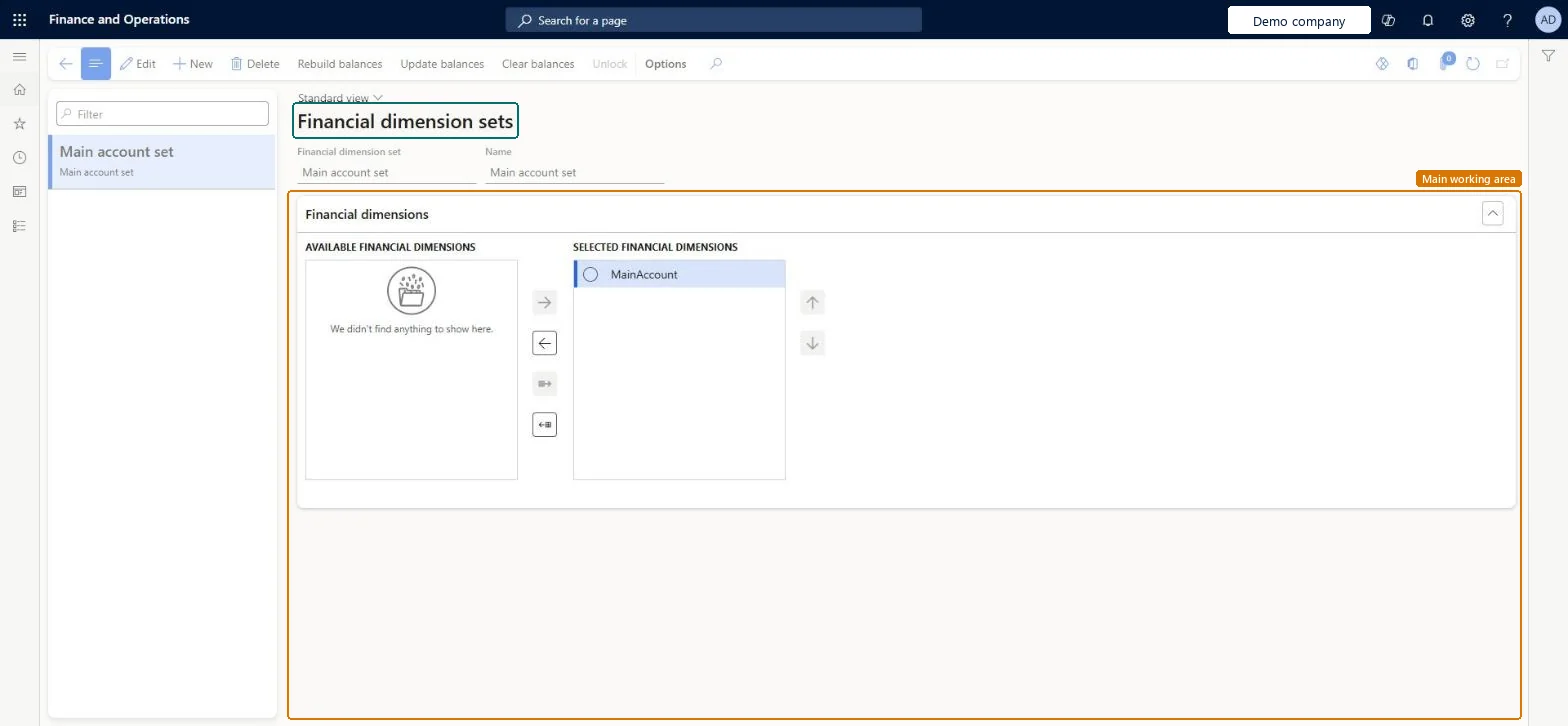
Used to create and manage dimension sets and their balances, including creating, updating, rebuilding, and clearing balances.
Screen 1
Create the financial dimension set
Go to General ledger > Chart of accounts > Dimensions > Financial dimension sets
- Select New
- Enter the dimension set code and name
- Move MainAccount to the selected financial dimensions with the arrow
1Financial dimension set Main account set 2Name Main account set 3Selected financial dimension MainAccount 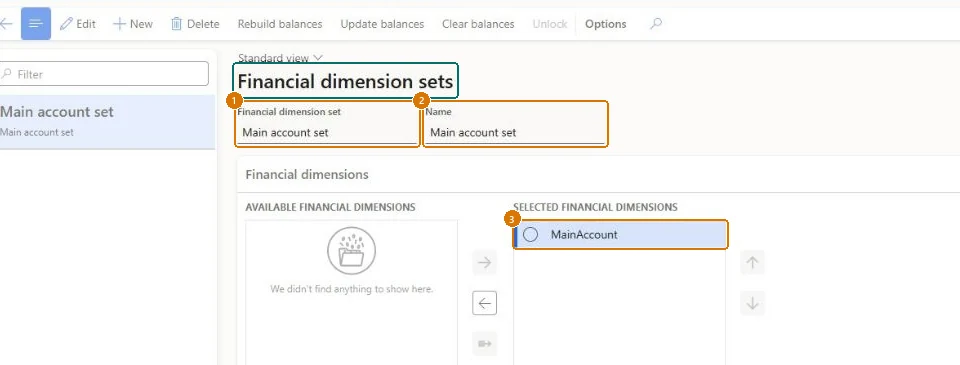
Show the full screen
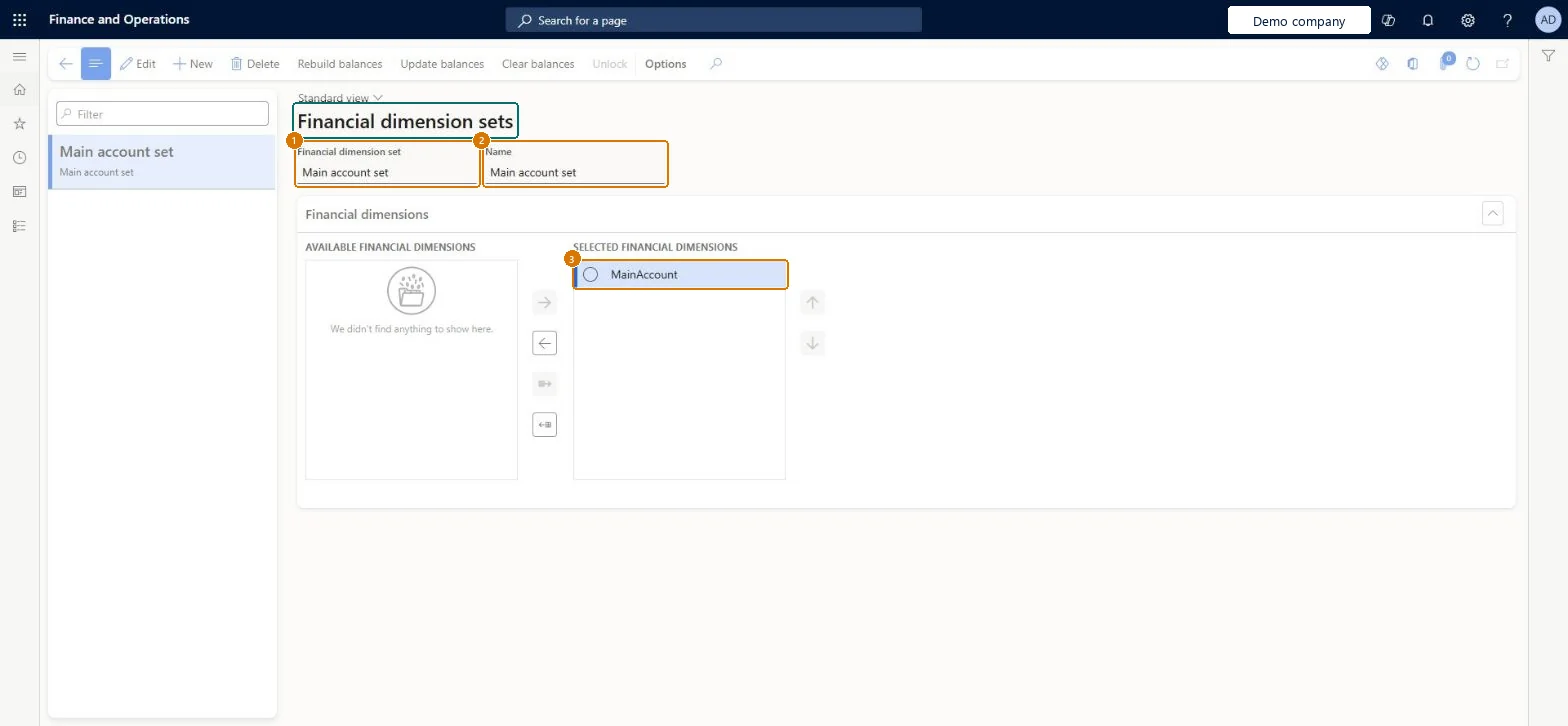
page title tab to open what to set or check
Microsoft's steps
- Go to General ledger > Chart of accounts > Dimensions > Financial dimension sets.
- Create a new dimension set.
- Move the dimensions you need from the Available financial dimensions list to the Selected financial dimensions list with the right arrow, up to eleven.
- Select Create balances to start balances for the set.
- Select Update balances to bring in the latest postings, or set up a recurring batch job to do it.
Source: Microsoft Learn ↗
Field guide
| Field | What it means | Worked example | Table column |
|---|---|---|---|
| Selected financial dimensions | The dimensions that make up the set, in order; up to eleven can be chosen.Microsoft Learn ↗ | — | — |
| Create balances | Starts summarized balances for a set that has none yet.Microsoft Learn ↗ | — | — |
| Update balances | Adds the general ledger postings made since the last update to the set's balances.Microsoft Learn ↗ | — | — |
| Rebuild balances | Recreates the balances from scratch; heavy processing that is only needed when balances look wrong.Microsoft Learn ↗ | — | — |
| Clear balances | Removes the balances and stops further updates for the set.Microsoft Learn ↗ | — | — |
| Financial dimension set | — | Main account set | — |
| Name | — | Main account set | Description |
| Selected financial dimension | — | MainAccount | — |
Functional consultant
4Setup decisions
| Setup step | Recommended value and why | Decision · common mistake · test |
|---|---|---|
| Set up Financial dimension sets | — | — |
Solution architect
5Design impact
| Shared or per company | Shared: the same records are used by every legal entity. Microsoft data model ↗ |
|---|---|
| Can it be undone | — |
| Feature or country | — |
| If you change it later | The dimensions in a set can be changed at any time, but if the set already has balances they must be cleared and rebuilt afterwards, or the trial balance can show duplicate rows. Every set with balances also adds work to all general ledger posting. Microsoft Learn ↗ |
Technical architect
6Technical
| Menu item | DimensionFocusTable Checked in Dynamics 365 |
|---|---|
| Form | DimensionFocus Checked in Dynamics 365 |
| Table | DimensionHierarchyShown as “Dimension set” in Record infoChecked in Dynamics 365 |
| Data entities | DimensionHierarchyBaseEntityThe DimensionHierarchyBaseEntity is the base entity for all entities based on the DimensionHierarchy table. Microsoft data model ↗DimensionIntegrationFormatEntityFinancial dimension format Microsoft data model ↗FinancialDimensionSetEntityFinancial dimension sets Microsoft data model ↗ |
| Who can open it | PrivilegesDimensionFocusTableMaintain DimensionFocusTableMaintainDimensionFocusTableView DimensionFocusTableViewDutiesMaintain budget planning configuration and processes BudgetPlanningConfigProcessMaintainView budget planning configuration and processes BudgetPlanningConfigProcessViewMaintain dimensions master DimensionsMaintainView dimensions master DimensionsViewMaintain chart of accounts master LedgerChartOfAccountsMaintain12 security rolesBudget clerkBudgetBudgetClerkBudget contributor BudgetBudgetContributorBudget manager BudgetBudgetManagerChief executive officer CompanyChiefExecutiveOfficerChief financial officer CompanyChiefFinancialOfficerAccounts receivable manager CustInvoiceAccountsReceivableManagerManager HcmManagerAccountant LedgerAccountantAccounting manager LedgerAccountingManagerAccounting supervisor LedgerAccountingSupervisorFinancial controller LedgerFinancialControllerAccounts payable manager VendInvoiceAccountsPayableManager |
| Actions on the page | Buttons: Rebuild balances, Update balances, Clear balances, UnlockChecked in Dynamics 365 |
Developer
7Developer
| Open it directly | https://<your-environment>/?mi=DimensionFocusTable |
|---|---|
| Integrate with | DimensionHierarchyBaseEntity data entity Microsoft data model ↗ |
| Table definition | DimensionHierarchy columns and relations Microsoft data model ↗ |
Everyone
8Sources and checks
- learn.microsoft.com/dynamics365/finance/general-ledger/financial-dimension-sets
- learn.microsoft.com/dynamics365/finance/general-ledger/financial-dimension-sets
- learn.microsoft.com/common-data-model/schema/core/operationscommon/tables/finance/financialdimensions/group/dimensionhierarchy
- Checked in a working Dynamics 365 system, version 10.0.49: the menu item, form, table and security, the page, the demo records and the values in the screenshots.
GL-COA-110 — Set up Financial dimension sets. Beyond ERP Atlas Hub, snapshot 2026-10-16, partly verified. https://www.beyonderp.cloud/atlas/step/GL-COA-110