Setup step on the Fixed assets parameters page · Fixed assets
Set up Fixed assets parameters
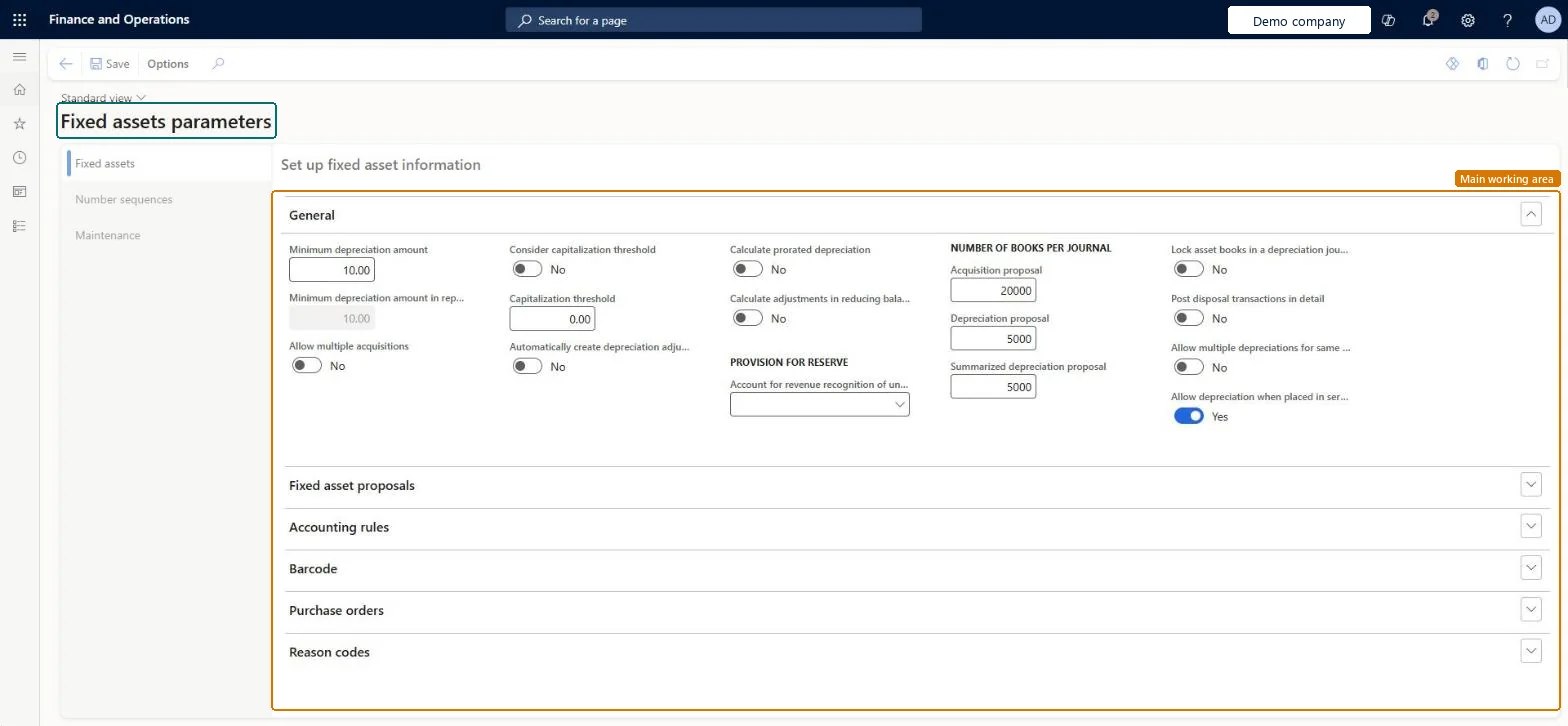
Used to set rules such as the capitalization threshold, disposal posting detail, purchasing integration, reason codes and fixed asset number sequences.
- Used by
- Auditor, Chief executive officer, Chief financial officer and 6 more roles
- Business process
- Manually create fixed assets in Dynamics 365 Finance
- Menu item
AssetParameters- Main table
AssetParameters- Data entity
AssetParametersEntity- Setup steps
- 1 on this page
Everyone
1What it is and why
| What it is | A setup page where you set the parameters that control how the Fixed assets module behaves. |
|---|---|
| What you do here | Used to set rules such as the capitalization threshold, disposal posting detail, purchasing integration, reason codes and fixed asset number sequences. |
| Example | For example, a company that buys a truck and its truck body from two vendors can turn on Allow multiple acquisitions to post both purchases against one asset. |
Functional consultant · Solution architect
2Where it fits
| Business process | Manage active assets › Maintain fixed assets › Manually create fixed assets in Dynamics 365 Finance |
|---|---|
| Menu path | Fixed assets › Setup › Fixed assets parameters |
| Set up first | — |
| Used next by | Fixed assets Microsoft Learn ↗Create depreciation proposal Microsoft Learn ↗ |
| Related pages | Fixed asset groups Microsoft Learn ↗ |
| In this process | — |
End user · Functional consultant
3How to do it
Step by step, with screenshots
Set up Fixed assets parameters1 screen
Used to set rules such as the capitalization threshold, disposal posting detail, purchasing integration, reason codes and fixed asset number sequences.
Screen 1
Review the fixed assets parameters
Go to Fixed assets > Setup > Fixed assets parameters, Fixed assets tab
- Expand the Purchase orders section
- Check Allow asset acquisition from Purchasing
- Check Create asset during product receipt or invoice posting
- Select Save if you change anything
1Allow asset acquisition from Purchasing Yes 2Create asset during product receipt or invoice posting No 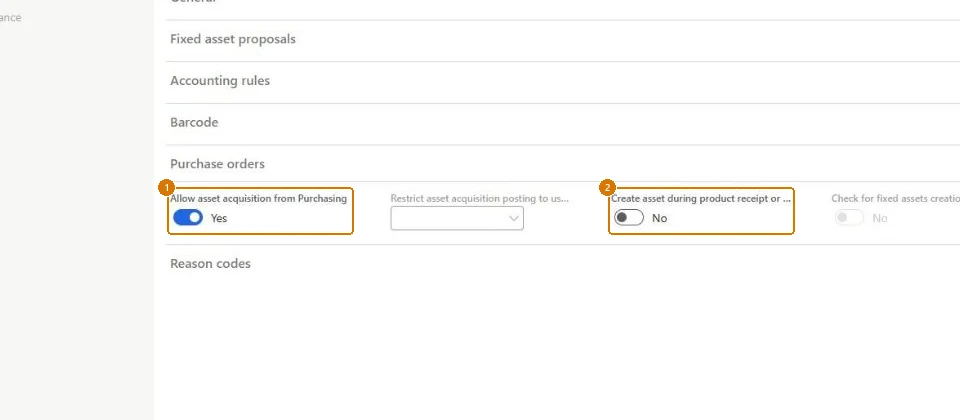
Show the full screen
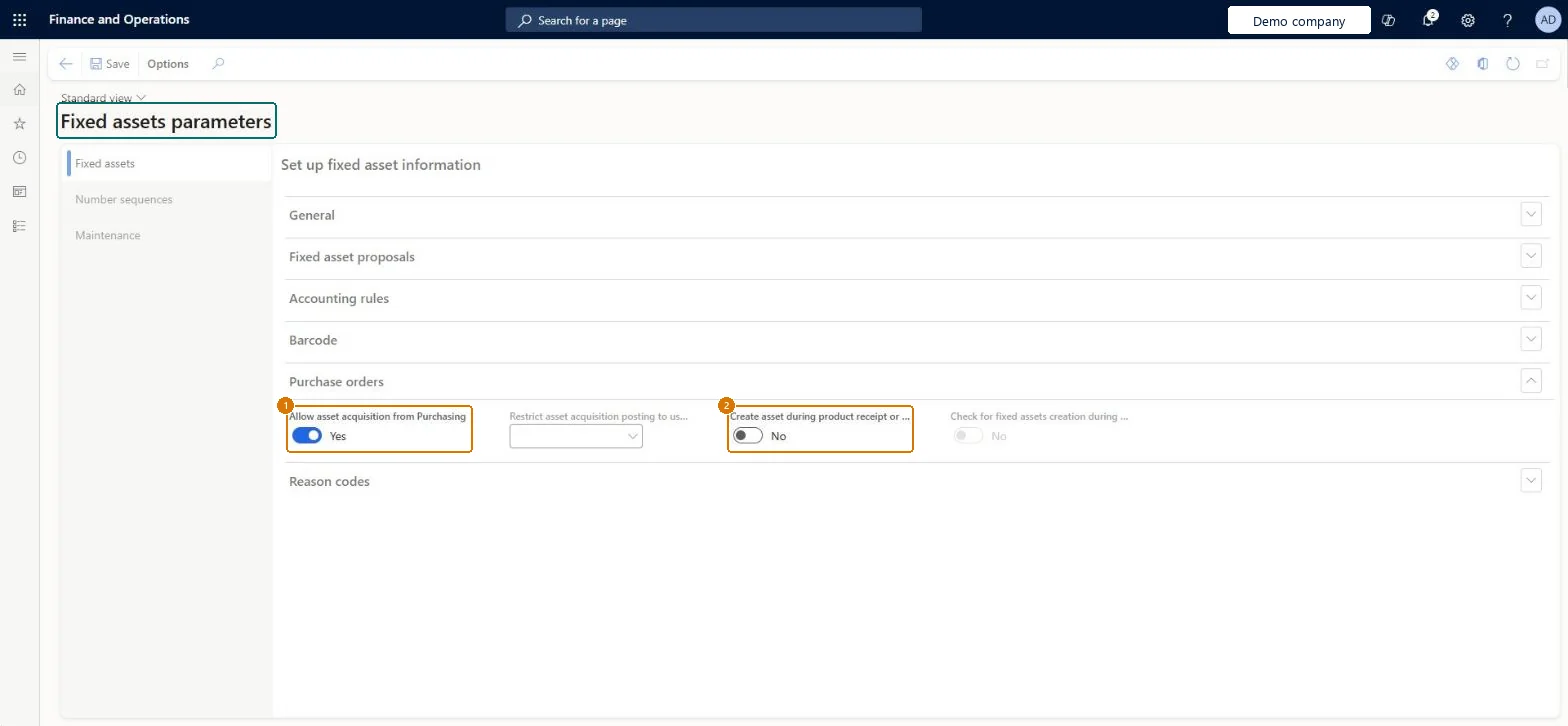
page title tab to open what to set or check
Microsoft's steps
- Go to Fixed assets > Setup > Fixed assets parameters.
- Expand the Purchase orders FastTab.
- Select the Allow asset acquisition from Purchasing check box.
- Select the Create asset during product receipt or invoice posting check box.
Source: Microsoft Learn ↗
Field guide
| Field | What it means | Worked example | Table column |
|---|---|---|---|
| Capitalization threshold | Assets bought below this amount are still created, but with Calculate depreciation set to No.Microsoft Learn ↗ | — | CapitalizationThreshold |
| Automatically create depreciation adjustment amounts with disposal | Adjusts depreciation automatically when an asset is disposed of.Microsoft Learn ↗ | — | IsAutomaticPosting |
| Lock asset books in a depreciation journal | Stops posting if the same asset book is in more than one depreciation journal.Microsoft Learn ↗ | — | — |
| Post disposal transactions in detail | Decides whether disposals post acquisition values in detail by this year and prior years.Microsoft Learn ↗ | — | — |
| Allow depreciation when placed in service and disposal are in the same fiscal year | Calculates depreciation for assets placed in service and disposed of in the same fiscal year; it is the default for new books.Microsoft Learn ↗ | — | — |
| Allow multiple acquisitions | Allows more than one acquisition per asset per book.Microsoft Learn ↗ | — | — |
| Allow asset acquisition from Purchasing | Posts the asset acquisition when the vendor invoice is posted.Microsoft Learn ↗ | Yes | AssetAllowAcqPostingPO |
| Restrict asset acquisition posting to user group | Limits who can post fixed asset acquisitions.Microsoft Learn ↗ | — | AssetUserGroupIdPostPO |
| Create asset during product receipt or invoice posting | Creates a new asset during posting so it doesn't need to exist beforehand.Microsoft Learn ↗ | No | AssetAllowCreate |
| Check for fixed assets creation during line entry | Applies only to purchase requisitions.Microsoft Learn ↗ | — | — |
| Number of books per journal | Sets the maximum number of books in each acquisition and depreciation journal created in batch.Microsoft Learn ↗ | — | — |
| Minimum depreciation amount in reporting currency | The minimum depreciation amount in the reporting currency.Microsoft Learn ↗ | — | — |
Functional consultant
4Setup decisions
| Setup step | Recommended value and why | Decision · common mistake · test |
|---|---|---|
| Set up Fixed assets parameters | — | — |
Solution architect
5Design impact
| Shared or per company | Per company: each legal entity has its own records. Microsoft data model ↗ |
|---|---|
| Can it be undone | — |
| Feature or country | — |
| If you change it later | The setting for depreciation when placed in service and disposed of in the same fiscal year only becomes the default for books created afterwards; existing books keep their setting. Microsoft Learn ↗ |
Technical architect
6Technical
| Menu item | AssetParameters Checked in Dynamics 365 |
|---|---|
| Form | AssetParameters Checked in Dynamics 365 |
| Table | AssetParametersShown as “Fixed asset parameters” in Record infoChecked in Dynamics 365 |
| Data entities | AssetParametersEntityFixed asset parameters Microsoft data model ↗ |
| Who can open it | PrivilegesAdd default fixed asset journal names for proposals. AssetDepreciationProposalMissingJournalSelfHealingOpportunityTakeActionMaintain fixed assets parameters AssetParametersMaintainView fixed assets parameters AssetParametersViewDutiesManage fixed asset impairment AssetFixedAssetImpairmentManage_JPInquire into fixed asset policies AssetFixedAssetPoliciesInquireEnable fixed assets process AssetFixedAssetsProcessEnableReview fixed assets process performance AssetFixedAssetsProcessPerfReviewAssetSelfHealingRuleMaintain AssetSelfHealingRuleMaintain9 security rolesAuditorAuditPolicyManagerChief executive officer CompanyChiefExecutiveOfficerChief financial officer CompanyChiefFinancialOfficerAccountant LedgerAccountantAccounting manager LedgerAccountingManagerAccounting supervisor LedgerAccountingSupervisorFinancial controller LedgerFinancialControllerRental manager RentalManagerRental purchasing manager RentalPurchasingManager |
| Actions on the page | Options: Personalize, Page options, Edit, ShareChecked in Dynamics 365 |
Developer
7Developer
| Open it directly | https://<your-environment>/?mi=AssetParameters |
|---|---|
| Integrate with | AssetParametersEntity data entity Microsoft data model ↗ |
| Table definition | AssetParameters columns and relations Microsoft data model ↗ |
Everyone
8Sources and checks
- learn.microsoft.com/dynamics365/finance/fixed-assets/set-up-fixed-assets
- learn.microsoft.com/dynamics365/finance/fixed-assets/tasks/create-acquire-assets-accounts-payable
- learn.microsoft.com/common-data-model/schema/core/operationscommon/tables/finance/fixedassets/parameter/assetparameters
- learn.microsoft.com/training/modules/configure-fixed-assets-mgmt-dyn365-finance/5-configure
- learn.microsoft.com/training/modules/set-up-acquire-fixed-assets-finance/set-up-acquisitions
- learn.microsoft.com/training/modules/set-up-acquire-fixed-assets-finance/set-up-fixed-assets
- learn.microsoft.com/dynamics365/finance/fixed-assets/number-books-per-journal
- learn.microsoft.com/dynamics365/finance/general-ledger/dual-currency
- learn.microsoft.com/dynamics365/finance/fixed-assets/tasks/calculate-fixed-asset-depreciation-legal-entities
- learn.microsoft.com/dynamics365/finance/fixed-assets/tasks/set-up-fixed-asset-groups
- Checked in a working Dynamics 365 system, version 10.0.49: the menu item, form, table and security, the page, the demo records and the values in the screenshots.
FA-SETUP-010 — Set up Fixed assets parameters. Beyond ERP Atlas Hub, snapshot 2026-10-16, partly verified. https://www.beyonderp.cloud/atlas/step/FA-SETUP-010