SETUP GUIDEHow to set it up8 sections. Choose a role to highlight what matters to you.
Everyone
1What it is and why
What it is
A periodic job that creates fixed asset acquisition journals in a batch job for assets that have an acquisition price on their books.
What you do here
Use this periodic task to acquire many fixed assets at once, with the books spread across journals according to the limits set in the parameters.
Example
For example, with 4,000 assets that each have two books, one on the current layer and one on the tax layer, an acquisition proposal for the current layer creates one acquisition journal with 4,000 asset books, within the default limit of at least 10,000 books per acquisition journal.
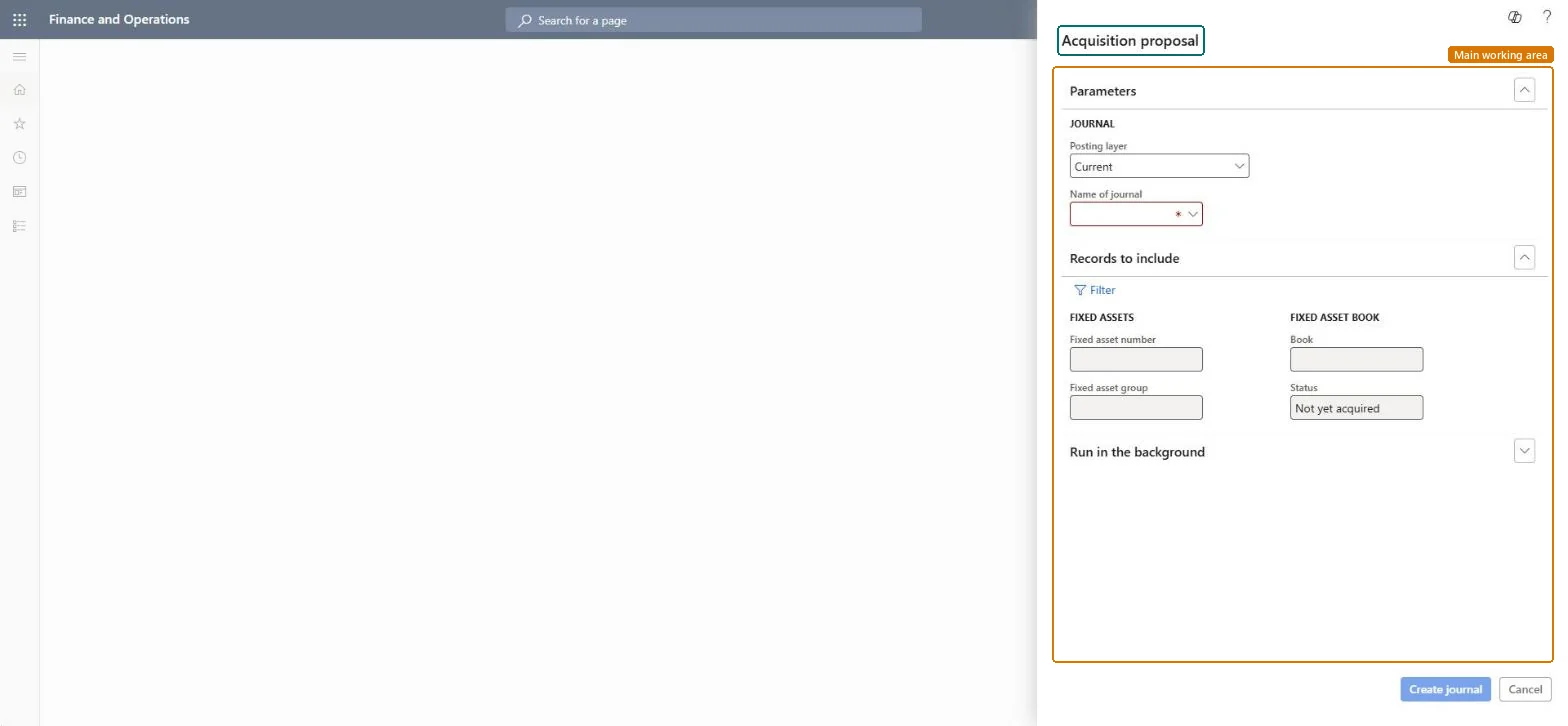
The page in Dynamics 365. page title tab to open what to set or check
About the examples: Examples and screenshots in this guide use BEAT, a demo company in a Dynamics 365 test environment. Use your own company's codes and values instead of copying them.
When to run it
When to run it
When many new assets are set up with an acquisition price on their books and must be acquired in one go, for example after a data migration or a large purchase.
How often
On demand, each time a batch of new assets is ready to be acquired.
Batch settings
Run it in the background for large asset lists. Fixed asset IDs with different separators (such as - or /) need a separate batch run for each separator.
What the output shows
One or more fixed asset acquisition journals with one line per asset book. The number of books per journal follows the Number of books per journal limit in Fixed assets parameters (default at least 10,000 books for acquisitions). A missing asset usually has no acquisition price on its book or a closed book.
Decides which books are proposed, such as Current for books that post to the ledger.Checked in Dynamics 365
Current
Name of journal
The Post fixed assets journal name the acquisition journals are created with. Required.Checked in Dynamics 365
Status (Records to include)
Limits the proposal to books with this status; by default Not yet acquired.Checked in Dynamics 365
Not yet acquired
Common errors and fixes
Message
What to do
An asset isn't proposed
Enter an Acquisition price on the asset book; only books with an acquisition price are proposed. Microsoft Learn
Transfers or splits fail, or several lines share one voucher
Use a journal name with Journal type Post fixed assets that doesn't have the One voucher number only setting; several automated processes, such as transfers and splits, need a unique voucher number. Microsoft Learn
Test checklist
Each selected asset book with an acquisition price has one journal line.
No journal holds more books than the Number of books per journal limit, except to keep one asset in one journal.
Run the proposal in the background for large numbers of assets, one posting layer at a time, and review the journals before posting.The batch distributes asset books over journals up to the Number of books per journal limit; derived books aren't counted.
Fixed assets is part of Dynamics 365 Finance. Fixed asset accountants run the proposal. On this system the roles that open the page include Accounting supervisor, Accountant, Rental manager. No Feature management feature needs to be turned on for this page.
Checked in Dynamics 365
Solution architect
5Design impact
Shared or per company
Per company: the proposal picks up asset books of the current legal entity. Microsoft Learn
Can it be undone
Reversible: Delete the created journals before posting to discard the proposal.
If you change it later
Creates fixed asset acquisition journals; posting them acquires the assets and updates their books and the ledger. Microsoft Learn
Technical architect
6Technical
Menu item
action:AssetMultiJournalAcqProposalChecked in Dynamics 365
Form
DialogChecked in Dynamics 365
Roles to set it up and use it
To use itAccounting supervisor LedgerAccountingSupervisorAccountant LedgerAccountantRental manager RentalManagerGive people one of these roles. On this system, 3 roles can run this page.Checked in Dynamics 365
Load order: The acquisition proposal has no data entity in Data management, so it can't be loaded from a file or a configuration template. The report stores nothing of its own: it reads the posted fixed asset data, so migrate the assets, books and transactions and run it again in the new environment. It creates journals from the books' acquisition prices, so it can be used after a migration to acquire the loaded assets.Microsoft Learn