About the examples: Examples and screenshots in this guide use BEAT, a demo company in a Dynamics 365 test environment. Use your own company's codes and values instead of copying them.
Step by step, with screenshots
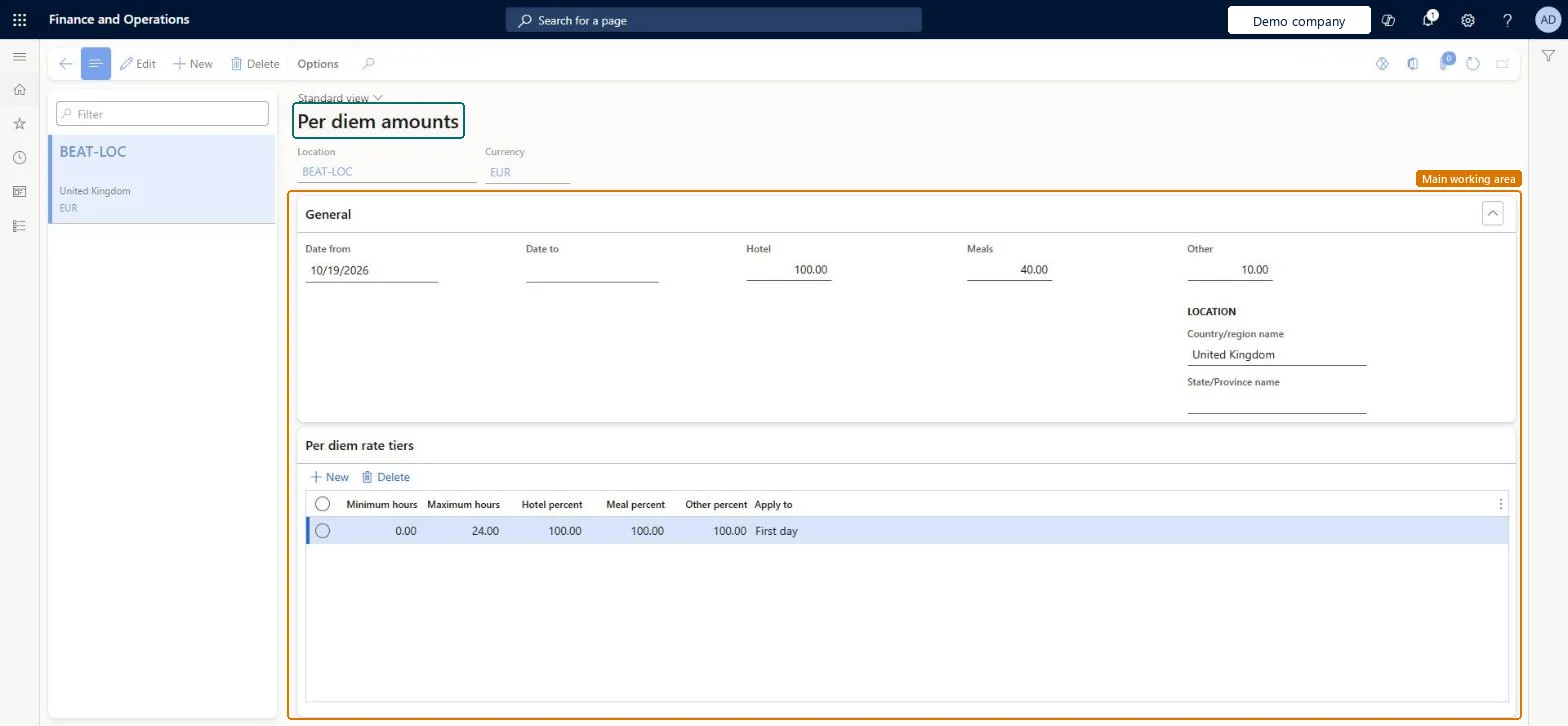
Set up Per diems1 screen
Use this page to set the fixed daily allowance paid to travelling workers instead of their actual costs.
Screen 1
Set a per diem rate for a location
Go to Expense management > Setup > Calculations and codes > Per diems
Make sure the per diem location exists
Select New
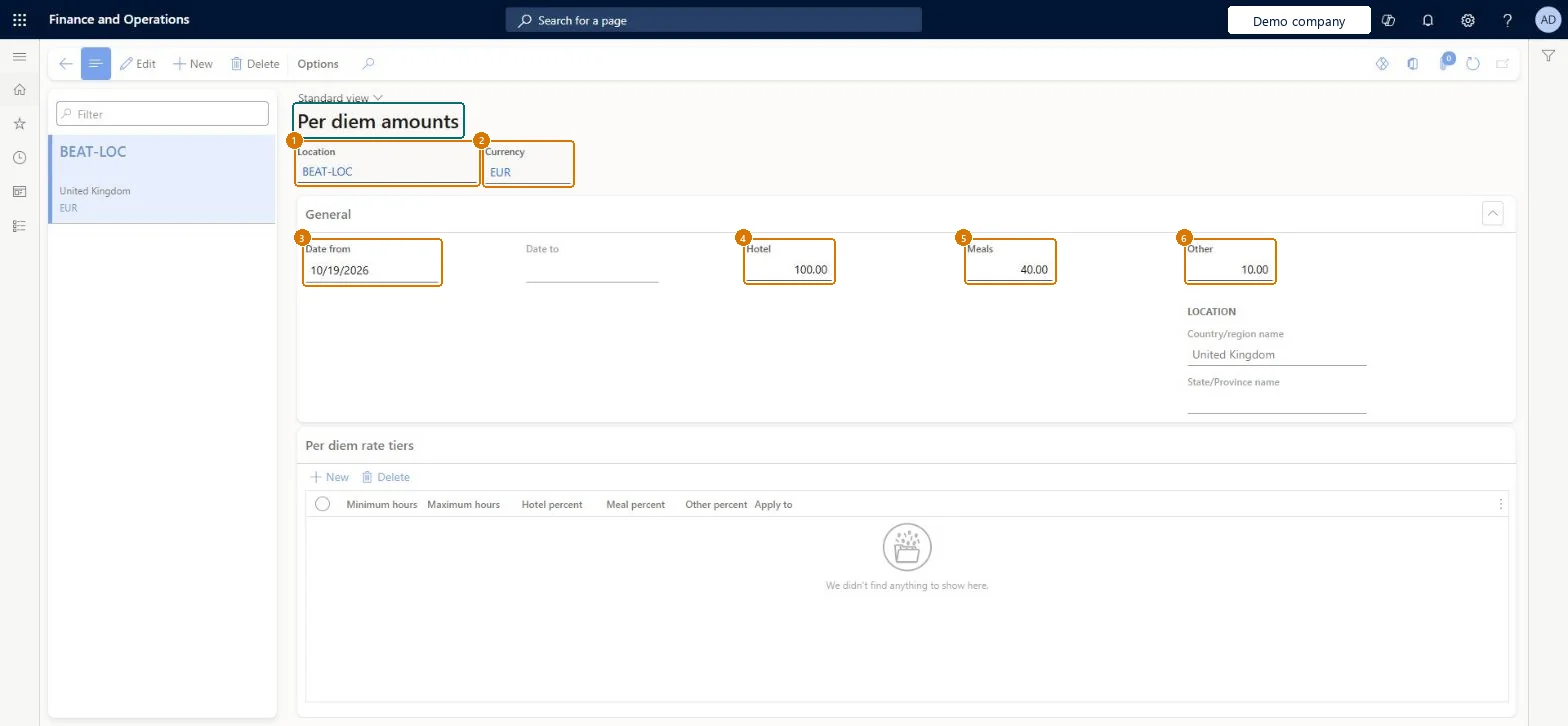
Select the location and the currency
Enter the date the rate starts
Enter the daily amounts for hotel, meals and other costs
Select Save
1Location
BEAT-LOC
2Currency
EUR
3Date from
10/19/2026
4Hotel
100.00
5Meals
40.00
6Other
10.00
Show the full screen page title tab to open what to set or check
Steps from Microsoft
Go to Expense management > Setup > Calculations and codes > Per diems.
Select New.
Select the Location and the Currency.
On the General FastTab, enter the Date from and Date to when the allowance is valid.
Enter the allowances in the Hotel, Meals and Other fields.
A rate per per diem location for Hotel, Meals and Other in the agreed currency, with a new dated row for every rate changeLearn sets per diem rates per location with a currency, valid between a start and end date, so a new row for each rate period keeps older trips on the rate that applied to them.
Reversible: Rates are valid for a date range; add a new row for a rate change rather than overwriting the old one.
If you change it later
Rates are valid from their date, so a new rate applies to per diems in its date range; per diems already entered keep the rate they were calculated with. Microsoft Learn
Technical architect
6Technical
Menu item
TrvPerDiemChecked in Dynamics 365
Form
TrvPerDiemsChecked in Dynamics 365
Table
TrvPerDiemsShown as “Per diems” in Record infoChecked in Dynamics 365
PrivilegesMaintain per diem rates used during expense entry TrvPerDiemMaintainView per diem rates used during expense entry TrvPerDiemViewDutiesMaintain Master entity data for data management DataManagementApplicationMasterEntitiesMaintainView Master entity data for data management DataManagementApplicationMasterEntitiesViewMaintain Reference entity data for data management DataManagementApplicationReferenceEntitiesMaintainView Reference entity data for data management DataManagementApplicationReferenceEntitiesViewEnable expense management process TrvTravelAndExpenseProcessEnableMaintain expense management process TrvTravelAndExpenseProcessMaintainInquire into expense management reference data TrvTravelAndExpenseReferenceDataInquire6 security rolesBusiness Performance Planning app role BPPBudgetPlanningAppRoleData management administrator DataManagementAdministratorData management migration user DataManagementMigrationUserExpense administrator ExpenseAdministratorDemand planning app role ScpDemandPlanningAppRoleInformation technology manager SysServerITManagerChecked in Dynamics 365
Roles to set it up and use it
To set it up or change itExpense administrator ExpenseAdministratorInformation technology manager SysServerITManagerBusiness Performance Planning app role BPPBudgetPlanningAppRoleData management migration user DataManagementMigrationUserDemand planning app role ScpDemandPlanningAppRoleGive people one of these roles. On this system, 6 roles can open this page.Checked in Dynamics 365
Actions on the page
Options: Personalize, Page options, ShareChecked in Dynamics 365
TrvPerDiemsEntity (Per diems): loaded for each company, in Microsoft's default template 600 - Expense.Load order: Microsoft's default template 600 - Expense loads Per diems at execution unit 1, level 40, sequence 10. Lower levels load first, and entities at the same level load in sequence order.Load first: the default templates at lower levels (System setup to dependency bands 30 to 90)Microsoft Learn
Checked in a working Dynamics 365 system, version 10.0.49: the menu item, form, table and security, the page, the demo records and the values in the screenshots.
To cite this step: EM-SETUP-100, Set up Per diems. Beyond ERP Atlas Hub, 2026-11-11. https://www.beyonderp.cloud/atlas/step/EM-SETUP-100