BeyondERP.Newsletter
Menu

Report page · Expense management

Per diem per employee

A report that shows the per diems given to an employee over a period or on a specific expense report.

Business process
Manage time and attendance
Menu item
output:TrvAllowance
Setup steps
1 on this page
Show what matters for
PAGE GUIDEWhat the page does and how to use it8 sections. Choose a role to highlight what matters to you.
Everyone

1What it is and why

What it isA report that shows the per diems given to an employee over a period or on a specific expense report.
What you do hereUse this report to list per diems by date range, expense report and expense category.
ExampleFor example, for a five-day Redmond trip at 150.00 lodging, 75.00 meals and 5.00 incidentals, the daily total is 230.00 and five days come to 1,150.00; with three breakfasts and two lunches provided, the report shows 1,037.50 paid.
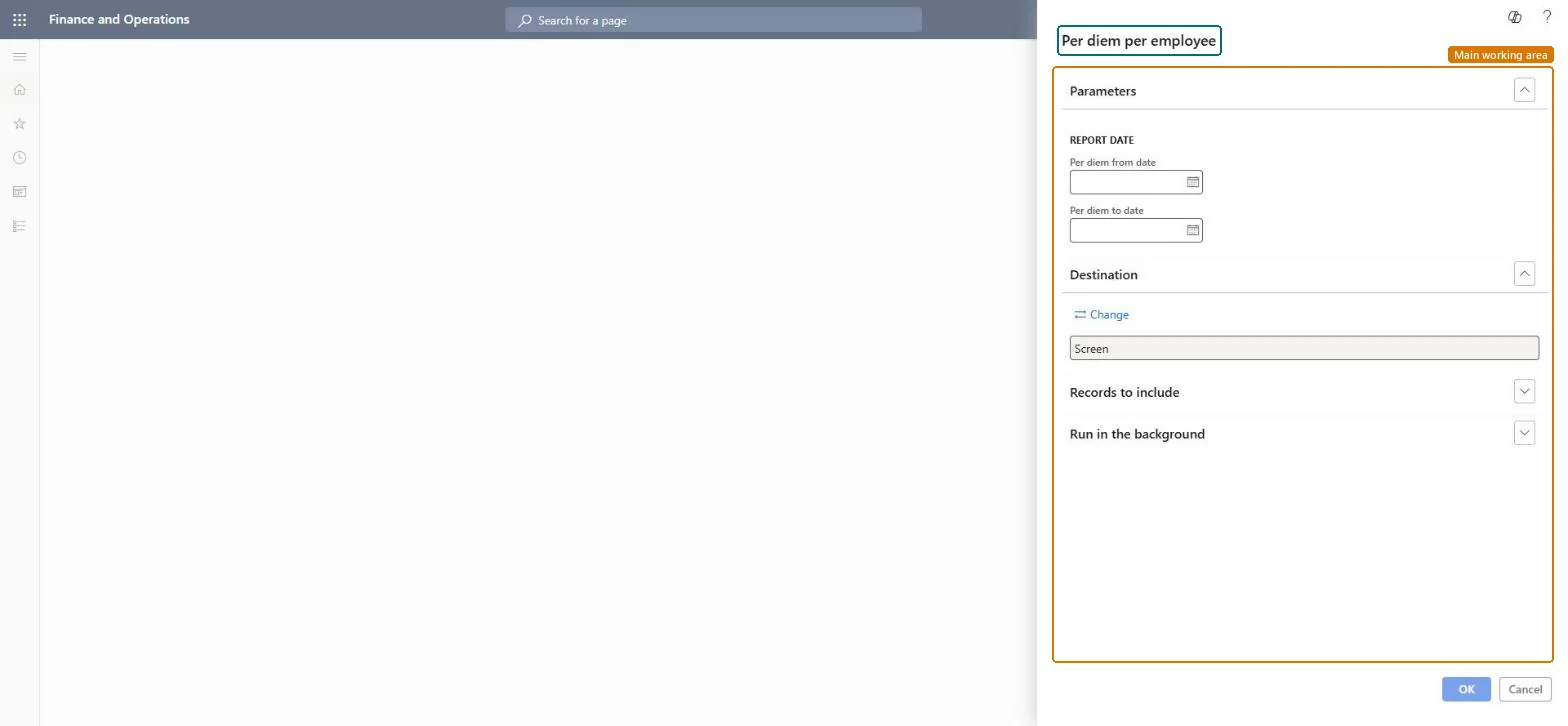
Per diem per employee page in Dynamics 365
The page in Dynamics 365. page title tab to open what to set or check
Functional consultant · Solution architect

2Where it fits

Business processManage time and attendance
Menu pathExpense management › Inquiries and reports › Per diem per employee
Set up firstPer diems Microsoft Learn
Used next byPosted transactions Microsoft Learn
Related pagesPer diem locations Microsoft Learn Expense management parameters (Per diem tab) Microsoft Learn
End user · Functional consultant

3How to do it

About the examples: Examples and screenshots in this guide use BEAT, a demo company in a Dynamics 365 test environment. Use your own company's codes and values instead of copying them.

When to run it

When to run itWhen you review per diem allowances paid to employees, for example in an audit or after changing per diem rates.
How oftenOn demand, for example monthly.
What the output showsPer diems given to employees for the date range or expense report. An amount that is higher than expected usually means meal reductions were not entered for provided meals.

Source: Microsoft Learn

Setup steps on this page

Check per diem payments

Confirm per diems were paid at the right location rate and reduction.

Steps from Microsoft

  1. Go to Expense management > Inquiries and reports > Per diem per employee.
  2. Enter the Per diem from date and Per diem to date of the trips to review.
  3. In Records to include, filter on Expense report number or Expense category.
  4. Run the report and compare the per diem amounts with the location rates and any meal reductions.

Source: Microsoft Learn

Fields on the page

FieldWhat it means
Per diem from dateThe first date of the per diems to show.Microsoft Learn
Per diem to dateThe last date of the per diems to show.Microsoft Learn
Expense report numberThe expense report that includes a per diem.Microsoft Learn
Expense categoryThe expense categories the per diems are assigned to.Microsoft Learn

Common errors and fixes

MessageWhat to do
The report prints no linesRecords to include filters out everything, or the data isn't posted yet. Clear the filters, check the date range, and run it again. Microsoft Learn
The report runs but shows another company's data is missingReports read the current legal entity only. Change company and run the report again. Microsoft Learn

Test checklist

  1. Enter a per diem for five days at a location with rates.
  2. Enter the meals provided.
  3. Run the report for the dates.
  4. Check the per diem amount equals the rate times days minus the meal reduction.

Source: Microsoft Learn

Functional consultant

4Setup decisions

Setup stepRecommended value and whyDecision, common mistake and test
Check per diem paymentsRun it for the period after a rate change and compare with the rates on Per diems.The amount is the daily allowance of the location minus the reduction for provided meals.How is the per diem meal reduction calculated?Missing that provided meals weren't entered, so the full allowance was paid.Test: Per diem matches the rates

Feature management and licence

Licence or add-inIn this system Employee and Contractor enter their own expenses, and Expense administrator sets up the module and processes documents. The expense mobile app needs the Employee role, a company on the user account and a link to an employee with active employment. The expense administrator runs this report; no Feature management feature is needed.

Microsoft Learn

Solution architect

5Design impact

Shared or per companyPer company: the report runs in the legal entity you are signed in to and reads that company's expense data. Microsoft Learn
Can it be undoneNothing to undo: The report only reads per diem data; it changes nothing. Microsoft Learn
If you change it laterPer diem amounts follow the location rates valid on the dates and the meal reduction method in the parameters. Microsoft Learn
Technical architect

6Technical

Menu itemoutput:TrvAllowance Checked in Dynamics 365
FormSysOperationTemplateForm Checked in Dynamics 365
Roles to set it up and use itTo use itExpense administrator ExpenseAdministratorGive people one of these roles. On this system, 1 role can run this page.Checked in Dynamics 365
Developer

7Developer

Open it by URLhttps://<your-environment>/?mi=output:TrvAllowance
Data migrationLoad order: The report has no data entity in Data management, so it can't be loaded from a file or a configuration template. It reads posted or entered expense data and prints it; nothing on it is loaded or migrated. Run it in each environment after the data is there.Microsoft Learn
Everyone

8Sources