Purchasing agent, Purchasing Agent - Public Sector, Vendor account manager and 42 more roles
Business process
Administer system features
Menu item
smmActivitiesListPage
Main table
smmActivities
Data entity
smmActivitiesEntity
Setup steps
1 on this page
Show what matters for
SETUP GUIDEHow to set it up8 sections. Choose a role to highlight what matters to you.
Everyone
1What it is and why
What it is
A list page of all activities (such as appointments, tasks, events and actions), open or closed, assigned to you or to other employees.
What you do here
Use this page to create, view and update activities and to close or reopen them.
Example
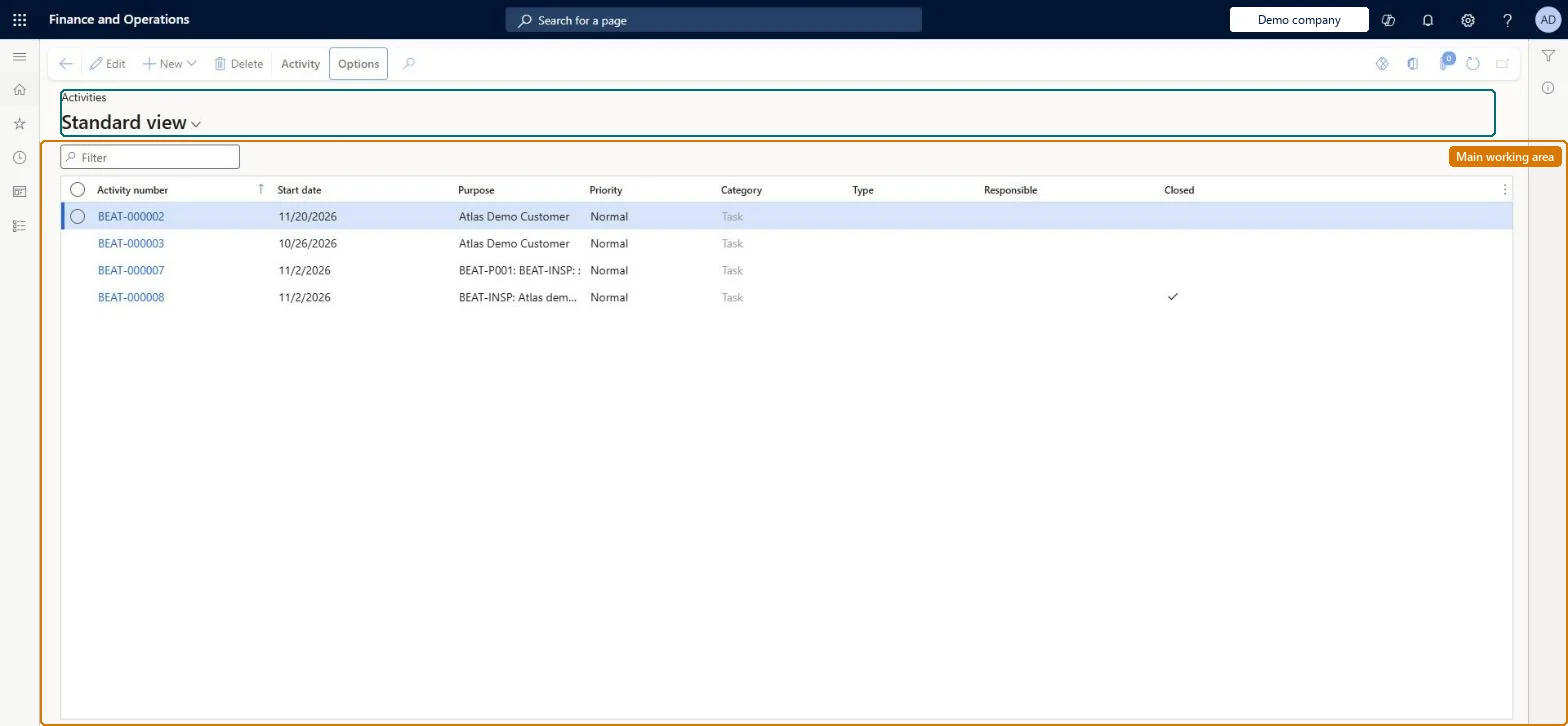
For example, BEAT's sales manager opens All activities and finds 4 tasks: BEAT-000002 starting 11/20/2026, BEAT-000003 from 10/26/2026, and BEAT-000007 and BEAT-000008 from 11/2/2026, of which BEAT-000008 is already closed.
The page in Dynamics 365. page title tab to open what to set or check
About the examples: Examples and screenshots in this guide use BEAT, a demo company in a Dynamics 365 test environment. Use your own company's codes and values instead of copying them.
Setup steps on this page
Use the All activities list
See every activity in the company, open or closed, for anyone.
Steps from Microsoft
Go to Common > Common > Activities > All activities.
Use All activities to see every appointment, task, event and action, open or closed, whoever it is assigned to.
Filter on Responsible or Category; for only your own work, use My activities instead.
Open an activity and check its Associations tab for the record it relates to.
Filter on Closed and Responsible firstThe list mixes open and closed activities of everyone, so the open work of one person is hidden without a filter.
On the live system, these roles can open the page: CAPA updater, CAPA administrator, Field service technician, Customer service representative, Sales representative, Customer service manager and 4 more.
Checked in Dynamics 365
Solution architect
5Design impact
Shared or per company
Per company: activities are kept in the legal entity where they are created (the Activities entity is not shared). Checked in Dynamics 365
Can it be undone
Reversible: The list changes no data; closed activities can be reopened.
If you change it later
Closing an activity marks it as done; activities created by a case close when the case is closed. Microsoft Learn
Technical architect
6Technical
Menu item
smmActivitiesListPageChecked in Dynamics 365
Form
smmActivitiesChecked in Dynamics 365
Table
smmActivitiesShown as “ACTIVITIES” in Record infoKey field: ActivityNumberChecked in Dynamics 365
Data entities
smmActivitiesEntityActivities Microsoft data model smmActivityParentLinkEntityActivity parent links (only the links between activities and their parent records)
Who can open it
PrivilegesMaintain activity details ActivitiesMainBasicMaintainView activity details ActivitiesMainBasicViewMaintain audit policy cases AuditPolicyCaseDetailMaintainMaintain compliance audit policy cases AuditPolicyCaseMaintainView my activities smmActivitiesListPage_MyActivitieViewView my activities due this week smmActivitiesListPage_MyDueThisWeViewMaintain my open activities smmActivitiesListPage_MyOpenMaintainView my open activities smmActivitiesListPage_MyOpenViewMaintain my activities past due smmActivitiesListPage_MyPastDueMaintainView my activities past due smmActivitiesListPage_MyPastDueViewDutiesMaintain audit policies AuditPolicyMaintainEnable case management CaseCaseManagementEnableInquire into case progress CaseCaseProgressInquireMaintain cases CaseCasesMaintainInquire into employee case progress CaseEmployeeCaseProgressInquireMaintain employee cases CaseEmployeeCasesMaintainInquire into inventory case progress CaseInventoryCaseProgressInquireMaintain inventory cases CaseInventoryCasesMaintainInquire into production case progress CaseProductionCaseProgressInquireMaintain production cases CaseProductionCasesMaintainInquire into project case progress CaseProjectCaseProgressInquireMaintain project cases CaseProjectCasesMaintainInquire into purchasing case progress CasePurchasingCaseProgressInquireMaintain purchasing cases CasePurchasingCasesMaintainInquire into sales case progress CaseSalesCaseProgressInquireMaintain sales cases CaseSalesCasesMaintainInquire into service case progress CaseServiceCaseProgressInquireMaintain service cases CaseServiceCasesMaintainInquire into collections status CollectionLetterCollectionsStatusInquirMaintain collections transactions CollectionLetterCollectionsTransMaintaiMaintain project master ProjProjectMasterMaintainMaintain non-conformance cases QMSCaseNonConformanceCasesMaintainMaintain quality order cases QMSCaseQualityCasesMaintainMaintain quarantine order cases QMSCaseQuarantineCasesMaintainInquire into leads and opportunities RentalsmmLeadsAndOpportunitiesInquireMaintain activities smmActivitiesMaintainInquire into activities smmActivityInquireInquire into campaign progress smmCampaignProgressInquireMaintain campaigns smmCampaignsMaintainInquire into leads and opportunities smmLeadsAndOpportunitiesInquireMaintain leads and opportunities smmLeadsAndOpportunititiesMaintainMaintain telemarketing smmTelemarketingMaintainInquire into telemarketing progress smmTelemarketingProgressInquire47 security rolesAuditor AuditPolicyManagerProduct designer BOMProductDesignerProduct design manager BOMProductDesignManagerCaseCategorySetupTestRoleCollections agent CollectionLetterCollectionsAgentCollections manager CollectionLetterCollectionsManagerMarketing coordinator CRMMarketingCoordinatorMarketing manager CRMMarketingManagerAccounts receivable manager CustInvoiceAccountsReceivableManagerField Service Integration User FieldServiceIntegrationUserCompensation and benefits manager HcmCompensationAndBenefitsManagerHuman resource assistant HcmHumanResourceAssistantHuman resource manager HcmHumanResourceManagerMaterials manager InventMaterialsManagerQuality control clerk InventQualityControlClerkQuality control manager InventQualityControlManagerReceiving clerk InventReceivingClerkAccountant LedgerAccountantAccounting manager LedgerAccountingManagerFinancial controller LedgerFinancialControllerMCRTestUserRoleProduction manager ProdProductionManagerProduction supervisor ProdProductionSupervisorProject accountant ProjProjectAccountantProject manager ProjProjectManagerCAPA administrator QMSCAPAAdministratorCAPA updater QMSCAPAUpdaterRental coordinator agent RentalCoordinatorAgentRental manager RentalManagerRental representative RentalRepresentativeProduction planner ReqProductionPlannerProcess engineer RouteProcessEngineerProcess engineering manager RouteProcessEngineeringManagerService dispatcher SMADispatcherField service technician SMAFieldServiceTechnicianService delivery manager SMAServiceDeliveryManagerBuying agent TradeBuyingAgentCustomer service manager TradeCustomerServiceManagerCustomer service representative TradeCustomerServiceRepresentativePurchasing manager TradePurchasingManagerSales clerk TradeSalesClerkSales manager TradeSalesManagerSales representative TradeSalesRepresentativePurchasing agent VendPurchasingAgentPurchasing Agent - Public Sector VendPurchasingAgent_PSNVendor account manager VendVendorAccountManagerWarehouse manager WMSWarehouseManagerChecked in Dynamics 365
Roles to set it up and use it
To set it up or change itCAPA updater QMSCAPAUpdaterCAPA administrator QMSCAPAAdministratorField service technician SMAFieldServiceTechnicianCustomer service representative TradeCustomerServiceRepresentativeSales representative TradeSalesRepresentativeTo use itCustomer service manager TradeCustomerServiceManagerProject manager ProjProjectManagerCollections manager CollectionLetterCollectionsManagerHuman resource manager HcmHumanResourceManagerVendor account manager VendVendorAccountManagerGive people one of these roles. On this system, 45 roles can open this page.Checked in Dynamics 365
Actions on the page
Activity(Action Pane without tabs): New, DeleteChecked in Dynamics 365
smmActivitiesEntity (Activities): loaded for each company.smmActivityParentLinkEntity (Activity parent links): loaded for each company.Load order: Load activity types first, then open activities, then their parent links. Closed activities are usually kept in the old system.Load first: activity types, workers, the parent records (customers, cases)Checked in Dynamics 365