Inventory accountant, Inventory accountant clerk, Accounting manager and 2 more roles
Business process
Define costing policies
Menu item
CostProdParameters
Main table
ProdParameters
Data entity
ProdProductionControlParametersEntity
Setup steps
1 on this page
Show what matters for
SETUP GUIDEHow to set it up8 sections. Choose a role to highlight what matters to you.
Everyone
1What it is and why
What it is
A setup page where you set the manufacturing accounting parameters for production, such as ledger posting of picking lists and reports as finished, production costing and the scrap method.
What you do here
Use this page to control how production transactions post to the general ledger and how production costs and error quantities are handled.
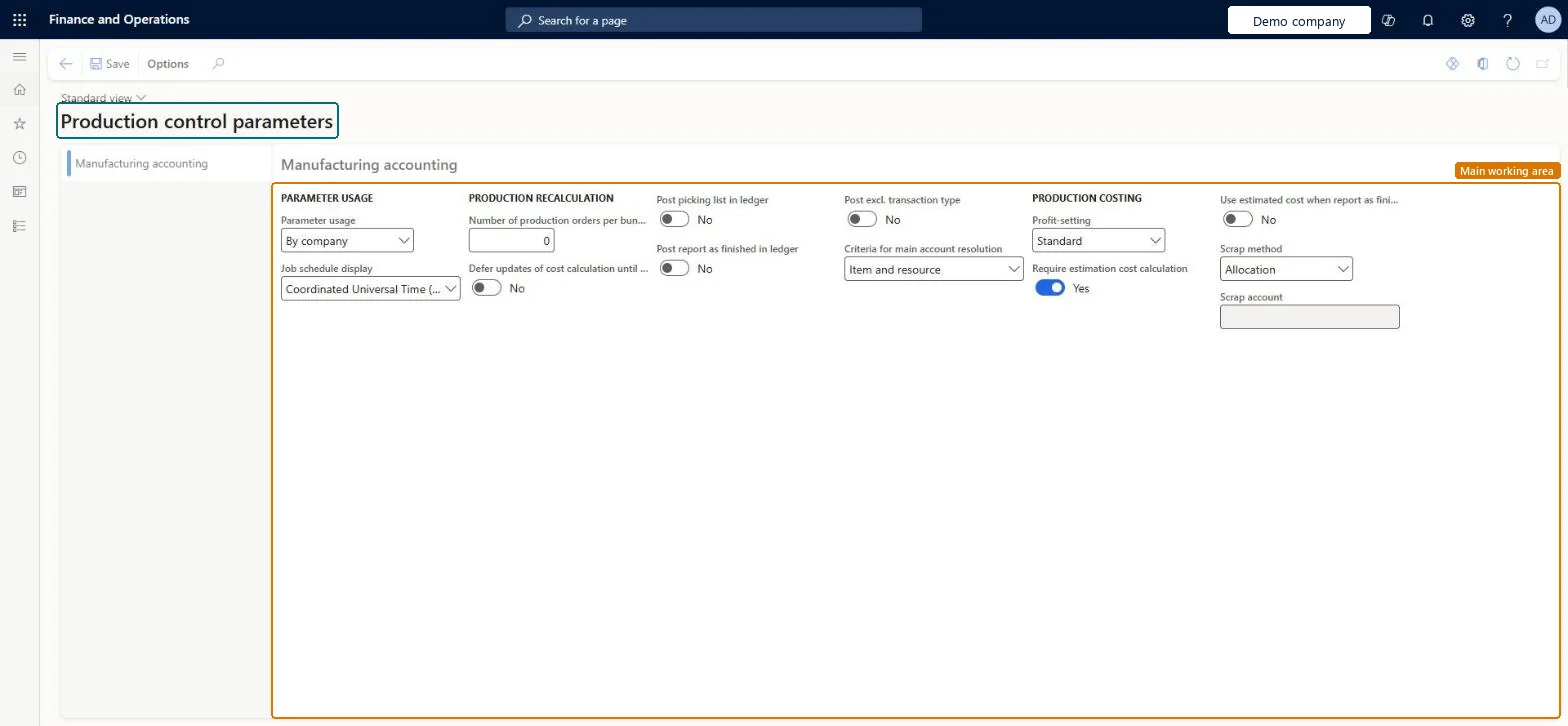
The page in Dynamics 365. page title tab to open what to set or check
About the examples: Examples and screenshots in this guide use BEAT, a demo company in a Dynamics 365 test environment. Use your own company's codes and values instead of copying them.
Setup steps on this page
Set up Parameters
Use this page to control how production transactions post to the general ledger and how production costs and error quantities are handled.
How to use it
Go to Cost management > Manufacturing accounting policies setup > Parameters.
In the Parameter usage field, select how the parameters are applied, such as By company.
Set Post picking list in ledger and Post report as finished in ledger to control ledger posting for these journals.
In the Production costing section, select the Profit-setting and set Require estimation cost calculation.
In the Scrap method field, select the method, and select a Scrap account if one is required.
Select Save.
Source: Checked in Dynamics 365
Fields on the page
Field
What it means
Table column
Post picking list in ledger
When selected, picking list journals for production orders post the value of materials in process to the general ledger. The setting can be overridden for a specific site.Microsoft Learn
PostPickList
Post report as finished in ledger
When selected, report as finished journals for production orders post to the general ledger. The setting can be overridden for a specific site.Microsoft Learn
PostReportedFinished
Scrap method
Specifies whether the value of error quantities is allocated to the good quantities reported as finished or posted to a dedicated scrap account.Microsoft Learn
CostingScrapMethod
Scrap account
The main account where the scrap for error quantities is posted when the production order is ended.Microsoft Learn
Test checklist
Set Post picking list in ledger and Post report as finished in ledger to Yes
Post a picking list journal for a production order and check the Estimated cost of materials consumed, WIP voucher
Report the order as finished with an error quantity and end it
Check the error quantity value posts to the scrap account
Post picking list in ledger and Post report as finished in ledger = Yes when WIP is accounted for; Scrap method = Scrap account with a production scrap expense accountLearn describes these options as what makes picking lists and reports as finished post WIP vouchers, and shows Scrap account with an expense account such as Production Scrap to post error quantities separately.
Selecting Post picking list in ledger but not Post physical inventory on the item model group, or leaving the Estimated cost of materials consumed accounts empty: then no WIP voucher is posted.
Reversible: The settings can be changed and overridden per site; they apply to journals posted afterwards.
Technical architect
6Technical
Menu item
CostProdParametersChecked in Dynamics 365
Form
ProdParametersChecked in Dynamics 365
Table
ProdParametersShown as “PRODUCTION PARAMETERS” in Record infoChecked in Dynamics 365
Data entities
ProdProductionControlParametersEntityProduction control parameters Microsoft data model
Who can open it
PrivilegesMaintain costing parameters CostParametersMaintainView costing parameters CostParametersViewMaintain production parameters ProdParametersMaintainView production parameters ProdParametersViewDutiesInquire into costing policies CostPoliciesInquireMaintain costing policies CostPoliciesMaintainInquire into production policies ProdProductionPoliciesInquireEnable production process ProdProductionProcessEnable5 security rolesInventory accountant InventCostAccountantInventory accountant clerk InventCostCostClerkAccounting manager LedgerAccountingManagerProduction manager ProdProductionManagerProcess engineering manager RouteProcessEngineeringManagerChecked in Dynamics 365
Roles to set it up and use it
To set it up or change itAccounting manager LedgerAccountingManagerProduction manager ProdProductionManagerProcess engineering manager RouteProcessEngineeringManagerTo use itInventory accountant InventCostAccountantInventory accountant clerk InventCostCostClerkGive people one of these roles. On this system, 5 roles can open this page.Checked in Dynamics 365
ProdProductionControlParametersEntity (Production control parameters): loaded for each company, in Microsoft's default template 410 - Production control.Load order: Microsoft's default template 410 - Production control loads Production control parameters at execution unit 1, level 410, sequence 70. Lower levels load first, and entities at the same level load in sequence order.Load first: the default templates at lower levels (System setup to Transportation management)Microsoft Learn