Accounts payable clerk, Accounts payable manager, Auditor and 13 more roles
Business process
Use netting agreements to settle customer balances with vendor balances in Dynamics 365 Finance
Menu item
CustVendNettingOverview
Main table
CustVendNettingBalanceTmp
Setup steps
1 on this page
Show what matters for
SETUP GUIDEHow to set it up8 sections. Choose a role to highlight what matters to you.
Everyone
1What it is and why
What it is
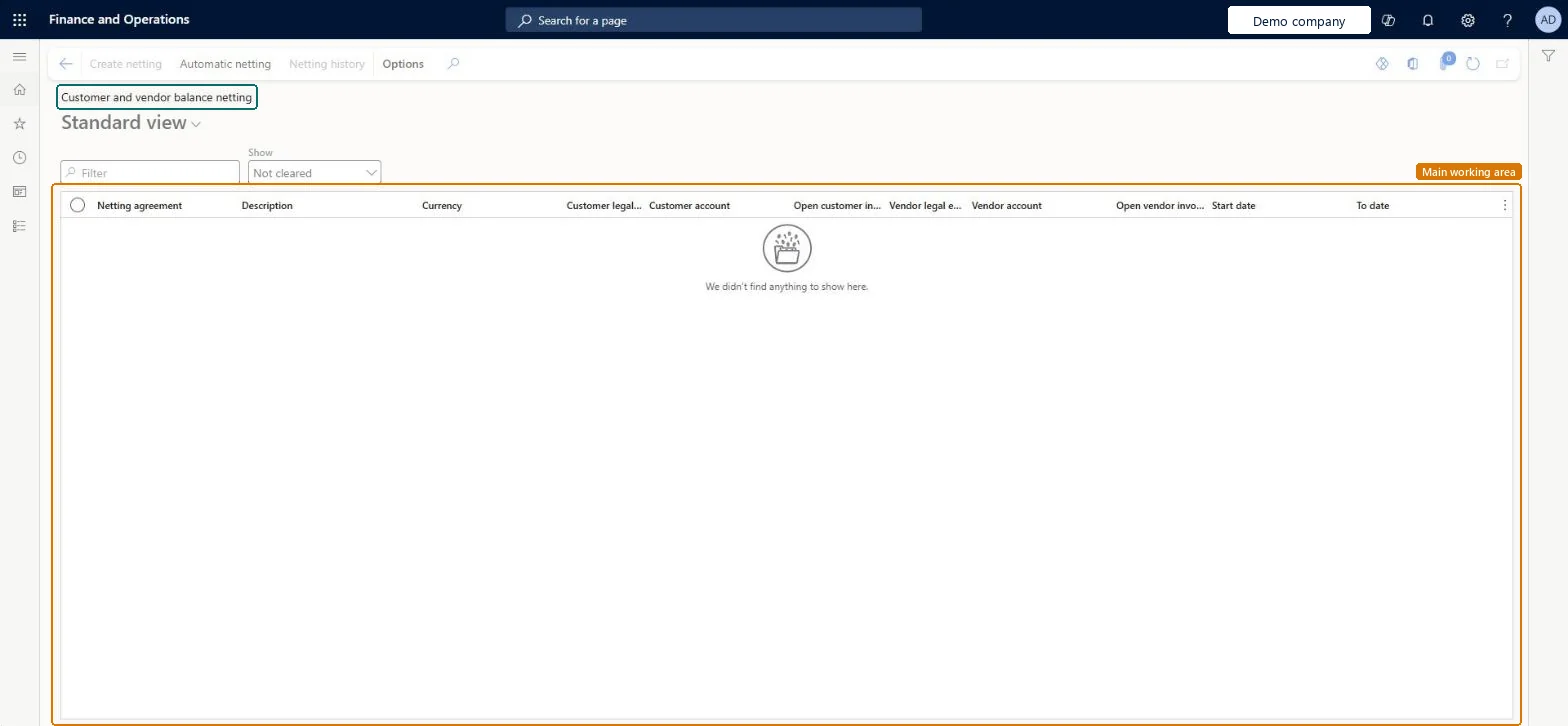
A page that lists all the customer and vendor account pairs that are available for netting.
What you do here
Use this page to net open customer and vendor invoices for the same party, start automatic netting, and view or reverse netting history.
Example
For example, in BEAT the customer BEAT-000001 owed 100.00 USD on one invoice and the company owed the same party 100.00 USD as vendor BEAT-000001. Create netting under agreement BEAT-NET posted journal batch BEAT-000008 with two vouchers, and both open balances showed 0.00 afterwards.
The page in Dynamics 365. page title tab to open what to set or check
About the examples: Examples and screenshots in this guide use BEAT, a demo company in a Dynamics 365 test environment. Use your own company's codes and values instead of copying them.
Setup steps on this page
Net customer and vendor balances by hand
Use this page to net the open invoices of a customer and vendor pair before the payment run, so only the remaining amount is paid or collected.
Steps from Microsoft
Go to Cash and bank management > Netting > Customer and vendor balance netting. The page lists every customer and vendor pair of an active netting agreement with its open balances.
Select the pair you want to net, then select Create netting.
Mark the open customer invoices and open vendor invoices to net. The netting amount is the smaller of the two marked balances.
Select Post. A netting journal with two lines posts: one line settles the marked customer invoices, the other settles the marked vendor invoices.
Open Netting history, select the netting, and select Print netting advice to send the customer or vendor a notice of the netting.
The customer side of the netting pair, taken from the active netting agreement.Microsoft Learn
BEAT-000001
Vendor account
The vendor side of the netting pair, from the same agreement.Microsoft Learn
BEAT-000001
Netting amount
The smaller of the marked customer invoice balance and the marked vendor invoice balance; this amount is settled on both sides.Microsoft Learn
100.00
Common errors and fixes
Message
What to do
The customer and vendor pair doesn't appear on Customer and vendor balance netting
The netting agreement must be activated, and its effective period must cover today. Activate the agreement and check its dates. Microsoft Learn
An invoice you expected to net isn't offered for netting
Transactions already included in a payment journal aren't part of netting. Run netting before you create the payment journal, and use Accounts payable > Periodic tasks > All marked transaction details to see which transactions are already marked for settlement. Microsoft Learn
Test checklist
Post a 100.00 customer invoice and a 100.00 vendor invoice for a pair in an active netting agreement.
On this page, select the pair, select Create netting, mark both invoices and select Post.
Open Netting history and check one netting with status Posted, one customer line of -100.00 and one vendor line of +100.00.
Check that the customer and the vendor both show an open balance of 0.00, and that the bridging account has a debit and a credit of 100.00.
Net before each payment run: select the pair, mark the invoices on both sides and post, then create the payment journal for what stays open.Learn designs netting to run before a payment journal is created; transactions already in a payment journal aren't netted.
The netting journal takes its vouchers from the voucher series on the journal name of the Customer and vendor netting type. In BEAT the journal name BEAT-NET uses voucher series Acco_116. Checked in Dynamics 365
Feature management and licence
Feature to turn on
Customer and vendor netting (Generally available in 10.0.40; on by default from 10.0.43)
Licence or add-in
In this system 16 roles can open this page, among them Auditor, Collections agent, Collections manager and Chief financial officer.
Per company: the pairs come from the netting agreements of the legal entity you work in. For an intercompany agreement, each posting creates two vouchers in the legal entity that holds the agreement and one in the counterparty legal entity. Microsoft Learn
Can it be undone
Reversible: Reverse netting on Netting history unsettles both sides and reverses the netting journal.
If you change it later
Invoices already included in a payment journal can't be netted, so run netting before you create the payment journal. Microsoft Learn
Technical architect
6Technical
Menu item
CustVendNettingOverviewChecked in Dynamics 365
Form
CustVendNettingOverviewChecked in Dynamics 365
Table
CustVendNettingBalanceTmpShown as “Netting balance working table” in Record infoChecked in Dynamics 365
Who can open it
PrivilegesView customer and vendor netting CustVendNettingTransViewDutiesInquire into invoice and cash policies CustInvoiceInvoiceAndCashPoliciesInquirInquire into customer payments status PaymCustomerPaymentsStatusInquireInquire into vendor payment status PaymVendorPaymentStatusInquireInquire into invoice and payment policies VendInvoiceInvoicePaymentPoliciesInquir16 security rolesAuditor AuditPolicyManagerCollections agent CollectionLetterCollectionsAgentCollections manager CollectionLetterCollectionsManagerChief financial officer CompanyChiefFinancialOfficerAccounts receivable clerk CustInvoiceAccountsReceivableClerkAccounts receivable manager CustInvoiceAccountsReceivableManagerAccountant LedgerAccountantAccounting manager LedgerAccountingManagerAccounting supervisor LedgerAccountingSupervisorFinancial controller LedgerFinancialControllerAccounts payable centralized payments clerk PaymAccountsPayableCentralPaymClerkAccounts payable payments clerk PaymAccountsPayablePaymentsClerkAccounts receivable centralized payments clerk PaymAccountsReceivableCentralPaymClerkAccounts receivable payments clerk PaymAccountsReceivablePaymentsClerkAccounts payable clerk VendInvoiceAccountsPayableClerkAccounts payable manager VendInvoiceAccountsPayableManagerChecked in Dynamics 365
Roles to set it up and use it
To use itChief financial officer CompanyChiefFinancialOfficerAccounting manager LedgerAccountingManagerFinancial controller LedgerFinancialControllerAccountant LedgerAccountantAccounting supervisor LedgerAccountingSupervisorGive people one of these roles. On this system, 16 roles can open this page.Checked in Dynamics 365
Actions on the page
Buttons: Create netting, Automatic netting, Netting historyChecked in Dynamics 365
Load order: Customer and vendor balance netting has no data entity in Data management, so it can't be loaded from a file or a configuration template. The page posts netting journals from open invoices. Load the netting agreements (CustVendNettingAgreementEntity and CustVendNettingPairEntity) and the open invoices, then net in the new environment.Microsoft Learn
Checked in a working Dynamics 365 system, version 10.0.49: the menu item, form, table and security, the page.
To cite this step: CB-NET-010, Net customer and vendor balances by hand. Beyond ERP Atlas Hub, 2026-11-11. https://www.beyonderp.cloud/atlas/step/CB-NET-010