Cash and bank managementInquiries and reportsBank accounts
BankLedgerBalanceControl
Business process
Track cash position
Menu item
BankLedgerBalanceControl
Setup steps
1 on this page
Show what matters for
SETUP GUIDEHow to set it up8 sections. Choose a role to highlight what matters to you.
Everyone
1What it is and why
What it is
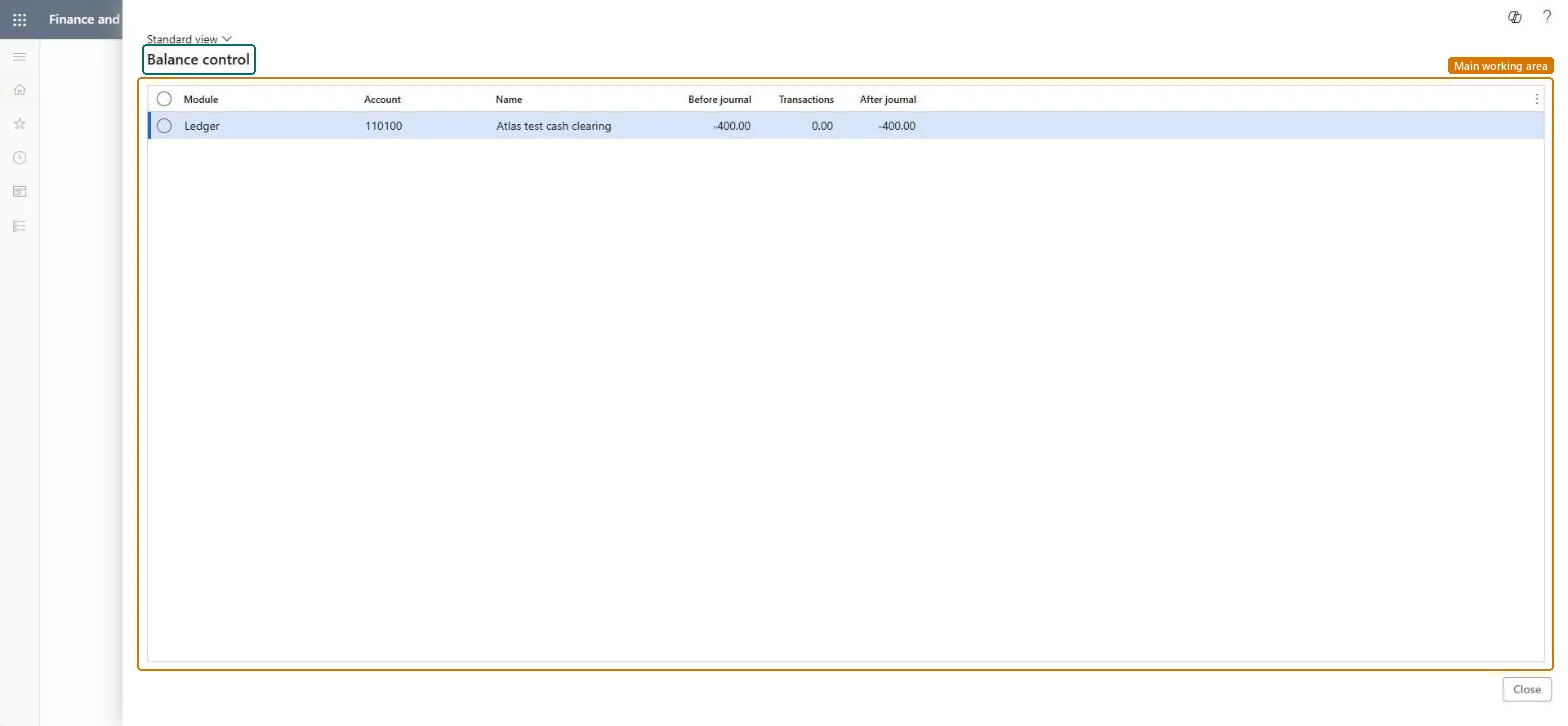
An inquiry that shows, for each bank or other balance control account, the balance before a journal, the journal's transactions and the balance after the journal.
What you do here
Use it to see whether a bank account will still have enough money once the open journals are posted, for example before a payment run.
Example
For example, before the treasurer of BEAT posts a vendor payment journal of 48,500.00 from the operating bank account, Balance control shows 120,000.00 before the journal, -48,500.00 in transactions and 71,500.00 after it, so the run can go ahead.
The page in Dynamics 365. page title tab to open what to set or check
About the examples: Examples and screenshots in this guide use BEAT, a demo company in a Dynamics 365 test environment. Use your own company's codes and values instead of copying them.
Setup steps on this page
Use Balance control before payment runs
Use Balance control to see the expected bank balance after open journals are posted.
Steps from Microsoft
Go to Cash and bank management > Inquiries and reports > Bank accounts > Balance control.
Find the bank account in the Account column; bank accounts set up in Cash and bank management are always balance control accounts.
Read Before journal, the posted balance, and Transactions, the amount the open journal lines will post to the account.
Check After journal: if it is below the amount you must keep in the account, change or hold the payment journal before posting it.
For petty cash or other liquidity main accounts to show here, add them first on Balance control accounts in General ledger.
Where the balance control account comes from, such as Bank for a bank account.Checked in Dynamics 365
Bank
Account
The bank account or main account whose balance is controlled.Microsoft Learn
OPERATING
Name
The name of the account.Checked in Dynamics 365
Operating account
Before journal
The balance of the account before the journal is posted.Microsoft Learn
120,000.00
Transactions
The total the journal lines will post to the account.Microsoft Learn
-48,500.00
After journal
The expected balance once the journal is posted: the balance before the journal plus the transactions.Microsoft Learn
71,500.00
Common errors and fixes
Message
What to do
A petty cash account isn't listed
Only bank accounts are balance control accounts by default. Add the petty cash main account on General ledger > Chart of accounts > Accounts > Balance control accounts. Microsoft Learn
After journal looks too high because a payment journal isn't counted
The expected balance includes posted and unposted journals. Check that the payment lines use the bank account (or its main account) you are looking at. Microsoft Learn
Test checklist
Note the posted balance of one bank account on the Bank accounts page.
Create a vendor payment journal with one line of 1,000.00 paid from that bank account, without posting it.
Open Balance control and check that Before journal equals the posted balance and Transactions shows -1,000.00.
Check that After journal equals Before journal minus 1,000.00.
Look up the paying bank account's After journal amount before posting each vendor payment journal; add petty cash main accounts to Balance control accounts if they should be controlled too.The expected balance includes posted and unposted journals, so it shows whether the money in the account covers the payments before they are posted.
Per company: balance control accounts are kept per legal entity (the Balance control accounts entity is company-specific in Data management), so the inquiry shows the accounts of the company you are in. Checked in Dynamics 365
Can it be undone
Reversible: The inquiry changes no data.
If you change it later
The inquiry reads posted balances and open journals; it posts nothing. Bank accounts are balance control accounts by default; any other liquidity main account appears only after it is added on Balance control accounts. Microsoft Learn
Technical architect
6Technical
Menu item
BankLedgerBalanceControlChecked in Dynamics 365
Form
LedgerBalanceControlChecked in Dynamics 365
Roles to set it up and use it
To use itTreasurer PaymTreasurerChief financial officer CompanyChiefFinancialOfficerAccounting manager LedgerAccountingManagerFinancial controller LedgerFinancialControllerAccountant LedgerAccountantGive people one of these roles. On this system, 11 roles can open this page.Checked in Dynamics 365
Load order: Balance control (an inquiry) has no data entity in Data management, so it can't be loaded from a file or a configuration template. It shows balances calculated from posted transactions and open journals, so there is nothing to migrate. The balance control accounts behind it can be loaded with the Balance control accounts entity (LedgerBalanceControlEntity) in General ledger.Microsoft Learn
Checked in a working Dynamics 365 system, version 10.0.49: the menu item, form, table and security, the page.
To cite this step: CB-INQ-410, Use Balance control before payment runs. Beyond ERP Atlas Hub, 2026-11-11. https://www.beyonderp.cloud/atlas/step/CB-INQ-410