Accounts payable manager, Auditor, Chief executive officer and 11 more roles
Business process
Manage bills of exchange
Menu item
BankRemittance
Main table
BankAccountTable
Data entity
None for this page's own settings
Setup steps
1 on this page
Show what matters for
SETUP GUIDEHow to set it up8 sections. Choose a role to highlight what matters to you.
Everyone
1What it is and why
What it is
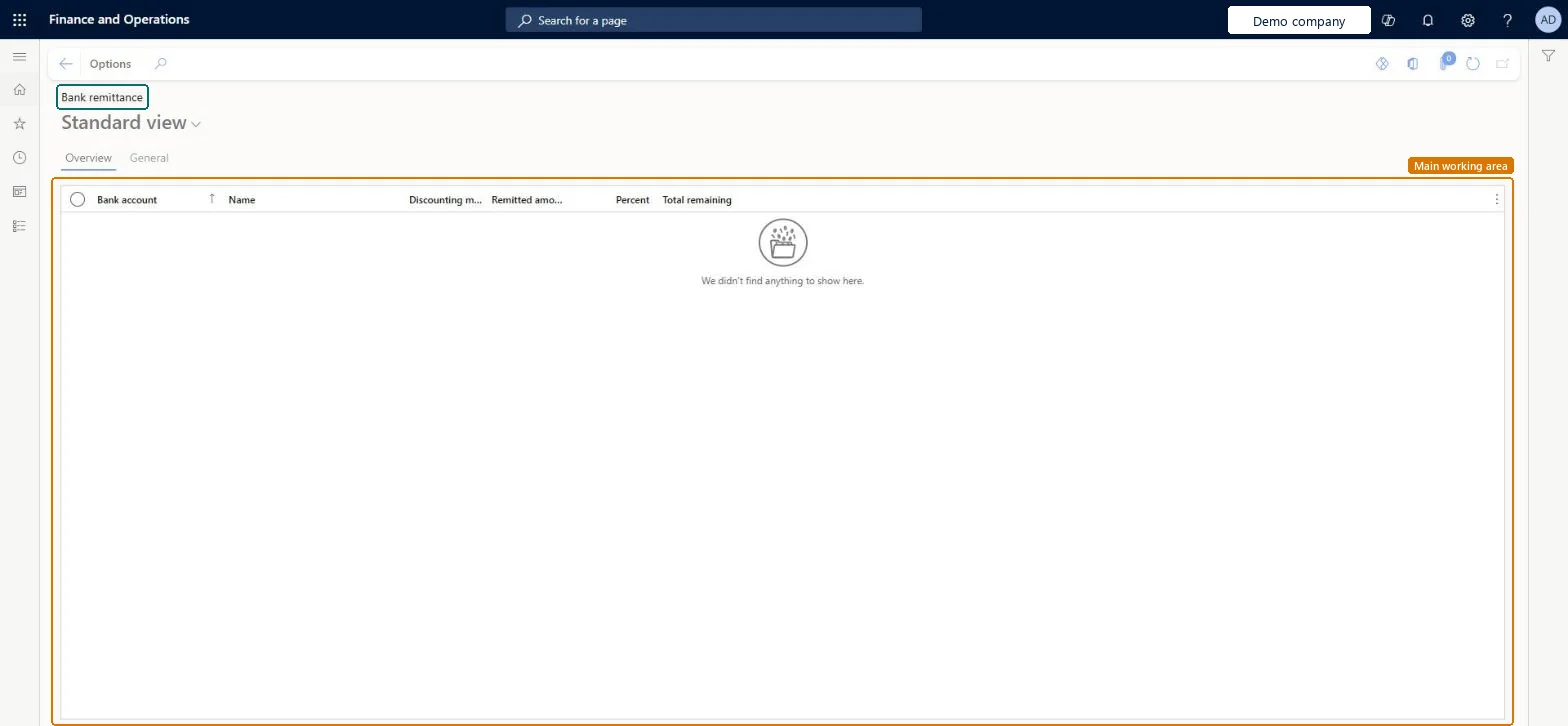
An inquiry over the company bank accounts for bill of exchange remittance, with the discounting method, remitted amount, percent and total remaining per bank account.
What you do here
Use this page to see, per bank account, the bills of exchange the company has remitted to its banks, before you remit more bills for collection or for discount.
Example
For example, before remitting 40,000.00 of customer bills for discount, the treasurer opens Bank remittance to see what is already remitted to each bank and picks the bank account for the new remittance journal.
The page in Dynamics 365. page title tab to open what to set or check
About the examples: Examples and screenshots in this guide use BEAT, a demo company in a Dynamics 365 test environment. Use your own company's codes and values instead of copying them.
Setup steps on this page
Check remittances per bank before remitting bills
Review the bills of exchange already remitted to each bank account before a new remittance.
Steps from Microsoft
Go to Cash and bank management > Inquiries and reports > Bank remittance.
On the Overview tab, read the Bank account, Name, Discounting method, Remitted amount, Percent and Total remaining columns.
Open the General tab for the details of the selected bank account.
Use what you read to choose the bank account in the Remittance journal in Accounts receivable, where bills are remitted for collection or for discount.
The company bank account the bills of exchange are remitted to.Checked in Dynamics 365
Name
The name of the company bank account.Checked in Dynamics 365
Common errors and fixes
Message
What to do
The Generate remittance process doesn't create a remittance number
On the bill of exchange method of payment in Accounts receivable, select Payment specification and enter Remittance in the Payment specification parameter field. Microsoft Learn
The Remittance journal can't be used
The Customer bank remittance journal type needs Automatic settlement cleared on Accounts receivable parameters. Microsoft Learn
Test checklist
Draw a customer bill of exchange and post it.
Remit it to a bank account in the Remittance journal and post.
Open Bank remittance and check the bank account and its remitted amount.
Open the page before each remittance journal and choose the bank account from it.Remittances for discount are a liability until the customer pays the bank, so the treasurer needs the remitted amount per bank before adding more.
Remittances are posted from the Accounts receivable Remittance journal (journal type Customer bank remittance), which needs Automatic settlement cleared in Accounts receivable parameters. Remit for discount posts the discount to an expense account and keeps the rest as a liability until the customer pays the bank. Microsoft Learn
Technical architect
6Technical
Menu item
BankRemittanceChecked in Dynamics 365
Form
BankRemittanceChecked in Dynamics 365
Table
BankAccountTableShown as “Bank accounts” in Record infoKey field: AccountID, BankCodeType, RegistrationNum, AccountNum, BankCIN, SWIFTNo, IBAN, CompanyPaymId, DivisionPaymIdChecked in Dynamics 365
Data entities
BankAccountEntityBank accounts (Loads the bank accounts this page lists, not the remittance amounts.) Microsoft data model
Who can open it
PrivilegesView bank account remittance inquiry BankRemittanceViewDutiesReview bank management process performance BankBankManagementProcessPerfReviewInquire into bank transaction status BankBankTransactionStatusInquireCustBankTransactionStatusInquireVendBankTransactionStatusInquire14 security rolesAuditor AuditPolicyManagerChief executive officer CompanyChiefExecutiveOfficerChief financial officer CompanyChiefFinancialOfficerAccounts receivable manager CustInvoiceAccountsReceivableManagerAccountant LedgerAccountantAccounting manager LedgerAccountingManagerAccounting supervisor LedgerAccountingSupervisorFinancial controller LedgerFinancialControllerAccounts payable centralized payments clerk PaymAccountsPayableCentralPaymClerkAccounts payable payments clerk PaymAccountsPayablePaymentsClerkAccounts receivable centralized payments clerk PaymAccountsReceivableCentralPaymClerkAccounts receivable payments clerk PaymAccountsReceivablePaymentsClerkTreasurer PaymTreasurerAccounts payable manager VendInvoiceAccountsPayableManagerChecked in Dynamics 365
Roles to set it up and use it
To use itTreasurer PaymTreasurerChief financial officer CompanyChiefFinancialOfficerAccounting manager LedgerAccountingManagerFinancial controller LedgerFinancialControllerAccountant LedgerAccountantGive people one of these roles. On this system, 14 roles can open this page.Checked in Dynamics 365
Actions on the page
Options: Personalize, Page options, ShareChecked in Dynamics 365
Developer
7Developer
Open it by URL
https://<your-environment>/?mi=BankRemittance
Data migration
Load order: The bank remittance inquiry has no data entity in Data management, so it can't be loaded from a file or a configuration template. It reads the company bank accounts and the remittances posted in Accounts receivable. Bank accounts themselves load with the Bank accounts entity (BankAccountEntity); open remitted bills are entered through the bill of exchange journals.Checked in Dynamics 365
Checked in a working Dynamics 365 system, version 10.0.49: the menu item, form, table and security, the page.
To cite this step: CB-INQ-220, Check remittances per bank before remitting bills. Beyond ERP Atlas Hub, 2026-11-11. https://www.beyonderp.cloud/atlas/step/CB-INQ-220