SETUP GUIDEHow to set it up7 sections. Choose a role to highlight what matters to you.
Everyone
1What it is and why
What it is
A basic Accounts payable setup page for vendor-related documents.
What you do here
Use this page to define the format of documents related to vendors that the organization uses to track receipts from vendors and enter reasons for payments to vendors.
The page in Dynamics 365. page title tab to open what to set or check
About the examples: Examples and screenshots in this guide use BEAT, a demo company in a Dynamics 365 test environment. Use your own company's codes and values instead of copying them.
Step by step, with screenshots
Set up Form setup1 screen
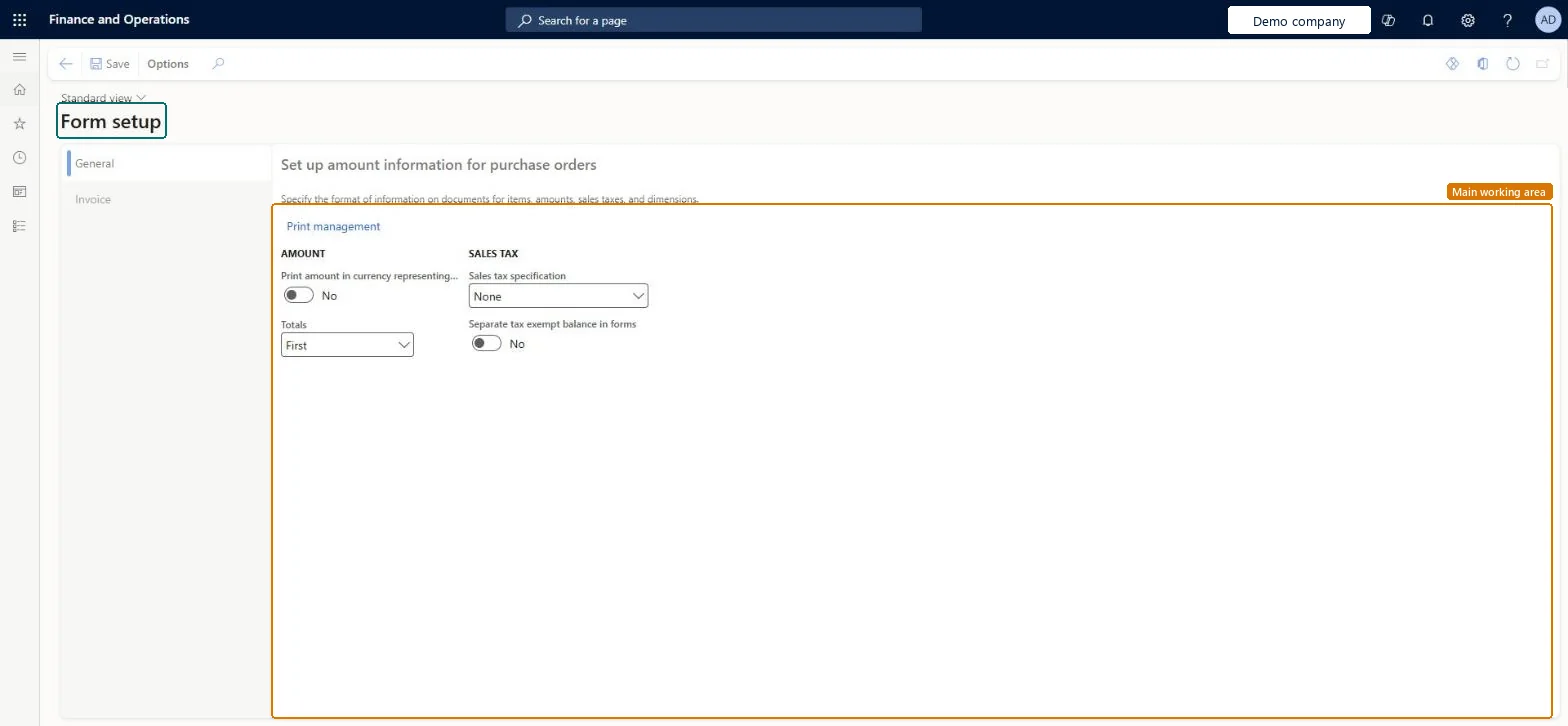
Define the format of the vendor-related documents the organization uses to track receipts from vendors and record reasons for payments to vendors.
Screen 1
Set the purchase order form options
Go to Accounts payable > Setup > Forms > Form setup, General tab
Open the General tab
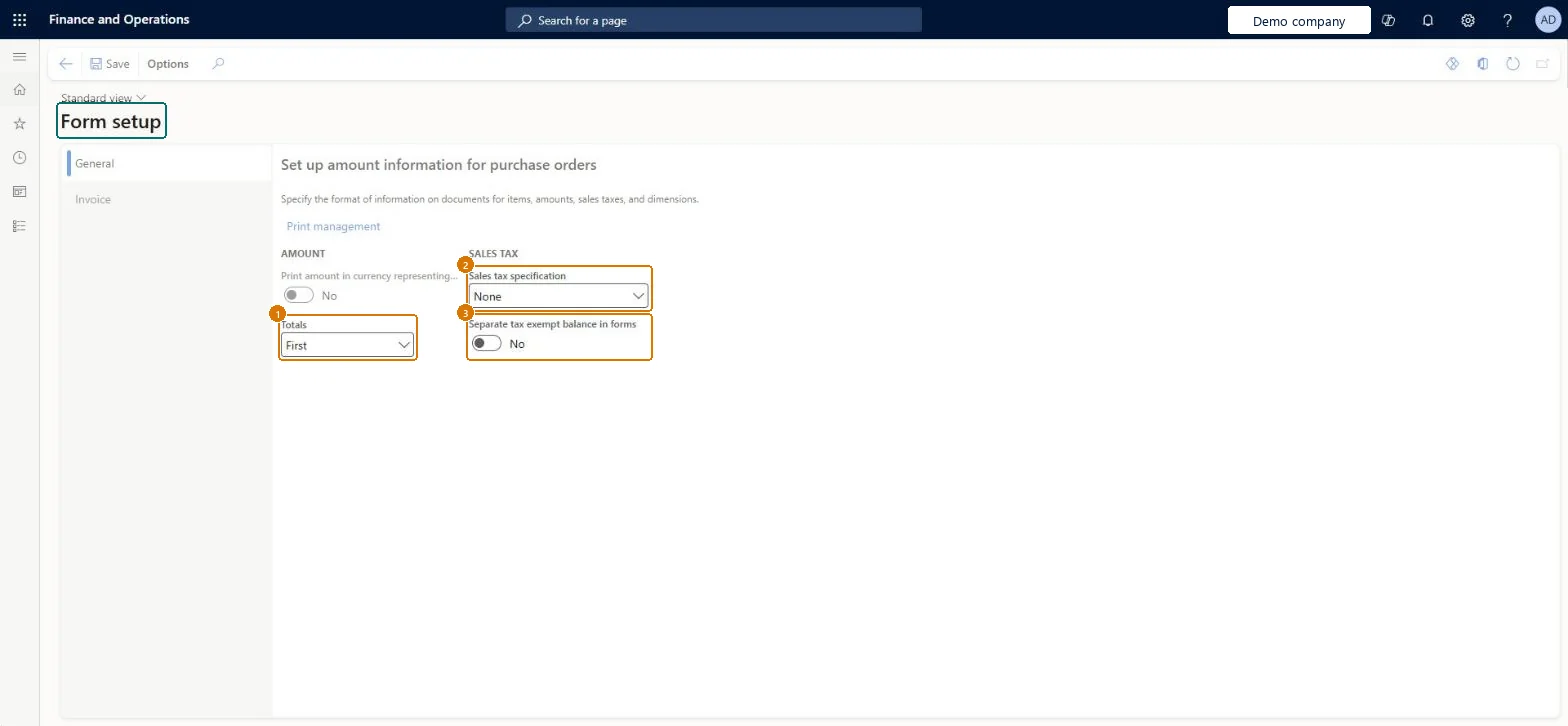
Set Totals, Sales tax specification and Separate tax exempt balance in forms
Select Save
1Totals
First
2Sales tax specification
None
3Separate tax exempt balance in forms
No
Show the full screen page title tab to open what to set or check
How to use it
Go to Accounts payable > Setup > Forms > Form setup.
Select the General tab on the left to set up amount information for purchase orders, or select the Invoice tab.
Under Amount, turn on Print amount in currency representing the accounting currency if needed, and choose the Totals position, for example First.
Under Sales tax, choose the Sales tax specification and turn on Separate tax exempt balance in forms if needed.
VendFormletterParametersShown as “Vendor, form parameters” in Record infoChecked in Dynamics 365
Data entities
PurchFormletterRequestForQuotationFormPrintingConfigurationEntityRequest for quotation form printing configurations Microsoft data model VendorFormSetupEntityVendor, form parameters Microsoft data model PurchFormletterPurchaseRequisitionFormPrintingConfigurationEntityPurchase requisition form printing configurations Microsoft data model PurchFormletterPurchaseOrderFormPrintingConfigurationEntityPurchase order form printing configurations Microsoft data model VendFormletterVendorFacingFormPrintingConfigurationEntityVendor facing form printing configurations Microsoft data model PurchFormletterWarehouseReceiptListFormPrintingConfigurationEntityReceipt list form printing configurations Microsoft data model PurchFormletterProductReceiptFormPrintingConfigurationEntityProduct receipt form printing configurations Microsoft data model PurchFormletterPurchaseAgreementFormPrintingConfigurationEntityPurchase agreement form printing configurations Microsoft data model PurchFormletterPurchaseInquiryFormPrintingConfigurationEntityPurchase inquiry form printing configurations Microsoft data model VendFormletterVendorInvoiceFormPrintingConfigurationEntityVendor invoice form printing configurations Microsoft data model
Who can open it
PrivilegesMaintain report configuration for purchase order-related reports VendFormletterParametersMaintainView report configuration for purchase order-related reports VendFormletterParametersViewDutiesInquire into invoice and payment policies VendInvoiceInvoicePaymentPoliciesInquirEnable invoice and payment process VendInvoiceInvoicePaymentProcessEnable4 security rolesAuditor AuditPolicyManagerAccounting manager LedgerAccountingManagerAccounting supervisor LedgerAccountingSupervisorAccounts payable manager VendInvoiceAccountsPayableManagerChecked in Dynamics 365
Roles to set it up and use it
To set it up or change itAccounts payable manager VendInvoiceAccountsPayableManagerAccounting supervisor LedgerAccountingSupervisorTo use itAccounting manager LedgerAccountingManagerAuditor AuditPolicyManagerGive people one of these roles. On this system, 4 roles can open this page.Checked in Dynamics 365
PurchFormletterRequestForQuotationFormPrintingConfigurationEntity data entity Microsoft data model
Data migration
PurchFormletterRequestForQuotationFormPrintingConfigurationEntity (Request for quotation form printing configurations): loaded for each company, in Microsoft's default template 320 - Procurement and sourcing.VendorFormSetupEntity (Vendor, form parameters): loaded for each company, in Microsoft's default template 120 - Accounts payable.PurchFormletterPurchaseRequisitionFormPrintingConfigurationEntity (Purchase requisition form printing configurations): loaded for each company, in Microsoft's default template 320 - Procurement and sourcing.Load order: Microsoft's default template 320 - Procurement and sourcing loads Request for quotation form printing configurations at execution unit 1, level 30, sequence 10. Lower levels load first, and entities at the same level load in sequence order.Load first: the default templates at lower levels (System setup to General ledger)Microsoft Learn
Checked in a working Dynamics 365 system, version 10.0.49: the menu item, form, table and security, the page, the demo records and the values in the screenshots.
To cite this step: AP-SETUP-100, Set up Form setup. Beyond ERP Atlas Hub, 2026-11-11. https://www.beyonderp.cloud/atlas/step/AP-SETUP-100