BeyondERP.Newsletter
Menu

Setup step on the Terms of payment page · Accounts payable

Define supplier payment terms

Calculate the due date of supplier invoices from an approved commercial term.

Used by
Accounts payable manager, Auditor, Accounting manager and 1 more role
Business process
Process supplier invoices
Menu item
PaymTerm
Main table
PaymTerm
Data entity
PaymentTermEntity
Setup steps
1 on this page
Show what matters for
SETUP GUIDEHow to set it up8 sections. Choose a role to highlight what matters to you.
Everyone

1What it is and why

What it isA setup page for all the terms of payment used by the company and its vendors.
What you do hereUse this page to calculate the due date from the invoice date; terms can be assigned to vendors, customers, purchase orders and sales orders.
ExampleA company has a standard vendor payment term of Net 30 days, so an invoice dated November 15 is due December 15.
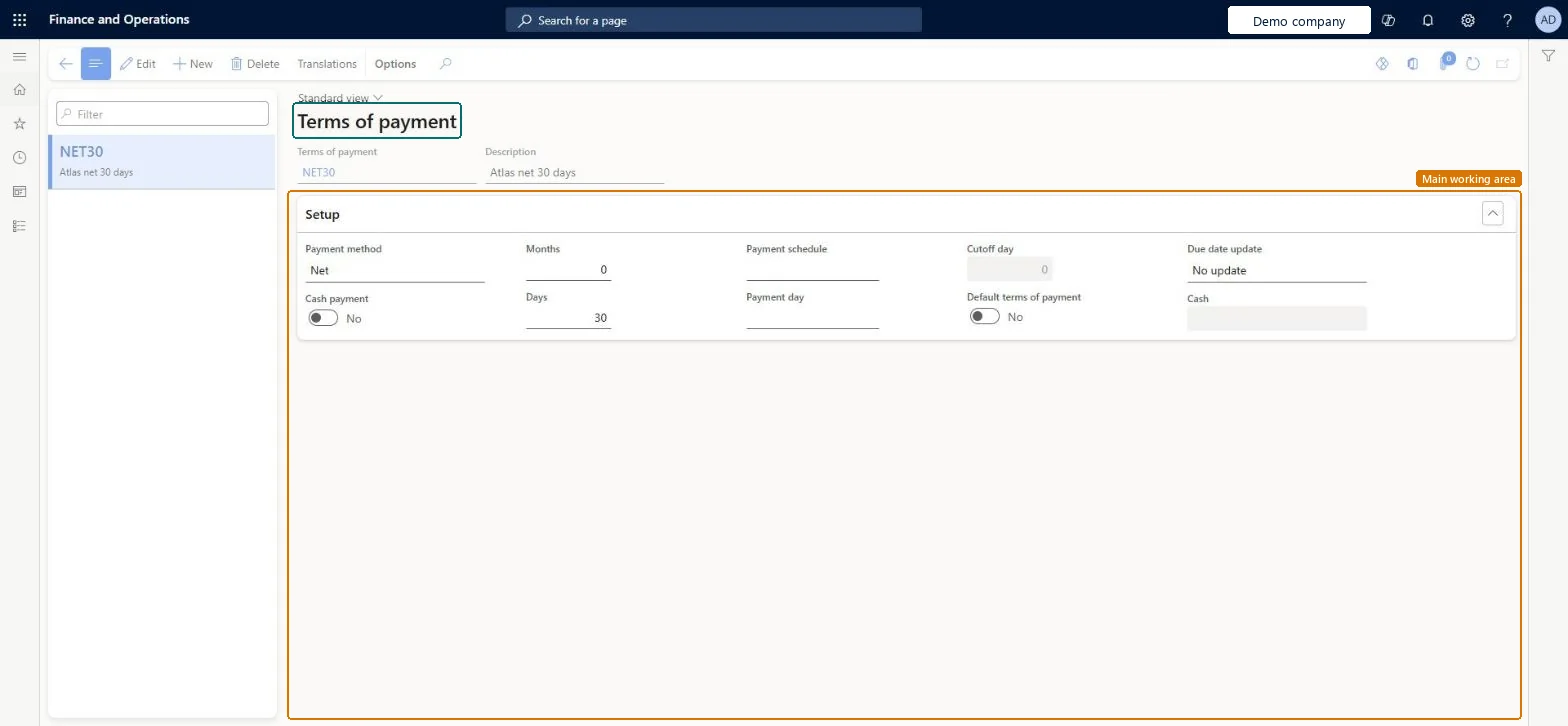
Terms of payment page in Dynamics 365
The page in Dynamics 365. page title tab to open what to set or check
Functional consultant · Solution architect

2Where it fits

End user · Functional consultant

3How to do it

About the examples: Examples and screenshots in this guide use BEAT, a demo company in a Dynamics 365 test environment. Use your own company's codes and values instead of copying them.

Step by step, with screenshots

Define supplier payment terms1 screen

Calculate the due date of supplier invoices from an approved commercial term.

  1. Screen 1

    Create the net 30 payment terms

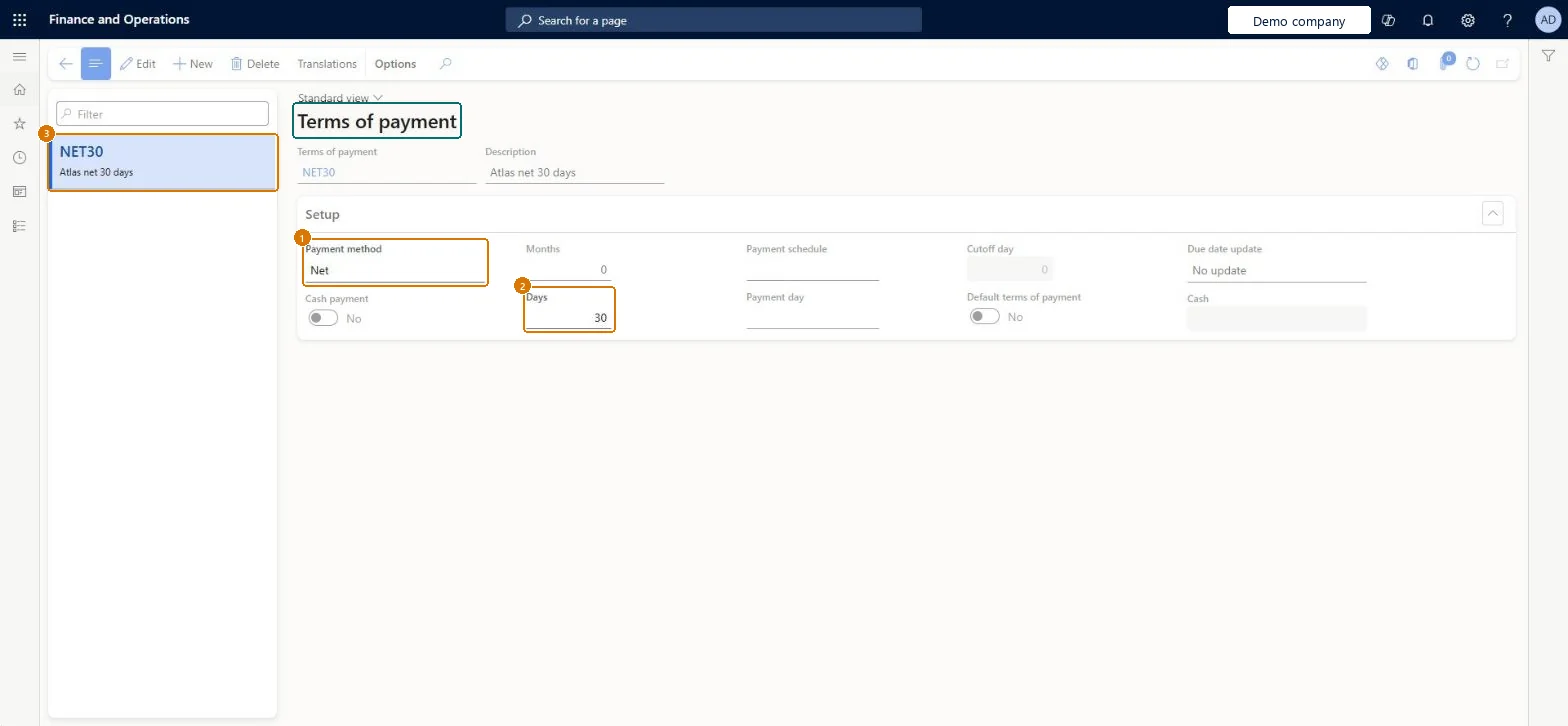
    Go to Accounts payable > Payment setup > Terms of payment, Setup section

    1. Select New and enter Terms of payment and Description
    2. In the Setup section, set Payment method
    3. Enter Months and Days
    1Payment methodNet
    2Days30
    3Terms of paymentNET30
    DescriptionNet 30 days
    Months0
    Create the net 30 payment terms (zoomed on the outlined fields)
    Show the full screenCreate the net 30 payment terms
    page title tab to open what to set or check

Steps from Microsoft

  1. Go to Accounts payable > Payment setup > Terms of payment.
  2. Select New.
  3. In the Terms of payment field, enter an ID, and add a description.
  4. In the Days field, enter the number of days to add to the due date, or to the end of the period chosen in the payment method.
  5. Save the record.

Source: Microsoft Learn

Fields on the page

FieldWhat it meansExampleTable column
DaysThe number of days added to the invoice date, or to the end of the period set by the payment method, to get the due date.Microsoft Learn 30NumOfDays
Payment methodWhere the due date calculation starts, such as Net or Current month.Microsoft Learn NetPaymMethod
CashThe main account used to settle invoices that are paid in cash when cash payment is turned on.Microsoft Learn CashLedgerDimension
Terms of paymentNET30PaymTermId
DescriptionA short description of the terms of payment.Checked in Dynamics 365Net 30 daysDescription
MonthsThe number of months to add when calculating the due date, depending on the terms.Microsoft Learn 0NumOfMonths

Test checklist

  1. Create Net 30 with Payment method Net and Days = 30.
  2. Assign it to a vendor.
  3. Post an invoice dated today for that vendor.
  4. Check the due date on the open transaction is 30 days later.

Source: Microsoft Learn

Functional consultant

4Setup decisions

Setup stepRecommended value and whyDecision, common mistake and test
Define supplier payment termsOne terms of payment code per agreed due-date rule (for example Net 30, end of month plus 30), set on vendors or vendor groupsTerms of payment calculate the due date from the invoice date and are assigned to vendors, customers, purchase orders and sales orders; Payment days round the due date to a set weekday or date.Confusing the invoice due-date term with the separate cash-discount date setup.Test: AP baseline defaults flow from setup to invoice and payment
Solution architect

5Design impact

Shared or per companyPer company: each legal entity has its own records. Microsoft data model
Can it be undoneReversible: Changing terms after invoices have been created requires a separate check of document due dates and payment proposals.
If you change it laterThis page sets how the due date is worked out; it doesn't set the cash discount date, which comes from Cash discounts. Microsoft Learn
Technical architect

6Technical

Menu itemPaymTerm Checked in Dynamics 365
FormPaymTerm Checked in Dynamics 365
TablePaymTermShown as “Terms of payment” in Record infoKey field: PaymTermIdChecked in Dynamics 365
Data entitiesPaymentTermEntityTerms of payment Microsoft data model CredManPaymTermRankEntityRanking of payment terms Microsoft data model
Who can open itPrivilegesMaintain vendor terms of payment PaymTermMaintainView vendor terms of payment PaymTermViewDutiesInquire into invoice and payment policies VendInvoiceInvoicePaymentPoliciesInquirEnable invoice and payment process VendInvoiceInvoicePaymentProcessEnable
4 security rolesAuditor AuditPolicyManagerAccounting manager LedgerAccountingManagerAccounting supervisor LedgerAccountingSupervisorAccounts payable manager VendInvoiceAccountsPayableManager
Checked in Dynamics 365
Roles to set it up and use itTo set it up or change itAccounts payable manager VendInvoiceAccountsPayableManagerAccounting supervisor LedgerAccountingSupervisorTo use itAccounting manager LedgerAccountingManagerAuditor AuditPolicyManagerGive people one of these roles. On this system, 4 roles can open this page.Checked in Dynamics 365
Actions on the pageOptions: Personalize, Page options, ShareChecked in Dynamics 365
Developer

7Developer

Open it by URLhttps://<your-environment>/?mi=PaymTerm
Integrate withPaymentTermEntity data entity Microsoft data model
Data migrationPaymentTermEntity (Terms of payment): loaded for each company, in Microsoft's default template 120 - Accounts payable.CredManPaymTermRankEntity (Ranking of payment terms): loaded for each company.Load order: Microsoft's default template 120 - Accounts payable loads Terms of payment at execution unit 1, level 40, sequence 10. Lower levels load first, and entities at the same level load in sequence order.Load first: Payment day lines, Payment schedule, the default templates at lower levels (System setup to dependency bands 30 to 90)Microsoft Learn
Table definitionPaymTerm columns and relations Microsoft data model
Everyone

8Sources