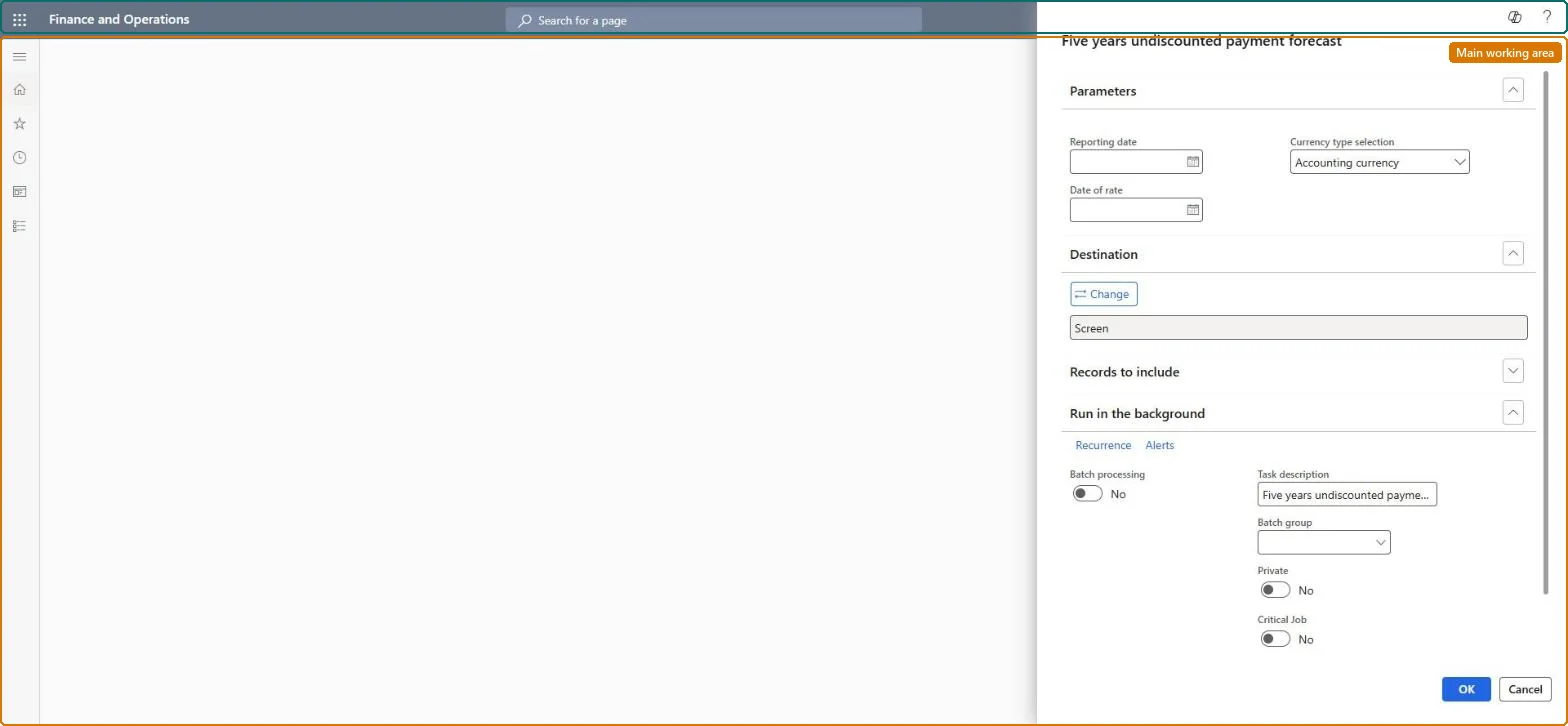
Run the Five years undiscounted payment forecast report
Asset leasingInquiries and reportsLease reports
AssetLeaseSsrsUndiscountedYearlyPayments
Business process
Analyze asset leases
Menu item
AssetLeaseSsrsUndiscountedYearlyPayments
Setup steps
1 on this page
Show what matters for
SETUP GUIDEHow to set it up8 sections. Choose a role to highlight what matters to you.
Everyone
1What it is and why
What it is
A report that shows the projected undiscounted lease payments for the next five years from a date you enter.
What you do here
Use this report to see lease payments grouped by year: the next 12 months, then months 13-24 up to 49-60, and everything after that.
Example
For example, for BEAT's year-end accounts the controller runs it as of 12/31 and copies the Current, 13-24 to 49-60 and Thereafter totals into the lease maturity analysis note.
The page in Dynamics 365. page title tab to open what to set or check
About the examples: Examples and screenshots in this guide use BEAT, a demo company in a Dynamics 365 test environment. Use your own company's codes and values instead of copying them.
When to run it
When to run it
At each reporting date when you prepare the lease maturity analysis for the financial statements.
How often
At each quarter or year end close, or on demand for a payment forecast.
What the output shows
One line per lease and book with Classification, Posting layer and Currency, and the undiscounted payments in the buckets Current, 13-24, 25-36, 37-48 and 49-60 months, and Thereafter. Totals that are too low usually mean leases with unconfirmed payment schedules or a reporting date that is later than intended.
Run the Five years undiscounted payment forecast report
Produce the Five years undiscounted payment forecast figures for the period you report.
Steps from Microsoft
Go to Asset leasing > Inquiries and reports > Lease reports > Five years undiscounted payment forecast.
Enter the reporting date. The yearly buckets are counted from this date, so use the balance sheet date of the disclosure.
Filter on the legal entities, lease groups or books you need for the disclosure.
Read the columns Current, 13-24 months up to 49-60 months and Thereafter for each lease, and compare their total with the remaining payments on the payment schedules.
Run it as of the balance sheet date, filtered on one posting layer, for the maturity analysis.The buckets count from the report date, and every book of a lease is a line, so the date and the posting layer decide the totals.
Asset leasing (Must be on)Multi-company purpose (Optional)
Licence or add-in
Asset leasing must be turned on in Feature management (feature Asset leasing). Microsoft Learn describes three Asset leasing roles: Maintain lease (add, edit and post leases), View lease (view leases and schedules and run reports) and Lease clerk (create new leases only). View lease users run it, as do Maintain lease users.
Runs for the legal entities you select. With the Multi-company purpose feature (version 10.0.44) the legal entities are picked from an organization hierarchy. Microsoft Learn
Can it be undone
Reversible: The report changes no data.
If you change it later
The report reads the posted lease schedules and changes nothing. Its figures change only when journals are posted, reversed or a lease is adjusted, so run it after the period's journals are posted. Microsoft Learn
Technical architect
6Technical
Menu item
AssetLeaseSsrsUndiscountedYearlyPaymentsChecked in Dynamics 365
Form
SysOperationTemplateFormChecked in Dynamics 365
Roles to set it up and use it
To use itLease accountant AssetLeaseLeaseMaintainAccountant LedgerAccountantLease manager AssetLeaseLeaseViewAccounting manager LedgerAccountingManagerGive people one of these roles. On this system, 4 roles can run this page.Checked in Dynamics 365
Load order: The Five years undiscounted payment forecast report has no data entity in Data management, so it can't be loaded from a file or a configuration template. A report stores no data; it reads the lease books and schedules, so migrate the leases instead.Microsoft Learn
Checked in a working Dynamics 365 system, version 10.0.49: the menu item, form, table and security, the page.
To cite this step: AL-RPT-010, Run the Five years undiscounted payment forecast report. Beyond ERP Atlas Hub, 2026-11-11. https://www.beyonderp.cloud/atlas/step/AL-RPT-010