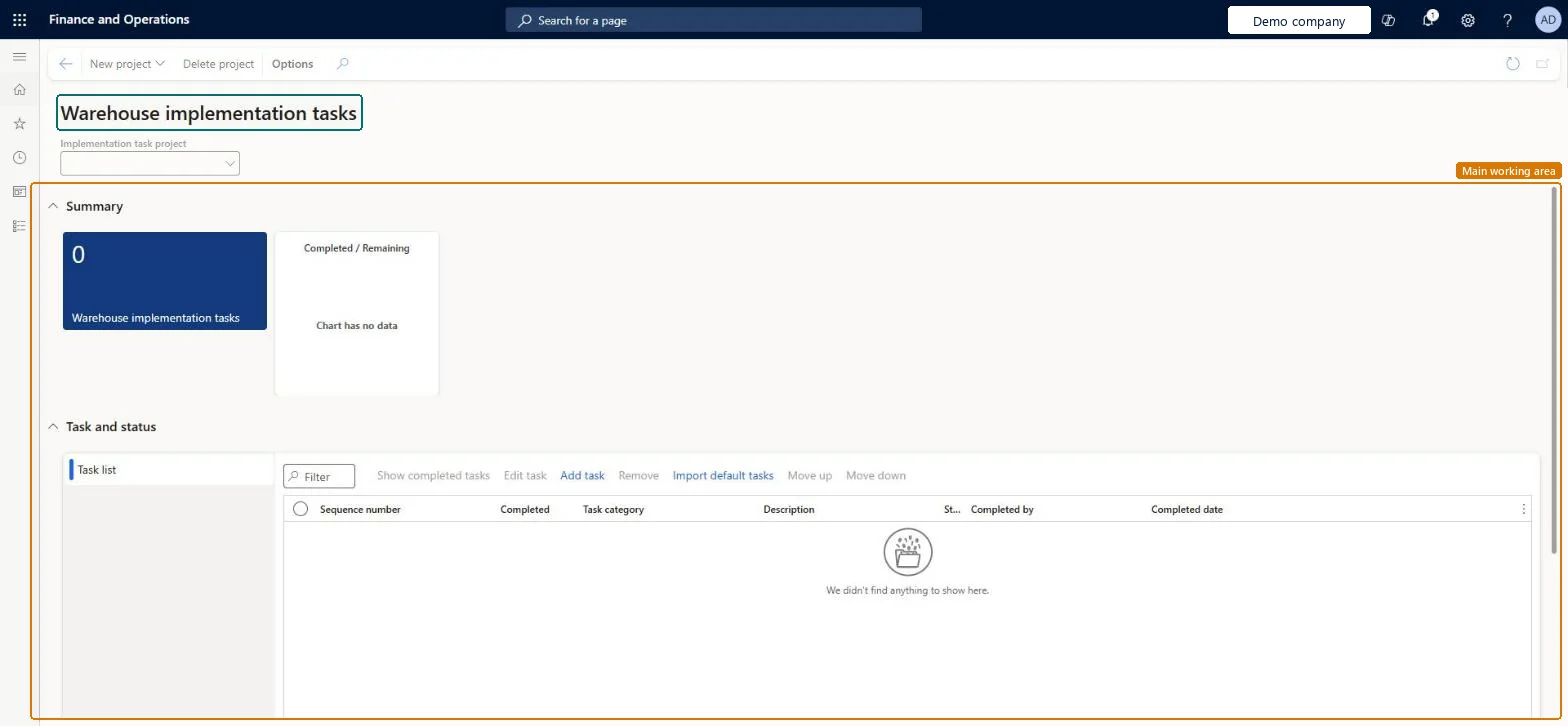
About the examples: Examples and screenshots in this guide use BEAT, a demo company in a Dynamics 365 test environment. Use your own company's codes and values instead of copying them.
Steps from Microsoft
Go to Warehouse management > Workspaces > Warehouse implementation tasks.
Select New project, enter a name, choose whether to copy an existing project, and select OK.
In the Implementation task project field, select the project to work with.
On the Tasks and status FastTab, select Import default tasks.
Use Add task, Edit task, Remove, Move up and Move down to adjust the list.
Select the Completed check box for each task as you finish it.
The project whose tasks the workspace shows. All data in the workspace is filtered by it.Microsoft Learn
Sequence number
The order in which to complete the task. Start with the lowest number and work upward.Microsoft Learn
Completed
A check box that you select for each task as you complete it.Microsoft Learn
Task category
The type of task. Select the text to open the page where the task's settings are configured.Microsoft Learn
Description
Full details about what must be done to complete the task.Microsoft Learn
Status
A check mark shows that the task has been completed.Microsoft Learn
Completed by
For a completed task, the name of the user who completed it.Microsoft Learn
Completed date
For a completed task, the date when it was completed.Microsoft Learn
Technical architect
4Technical
Menu item
WHSImplementationWorkspaceChecked in Dynamics 365
Form
WHSImplementationWorkspaceChecked in Dynamics 365
Who can open it
PrivilegesMaintain warehouse implementation tasks workspace. WHSImplementationWorkspaceMaintainView warehouse implementation tasks workspace. WHSImplementationWorkspaceViewDutiesInquire into warehouse operation master WMSWarehouseOperationMasterInquireMaintain warehouse operation master WMSWarehouseOperationMasterMaintain6 security rolesField Service Integration User FieldServiceIntegrationUserProduction supervisor ProdProductionSupervisorProcess engineer RouteProcessEngineerProcess engineering manager RouteProcessEngineeringManagerWarehouse planner WHSWarehousePlannerWarehouse manager WMSWarehouseManagerChecked in Dynamics 365
Roles to set it up and use it
To set it up or change itWarehouse manager WMSWarehouseManagerProcess engineer RouteProcessEngineerTo use itWarehouse planner WHSWarehousePlannerProduction supervisor ProdProductionSupervisorProcess engineering manager RouteProcessEngineeringManagerField Service Integration User FieldServiceIntegrationUserGive people one of these roles. On this system, 6 roles can open this page.Checked in Dynamics 365
Actions on the page
(Action Pane without tabs): New project, Delete projectChecked in Dynamics 365