About the examples: Examples and screenshots in this guide use BEAT, a demo company in a Dynamics 365 test environment. Use your own company's codes and values instead of copying them.
How to use it
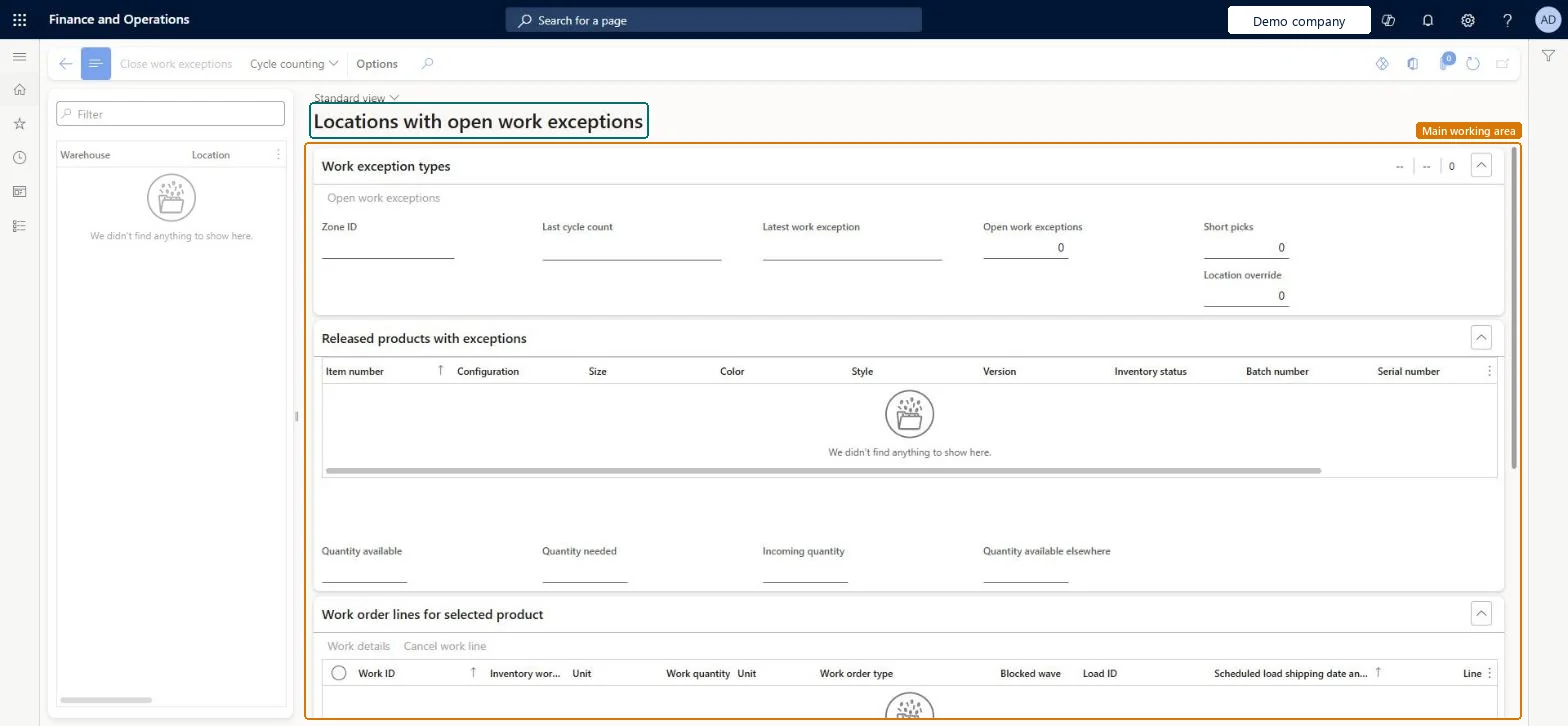
Go to Warehouse management > Work > Outbound > Locations with open work exceptions.
In the list on the left, use the Filter box to find a warehouse and location.
Select a location to see its work exception types and the released products with exceptions.
Select a product to see its lines in Work order lines for selected product.
Use the Close work exceptions and Cycle counting buttons on the Action Pane for the selected location.
Source: Checked in Dynamics 365
Test checklist
Create a short pick on the mobile app for a known location.
Open this page (or the Locations with open work exceptions tile in Outbound work monitoring) and check the location is listed with the affected product and work order line.
Resolve the exception and check the location no longer shows as open.
Reversible: This is an inquiry over the work exceptions log; it changes nothing. Entries leave it when they are closed or removed by the Clean up work exceptions logs job, which deletes them permanently. Microsoft Learn
Technical architect
5Technical
Menu item
WHSLocationWithWorkExceptionChecked in Dynamics 365
Form
WHSLocationWithWorkExceptionChecked in Dynamics 365
Table
WHSLocationWithWorkExcepShown as “WHSLOCATIONWITHWORKEXCEPTIONVIEW” in Record infoChecked in Dynamics 365
Who can open it
PrivilegesMaintain locations with open work exceptions WHSLocationWithWorkExceptionMaintainView locations with open work exceptions WHSLocationWithWorkExceptionViewDutiesMaintain warehouse planning WHSWarehousePlanningMaintainInquire into warehouse planning status WHSWarehousePlanningStatusInquire5 security rolesReceiving clerk InventReceivingClerkShipping clerk InventShippingClerkWarehouse planner WHSWarehousePlannerWarehouse manager WMSWarehouseManagerWarehouse worker WMSWarehouseWorkerChecked in Dynamics 365
Roles to set it up and use it
To set it up or change itWarehouse planner WHSWarehousePlannerTo use itWarehouse manager WMSWarehouseManagerWarehouse worker WMSWarehouseWorkerShipping clerk InventShippingClerkReceiving clerk InventReceivingClerkGive people one of these roles. On this system, 5 roles can open this page.Checked in Dynamics 365
Actions on the page
(Action Pane without tabs): Close work exceptions, Cycle countingChecked in Dynamics 365