BeyondERP.Newsletter
Menu

Setup page · Warehouse management

Wave process methods

A list page that shows the wave methods that wave templates use to create or distribute work, with buttons to regenerate methods and add new ones.

Used by
Warehouse planner, Warehouse manager
Business process
Manage warehouse operations
Menu item
WHSPostMethod
Main table
WHSPostMethod
Data entity
WHSWarehouseWaveProcessingMethodEntity
Setup steps
1 on this page
Show what matters for
PAGE GUIDEWhat the page does and how to use it8 sections. Choose a role to highlight what matters to you.
Everyone

1What it is and why

What it isA list page that shows the wave methods that wave templates use to create or distribute work, with buttons to regenerate methods and add new ones.
What you do hereUse this page to check which wave methods are available and to regenerate them when a method such as wave label printing is missing.
Wave process methods page in Dynamics 365
The page in Dynamics 365. page title tab to open what to set or check
Functional consultant · Solution architect

2Where it fits

Business processManage warehouse operations
Menu pathWarehouse management › Setup › Waves › Wave process methods
Used next byWave templates Microsoft Learn
Related pagesWave step codes Microsoft Learn
End user · Functional consultant

3How to do it

About the examples: Examples and screenshots in this guide use BEAT, a demo company in a Dynamics 365 test environment. Use your own company's codes and values instead of copying them.

Setup steps on this page

Set up Wave process methods

Use this page to check which wave methods are available and to regenerate them when a method such as wave label printing is missing.

Steps from Microsoft

  1. Go to Warehouse management > Setup > Waves > Wave process methods.
  2. Check that the method you need, such as waveLabelPrinting, is in the list.
  3. If it is not in the list, select Regenerate methods on the Action Pane.
  4. To use a method more than once in a wave template, select the Make method repeatable check box for it.

Source: Microsoft Learn

Fields on the page

FieldWhat it meansTable column
Make method repeatableLets a method such as wave label printing be added to a wave template two or more times, each with its own wave step code.Microsoft Learn RepeatableStep

Test checklist

  1. Check waveLabelPrinting and buildLoads are listed; if not, select Regenerate methods.
  2. Select Make method repeatable for waveLabelPrinting.
  3. Add Wave label printing twice to a wave template with two step codes.
  4. Validate the wave template and release an order to check both label tiers print.

Source: Microsoft Learn

Functional consultant

4Setup decisions

Setup stepRecommended value and whyDecision, common mistake and test
Set up Wave process methodsSelect Regenerate methods when a method such as waveLabelPrinting or buildLoads is missing; select Make method repeatable only for a method you add more than once to a wave templateMethods like wave label printing and load building only appear after regeneration, and multilevel labels need the waveLabelPrinting method marked repeatable so it can be added twice with different step codes.Trying to add Wave label printing twice (for carton and pallet labels) without Make method repeatable selected.
Solution architect

5Design impact

Shared or per companyPer company: each legal entity has its own records. Microsoft data model
Can it be undoneReversible: Regenerate methods can be run again, and the repeatable flag can be cleared. Microsoft Learn
Technical architect

6Technical

Menu itemWHSPostMethod Checked in Dynamics 365
FormWHSPostMethod Checked in Dynamics 365
TableWHSPostMethodShown as “VALIDATION/POSTING METHODS” in Record infoChecked in Dynamics 365
Data entitiesWHSWarehouseWaveProcessingMethodEntityWave process methods Microsoft data model
Who can open itPrivilegesMaintain posting methods WHSPostMethodMaintainView posting methods WHSPostMethodViewDutiesInquire into warehouse planning master data WHSWarehousePlanningMasterInquireRecord warehouse planning masters WHSWarehousePlanningMasterMaintain
2 security rolesWarehouse planner WHSWarehousePlannerWarehouse manager WMSWarehouseManager
Checked in Dynamics 365
Roles to set it up and use itTo set it up or change itWarehouse manager WMSWarehouseManagerWarehouse planner WHSWarehousePlannerGive people one of these roles. On this system, 2 roles can open this page.Checked in Dynamics 365
Actions on the page(Action Pane without tabs): Regenerate methods, Add new methods, Task configurationChecked in Dynamics 365
Developer

7Developer

Open it by URLhttps://<your-environment>/?mi=WHSPostMethod
Integrate withWHSWarehouseWaveProcessingMethodEntity data entity Microsoft data model
Data migrationWHSWarehouseWaveProcessingMethodEntity (Wave process methods): loaded for each company, in Microsoft's default template 400 - Warehouse management.Load order: Microsoft's default template 400 - Warehouse management loads Wave process methods at execution unit 1, level 30, sequence 10. Lower levels load first, and entities at the same level load in sequence order.Load first: the default templates at lower levels (System setup to General ledger)Microsoft Learn
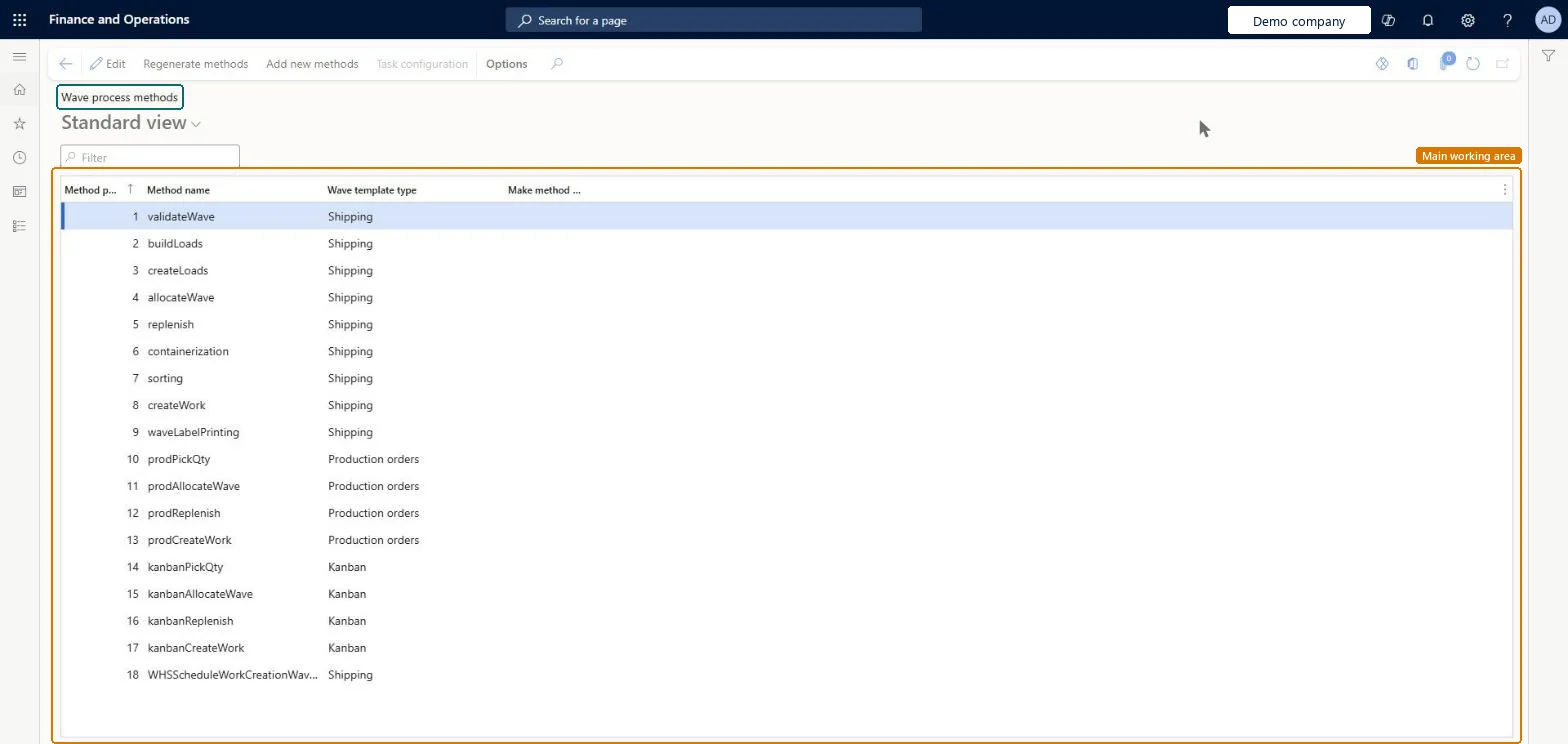
Table definitionWHSPostMethod columns and relations Microsoft data model
Everyone

8Sources