BeyondERP.Newsletter
Menu

Setup page · Warehouse management

Unit sequence groups

A setup page where you define unit sequence groups, which list the units a product can be handled in, from the smallest to the largest.

Used by
Field Service Integration User, Production supervisor, Process engineer and 3 more roles
Business process
Manage warehouse operations
Menu item
WHSUOMSeqGroupTable
Main table
WHSUOMSeqGroupTable
Data entity
WHSUnitOfMeasureConversionSequenceGroupEntity
Setup steps
1 on this page
Show what matters for
PAGE GUIDEWhat the page does and how to use it8 sections. Choose a role to highlight what matters to you.
Everyone

1What it is and why

What it isA setup page where you define unit sequence groups, which list the units a product can be handled in, from the smallest to the largest.
What you do hereUse this page to set the units, such as piece, box and pallet, that warehouse processes use for a product and the policies that apply to each unit.
ExampleFor example, a product stored as pallets that contain boxes that contain individual pieces uses a group with those three units in order.
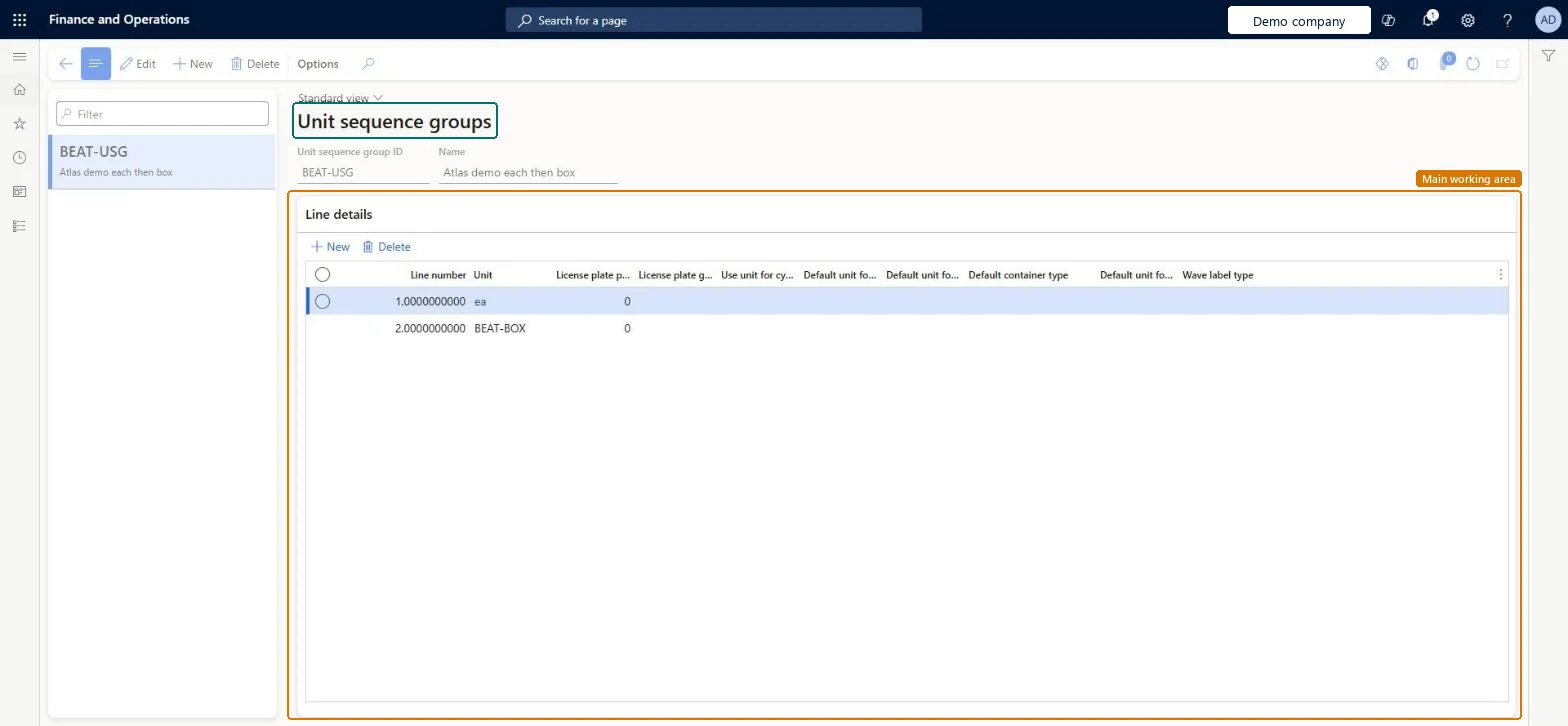
Unit sequence groups page in Dynamics 365
The page in Dynamics 365. page title tab to open what to set or check
Functional consultant · Solution architect

2Where it fits

Business processManage warehouse operations
Menu pathWarehouse management › Setup › Warehouse › Unit sequence groups
Related pagesContainer types Microsoft Learn Wave label types Microsoft Learn
End user · Functional consultant

3How to do it

About the examples: Examples and screenshots in this guide use BEAT, a demo company in a Dynamics 365 test environment. Use your own company's codes and values instead of copying them.

Setup steps on this page

Set up Unit sequence groups

Use this page to set the units, such as piece, box and pallet, that warehouse processes use for a product and the policies that apply to each unit.

Steps from Microsoft

  1. Go to Warehouse management > Setup > Warehouse > Unit sequence groups.
  2. Select New on the Action Pane.
  3. In the header, enter a Unit sequence group ID and a Name.
  4. In the Line details grid, select New and add one line for each unit, from the smallest unit to the largest.
  5. Set the fields on each line, such as License plate grouping and Use unit for cycle counting.
  6. Select Save.

Source: Microsoft Learn

Fields on the page

FieldWhat it meansTable column
UnitThe unit of measure for the line. A unit conversion must exist between it and every other unit in the group.Microsoft Learn UnitId
License plate packing typeAn identifier that is added to the license plate numbers created for this unit.Microsoft Learn LicensePlatePackType
License plate groupingGroups a receipt of more than one of this unit onto a single license plate.Microsoft Learn UnitizationGrouping
Use unit for cycle countingLets workers count the product in this unit.Microsoft Learn CycleCountUOM
Default unit for purchase and transferThe unit suggested by default when workers receive purchase orders and transfer orders on a mobile device.Microsoft Learn DefaultPurchUnitId
Default container typeThe container type used by default on license plates that hold this unit.Microsoft Learn DefaultContainerTypeCode
Wave label typeThe wave label type used to generate wave label records for this unit.Microsoft Learn WaveLabelTypeId

Test checklist

  1. Create a group Pcs-Box-PL with conversions 10 Pcs = 1 Box and 100 Pcs = 1 PL.
  2. Select Use unit for cycle counting on at least one unit and Default unit for purchase and transfer on PL.
  3. Assign the group to a WMS product with inventory unit Pcs.
  4. Release 100 Pcs and 20 Pcs sales lines and check work is created as 1 PL and in Box or Pcs.

Source: Microsoft Learn

Functional consultant

4Setup decisions

Setup stepRecommended value and whyDecision, common mistake and test
Set up Unit sequence groupsOne group per inventory unit and packaging hierarchy (for example Pcs-Box-PL), smallest unit first, with unit conversions between all unitsThe first unit must match the product's inventory unit, and conversions are needed so the system can translate quantities between levels.Mixing units from different unit of measure classes in one group, which can create work in an unexpected unit and round load and work quantities unexpectedly.
Solution architect

5Design impact

Shared or per companyPer company: each legal entity has its own records. Microsoft data model
Can it be undoneHard to reverse: Line units are fixed once saved; a different hierarchy needs a new group assigned to the products. Policy checkboxes can be changed. Microsoft Learn
If you change it laterMixing units from different unit of measure classes in one group can produce work in an unexpected unit and cause unexpected rounding of load and work line quantities. Microsoft Learn
Technical architect

6Technical

Menu itemWHSUOMSeqGroupTable Checked in Dynamics 365
FormWHSUOMSeqGroupTable Checked in Dynamics 365
TableWHSUOMSeqGroupTableShown as “UNIT SEQUENCE GROUPS” in Record infoKey field: UOMSeqGroupIdChecked in Dynamics 365
Data entitiesWHSUnitOfMeasureConversionSequenceGroupEntityUnit sequence groups Microsoft data model
Who can open itPrivilegesMaintain UOM sequence groups WHSUOMSeqGroupTableMaintainView UOM sequence groups WHSUOMSeqGroupTableViewDutiesInquire into warehouse operation master WMSWarehouseOperationMasterInquireMaintain warehouse operation master WMSWarehouseOperationMasterMaintain
6 security rolesField Service Integration User FieldServiceIntegrationUserProduction supervisor ProdProductionSupervisorProcess engineer RouteProcessEngineerProcess engineering manager RouteProcessEngineeringManagerWarehouse planner WHSWarehousePlannerWarehouse manager WMSWarehouseManager
Checked in Dynamics 365
Roles to set it up and use itTo set it up or change itWarehouse manager WMSWarehouseManagerProcess engineer RouteProcessEngineerTo use itWarehouse planner WHSWarehousePlannerProduction supervisor ProdProductionSupervisorProcess engineering manager RouteProcessEngineeringManagerField Service Integration User FieldServiceIntegrationUserGive people one of these roles. On this system, 6 roles can open this page.Checked in Dynamics 365
Developer

7Developer

Open it by URLhttps://<your-environment>/?mi=WHSUOMSeqGroupTable
Integrate withWHSUnitOfMeasureConversionSequenceGroupEntity data entity Microsoft data model
Table definitionWHSUOMSeqGroupTable columns and relations Microsoft data model
Everyone

8Sources