About the examples: Examples and screenshots in this guide use BEAT, a demo company in a Dynamics 365 test environment. Use your own company's codes and values instead of copying them.
Step by step, with screenshots
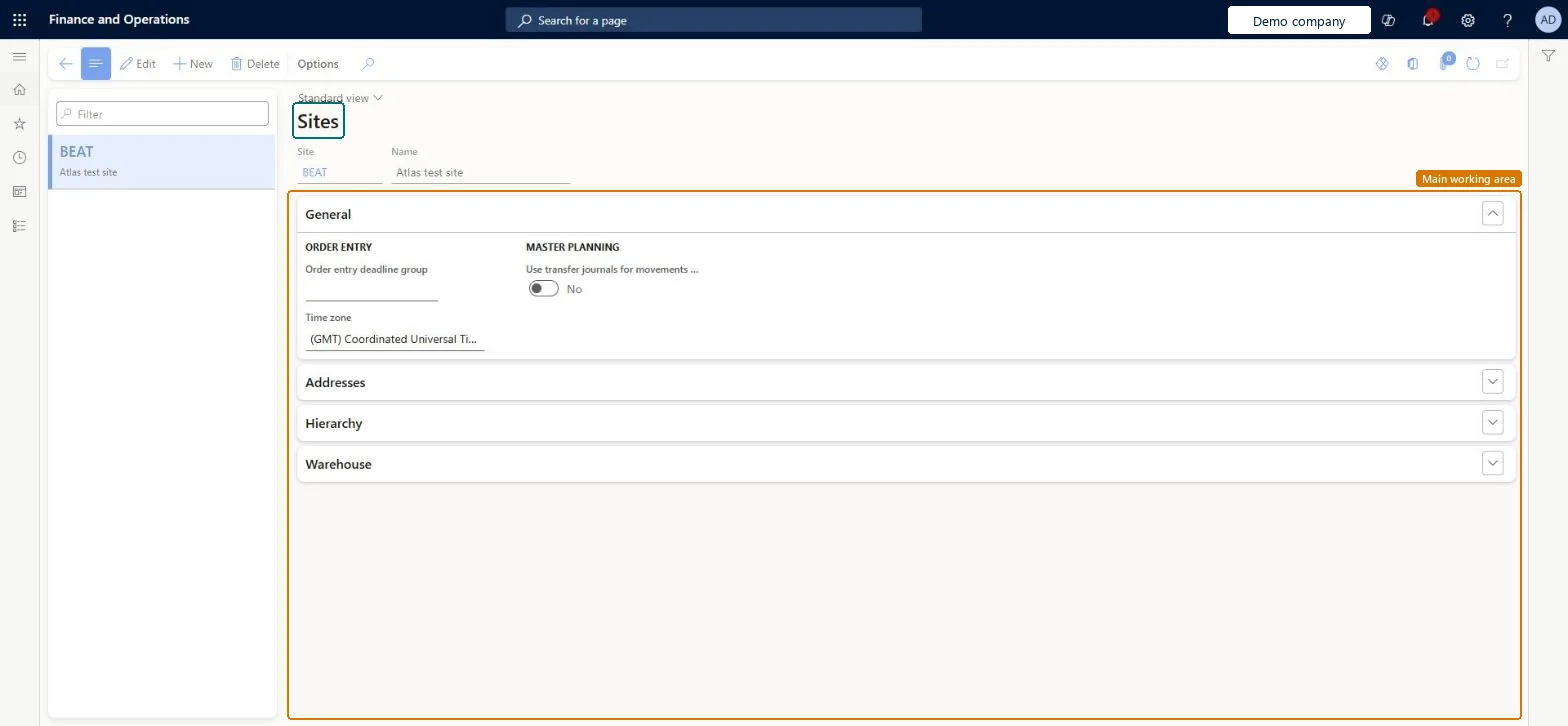
Set up Sites1 screen
Use this page to set up the places where a legal entity runs logistics, which can be linked to financial dimensions for general ledger integration.
Screen 1
Create a site
Go to Inventory management > Setup > Inventory breakdown > Sites
Select New
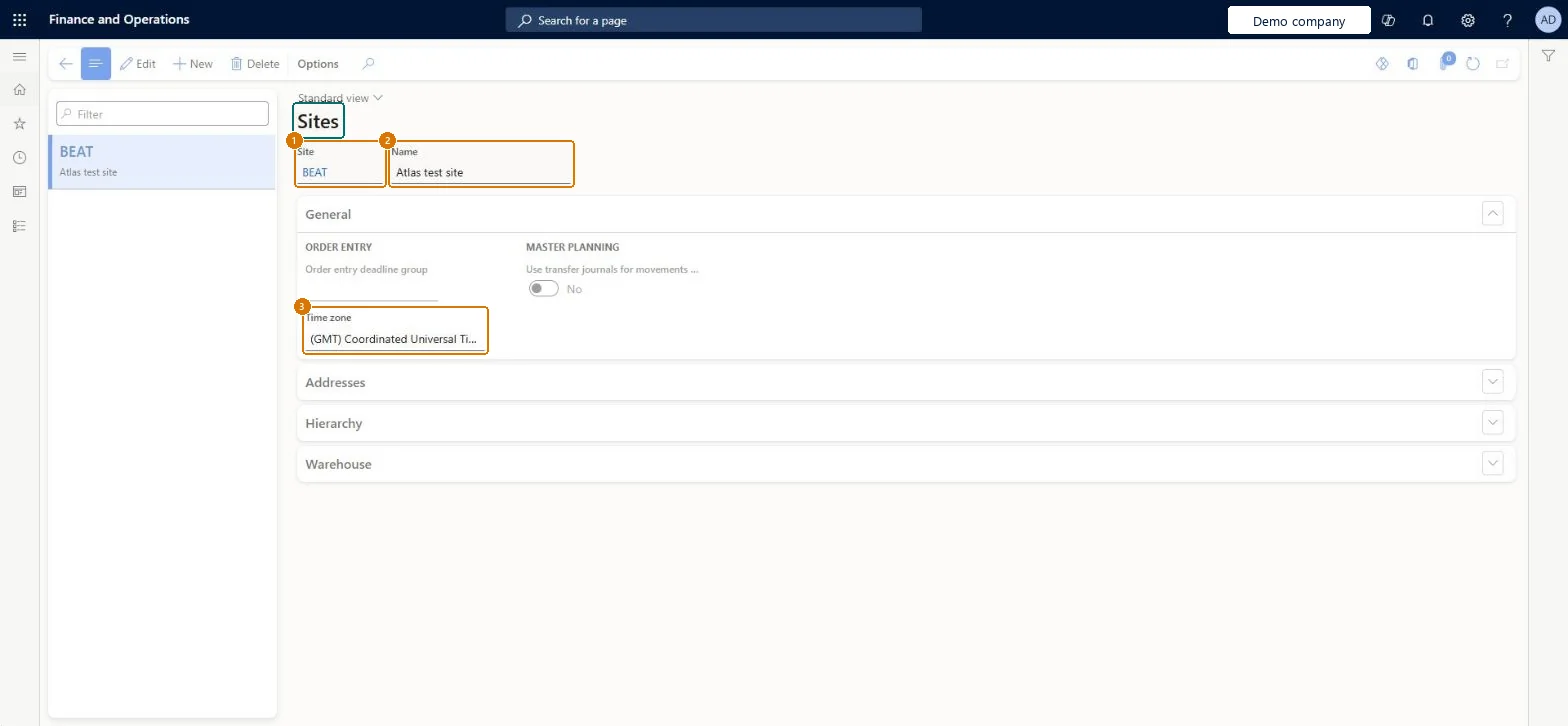
Enter the site code and name
Select the time zone
Optionally choose an order entry deadline group
On the Addresses tab, add the site address
Select Save
Create warehouses for the site on the Warehouses page
1Site
BEAT
2Name
Main site
3Time zone
(GMT) Coordinated Universal Time
Show the full screen page title tab to open what to set or check
How to use it
Go to Warehouse management > Setup > Warehouse > Sites.
Select New to create a site.
Enter the site code and the name.
On the General FastTab, set the time zone and the other general settings.
Use the Addresses FastTab to enter the site address.
At least one site per legal entity; use separate sites, not warehouses, where inventory must be kept financially apartLearn says every legal entity needs at least one site and all transactions refer to a site; it advises creating separate sites instead of using warehouse as a financial inventory dimension.
Creating sites casually and trying to remove them later. A site can only be deleted if no warehouses, resources or other master data reference it and no open inventory is on it.
Hard to reverse: While the site dimension link is locked, you can't change the financial dimension value on a site and new transactions must match it; you must unlock the link first. Transactions already posted keep their site. Microsoft Learn
Technical architect
6Technical
Menu item
InventSiteChecked in Dynamics 365
Form
InventSiteChecked in Dynamics 365
Table
InventSiteShown as “SITE” in Record infoKey field: SiteIdChecked in Dynamics 365
PrivilegesEntAssetMobileSetupViewMaintain sites InventSiteMaintainView sites InventSiteViewDutiesInquire into logistic policies InventLogisticPoliciesInquireEnable the logistic process InventLogisticProcessEnableInquire into general ledger policies LedgerGeneralLedgerPoliciesInquireEnable general ledger process LedgerGeneralLedgerProcessEnable19 security rolesAuditor AuditPolicyManagerProduct design manager BOMProductDesignManagerChief financial officer CompanyChiefFinancialOfficerMaintenance clerk EntAssetMaintenanceClerkMaintenance manager EntAssetMaintenanceManagerMaintenance requester EntAssetMaintenanceRequesterMaintenance worker EntAssetMaintenanceWorkerInventory accountant InventCostAccountantInventory accountant clerk InventCostCostClerkMaterials manager InventMaterialsManagerAccountant LedgerAccountantAccounting manager LedgerAccountingManagerAccounting supervisor LedgerAccountingSupervisorFinancial controller LedgerFinancialControllerProduction manager ProdProductionManagerProduction supervisor ProdProductionSupervisorProcess engineer RouteProcessEngineerProcess engineering manager RouteProcessEngineeringManagerWarehouse manager WMSWarehouseManagerChecked in Dynamics 365
Roles to set it up and use it
To set it up or change itWarehouse manager WMSWarehouseManagerMaterials manager InventMaterialsManagerAccounting supervisor LedgerAccountingSupervisorProduction manager ProdProductionManagerAccounting manager LedgerAccountingManagerTo use itProduction supervisor ProdProductionSupervisorProcess engineering manager RouteProcessEngineeringManagerProcess engineer RouteProcessEngineerProduct design manager BOMProductDesignManagerInventory accountant clerk InventCostCostClerkGive people one of these roles. On this system, 19 roles can open this page.Checked in Dynamics 365
Checked in a working Dynamics 365 system, version 10.0.49: the menu item, form, table and security, the page, the demo records and the values in the screenshots.