PAGE GUIDEWhat the page does and how to use it8 sections. Choose a role to highlight what matters to you.
Everyone
1What it is and why
What it is
A setup page where you configure the menu items that warehouse workers use to perform their work in the Warehouse Management mobile app.
What you do here
Use this page to define each mobile device task, such as an inquiry, a receiving flow or the processing of existing work, and the options that apply to it.
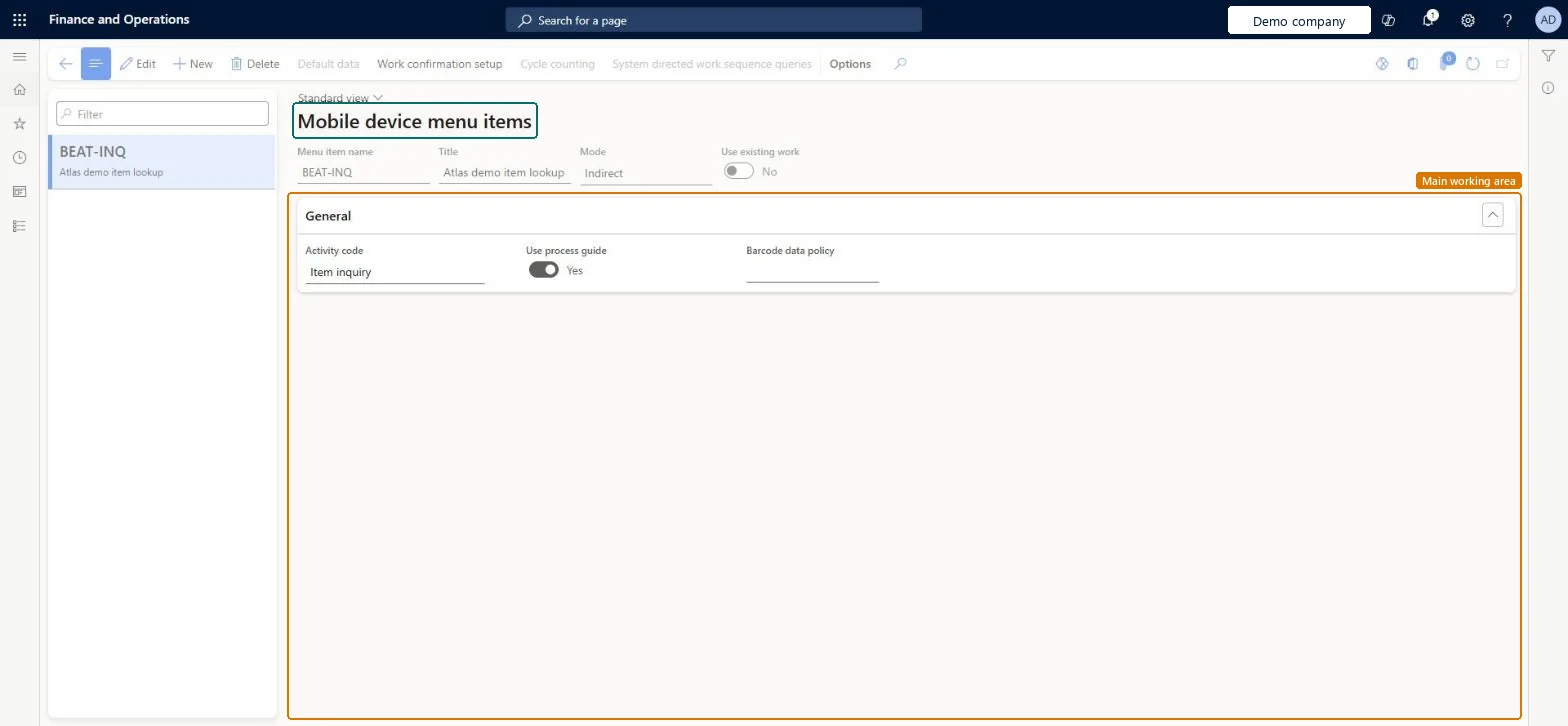
The page in Dynamics 365. page title tab to open what to set or check
About the examples: Examples and screenshots in this guide use BEAT, a demo company in a Dynamics 365 test environment. Use your own company's codes and values instead of copying them.
Setup steps on this page
Set up Mobile device menu items
Use this page to define each mobile device task, such as an inquiry, a receiving flow or the processing of existing work, and the options that apply to it.
How to use it
Go to Warehouse management > Setup > Mobile device > Mobile device menu items.
Select New to add a menu item, or select an existing one in the list pane and select Edit.
In the header, enter the Menu item name, the Title and the Mode, and set Use existing work.
On the General FastTab, set the options that apply, such as Work creation process, Display inventory status and Use default data.
Use the Action Pane buttons, such as Default data, Work confirmation setup and Cycle counting, for further setup.
Select Save.
Source: Checked in Dynamics 365
Fields on the page
Field
What it means
Table column
Mode
Decides what the menu item does. The Indirect mode is for a general activity or inquiry that does not create work.Microsoft Learn
MenuItemMode
Use existing work
Makes the menu item process work that another process has already created, such as putaway or picking work.Microsoft Learn
UseExistingWork
Display inventory status
Shows the status of items in inventory on the device.Microsoft Learn
Use default data
Turns on the Default data button, where you choose the fields that show data a worker typically needs.Microsoft Learn
Display disposition code
Shows disposition codes on the device so that workers can evaluate the status or quality of items, for example returned items.Microsoft Learn
Display batch disposition code
Shows batch disposition codes on the device so that workers can evaluate the status or quality of a batch.Microsoft Learn
Check on Warehouse management > Setup > Warehouse > License plates that the ID exists and that its items and quantities are available (not blocked). Microsoft Learn
Test checklist
Create a Purchase order line receiving item (Mode Work) and a user-directed picking item (Use existing work Yes) with a sales work class.
Add both to a test worker's menu.
Receive a purchase line in the app and check putaway work is created for another worker.
Release a sales order and check the picking item opens its work but not putaway work.
Mode Indirect for inquiries and activities; Mode Work for steps that create work; Mode Work with Use existing work Yes and a work class per item for processing existing workLearn defines these three menu item types; the work classes on an existing-work item control which work it can process, and so which roles can do it.
Planning opening stock with License plate loading where Batch number or Serial number is above Location in the reservation hierarchy; that option can't be used for those items.
Reversible: Settings can be changed at any time; workers pick them up the next time they run the item. Microsoft Learn
Technical architect
6Technical
Menu item
WHSRFMenuItemChecked in Dynamics 365
Form
WHSRFMenuItemChecked in Dynamics 365
Table
WHSRFMenuItemTableShown as “MENU ITEMS” in Record infoKey field: MenuItemNameChecked in Dynamics 365
Data entities
WHSWarehouseMobileDeviceMenuItemV3EntityWarehouse mobile device menu item V3 Microsoft data model
Who can open it
PrivilegesMaintain menu items on mobile devices WHSRFMenuItemMaintainView menu items on mobile devices WHSRFMenuItemViewDutiesEnable warehouse operation process WMSWarehouseOperationProcessEnable1 security roleWarehouse manager WMSWarehouseManagerChecked in Dynamics 365
Roles to set it up and use it
To set it up or change itWarehouse manager WMSWarehouseManagerGive people one of these roles. On this system, 1 role can open this page.Checked in Dynamics 365
Actions on the page
(Action Pane without tabs): Default data, Work confirmation setup, Cycle counting, System directed work sequence queries, Edit query, Field list, Edit query, Field listChecked in Dynamics 365