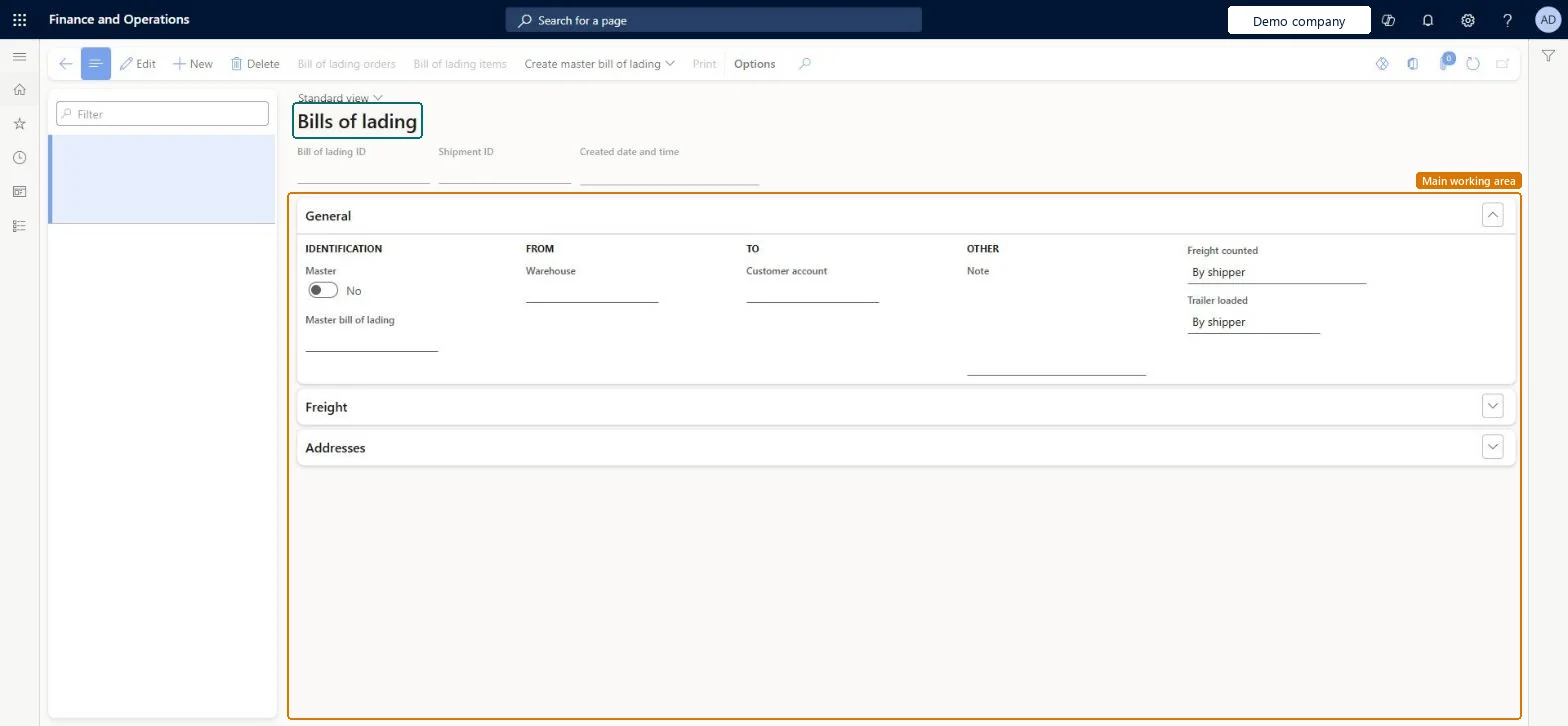
A details page where you create and maintain bills of lading, the shipping documents between the company and the carrier, including master bills of lading.
Shipping clerk, Logistics manager, Transportation coordinator and 2 more roles
Business process
Load goods for shipping
Menu item
WHSBillOfLading
Main table
WHSBillOfLading
Show what matters for
PAGE GUIDEWhat the page does and how to use it7 sections. Choose a role to highlight what matters to you.
Everyone
1What it is and why
What it is
A details page where you create and maintain bills of lading, the shipping documents between the company and the carrier, including master bills of lading.
What you do here
Use this page to create a bill of lading by hand, review one that was generated for a shipment, and create a master bill of lading.
The page in Dynamics 365. page title tab to open what to set or check
About the examples: Examples and screenshots in this guide use BEAT, a demo company in a Dynamics 365 test environment. Use your own company's codes and values instead of copying them.
How to use it
Go to Warehouse management > Inquiries and reports > Bill of lading.
Select New to create a bill of lading, or select an existing one in the list on the left.
Complete the General, Freight and Addresses FastTabs.
Use the Action Pane buttons, such as Create master bill of lading, Bill of lading orders, Bill of lading items and Print, as you need.
Source: Checked in Dynamics 365
Fields on the page
Field
What it means
Table column
Master bill of lading
A master bill of lading has the same layout and information as a bill of lading and summarises the content of all the shipments on a load.Microsoft Learn
WHSBillOfLadingShown as “BILL OF LADING” in Record infoKey field: BillOfLadingIdChecked in Dynamics 365
Who can open it
PrivilegesMaintain bill of lading WHSBillOfLadingMaintainView bill of lading WHSBillOfLadingViewDutiesBill of lading WHSBillOfLadingMaintainMaintain load planning WHSLoadPlanningMaintainInquire into load planning progress WHSLoadPlanningProgressInquire5 security rolesShipping clerk InventShippingClerkLogistics manager TMSLogisticsManagerTransportation coordinator TMSTransportationCoordinatorWarehouse planner WHSWarehousePlannerWarehouse manager WMSWarehouseManagerChecked in Dynamics 365
Roles to set it up and use it
To set it up or change itTransportation coordinator TMSTransportationCoordinatorShipping clerk InventShippingClerkTo use itWarehouse planner WHSWarehousePlannerWarehouse manager WMSWarehouseManagerLogistics manager TMSLogisticsManagerGive people one of these roles. On this system, 5 roles can open this page.Checked in Dynamics 365
Actions on the page
(Action Pane without tabs): Bill of lading orders, Bill of lading items, Create master bill of lading, PrintChecked in Dynamics 365