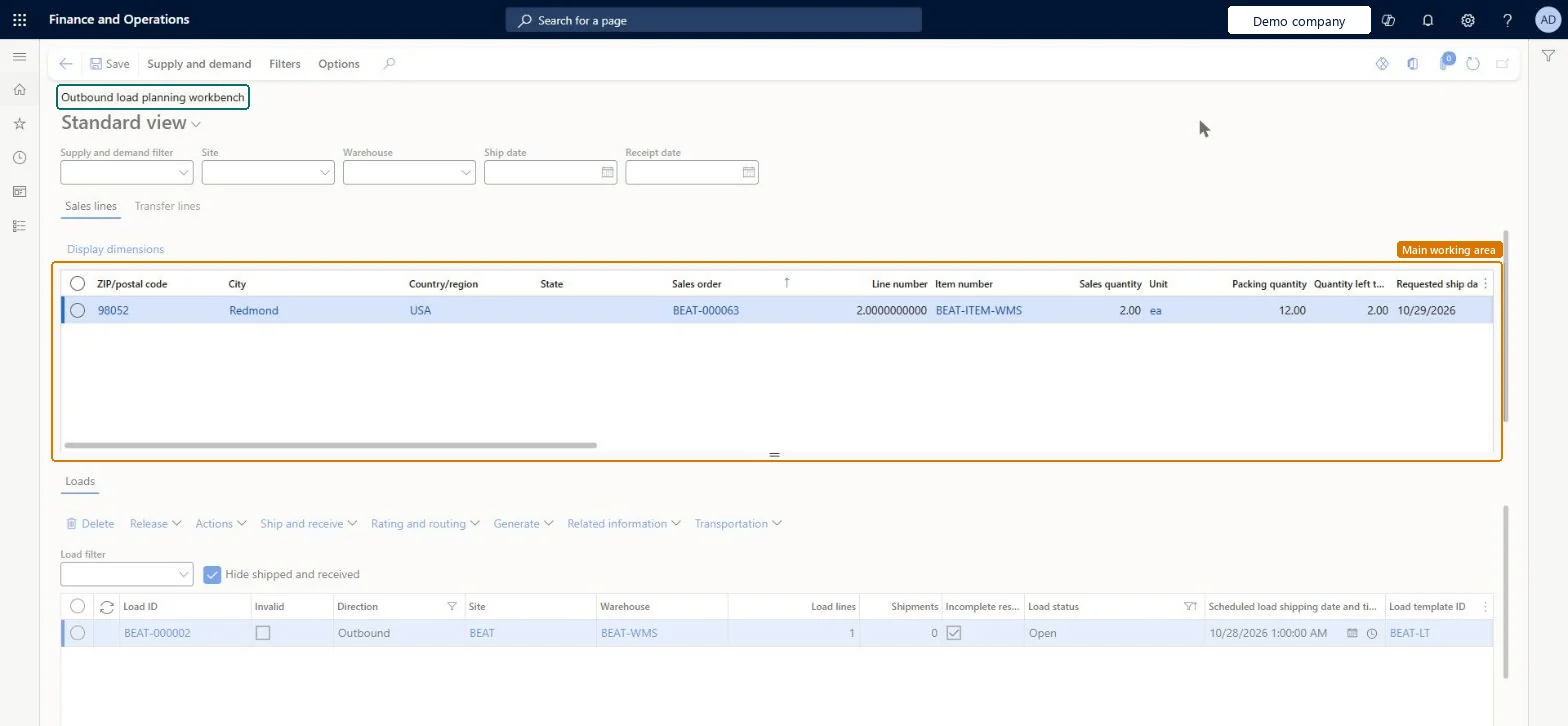
About the examples: Examples and screenshots in this guide use BEAT, a demo company in a Dynamics 365 test environment. Use your own company's codes and values instead of copying them.
Steps from Microsoft
Go to Warehouse management > Loads > Outbound load planning workbench.
Select the tab for the type of line to build the load from, for example Sales lines.
Select the order lines to include in the load.
On the Action Pane, open the Supply and demand tab and select To new load.
In the Load template ID field, select the load template that represents the container or vehicle to use.
The load template for the new load. It defines the maximum weight and volume for the whole load, for example the size of a container or a truck.Microsoft Learn
LoadTemplateId
Supply and demand filter
Applies a saved load planning filter so that the page shows only the order lines that match it.Microsoft Learn
Common errors and fixes
Message
What to do
Unable to cancel remaining qty for load. Work exists for load.
Cancel unfulfilled quantity only works when no Open or In progress work remains for the load. Finish or cancel that work first, or use Split quantity to new load. Microsoft Learn
Test checklist
Create a sales order for a transportation-enabled item at a warehouse enabled for transportation management and warehouse management processes.
On the Sales lines tab, select the line and Supply and demand > To new load; select a Load template ID and OK. Check the load appears in the Loads grid.
If you rate loads: set Transportation management actions usage to Used in Warehouse management parameters, open Rating and routing > Rate route workbench, select Rate shop and Assign a route.
Create a load planning filter, set it in Supply and demand filter and check only matching lines are shown.
Select the load and Release > Release to warehouse; check shipments and work are created.
Hard to reverse: Building loads is easy to change before release. Release to warehouse creates shipments and, with automatic wave processing, work; after that, changes mean canceling or reversing work and shipment confirmation on the load and releasing the order again. Microsoft Learn
Technical architect
5Technical
Menu item
WHSOutboundLoadPlanningWorkbenchChecked in Dynamics 365
Form
WHSOutboundLoadPlanningWorkbenchChecked in Dynamics 365
Table
SalesLineShown as “ORDER LINES” in Record infoKey field: InventTransIdChecked in Dynamics 365
To set it up or change itTransportation coordinator TMSTransportationCoordinatorTo use itWarehouse planner WHSWarehousePlannerWarehouse manager WMSWarehouseManagerLogistics manager TMSLogisticsManagerGive people one of these roles. On this system, 4 roles can open this page.Checked in Dynamics 365
Actions on the page
Supply and demand: Add, Related information, ConsolidateFilters: ManageChecked in Dynamics 365