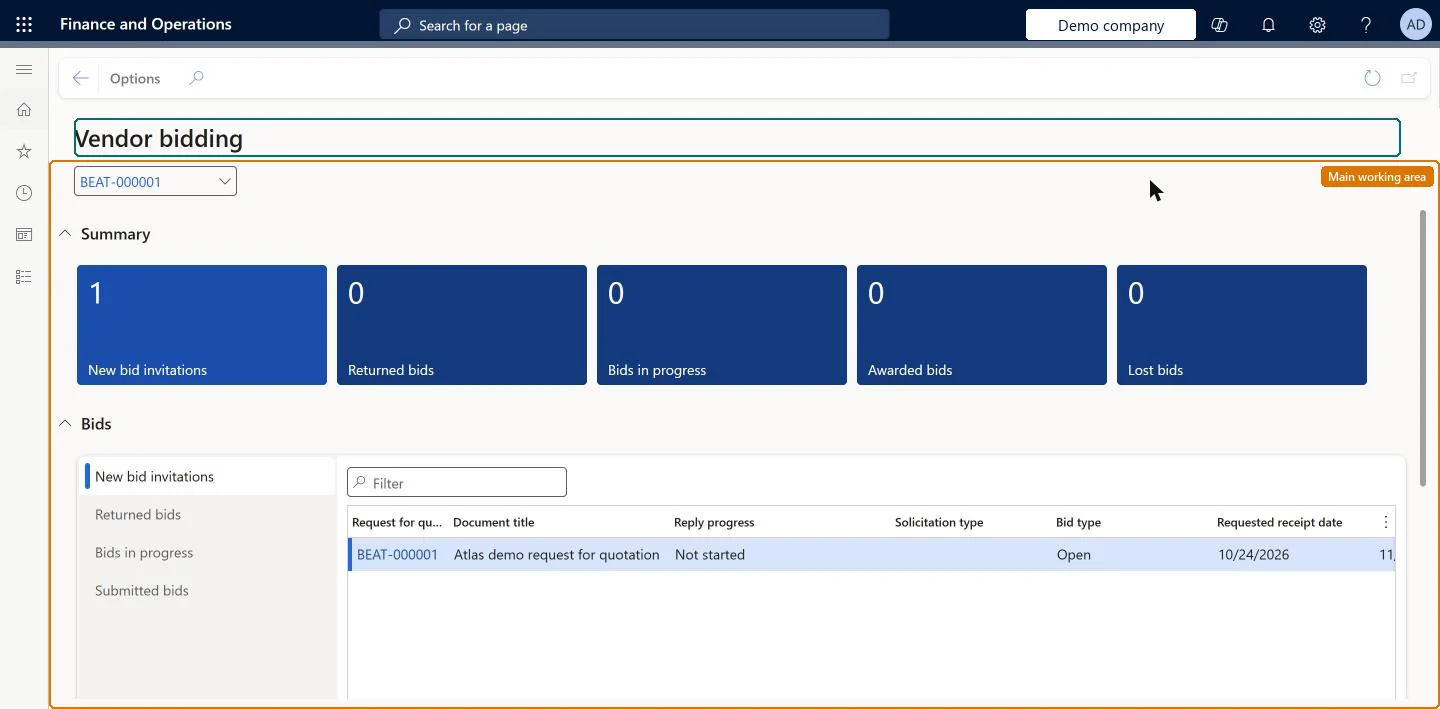
A workspace where a vendor sees the requests for quotation it has been invited to, its bids in progress, and bids it has won, lost, declined or had returned.
PAGE GUIDEWhat the page does and how to use it8 sections. Choose a role to highlight what matters to you.
Everyone
1What it is and why
What it is
A workspace where a vendor sees the requests for quotation it has been invited to, its bids in progress, and bids it has won, lost, declined or had returned.
What you do here
Use this page to view requests for quotation your company has been invited to and to respond to them by entering bids.
Example
For example, vendor BEAT-000001 sees a new RFQ under New bid invitations, selects Bid, enters a unit price of 12.50 on each line, answers the RFQ questionnaire and submits the bid two days before the expiration date. When BEAT awards one line, the bid moves to Awarded bids.
The page in Dynamics 365. page title tab to open what to set or check
About the examples: Examples and screenshots in this guide use BEAT, a demo company in a Dynamics 365 test environment. Use your own company's codes and values instead of copying them.
Setup steps on this page
Work on bids from the Vendor bidding workspace
Let vendors find RFQ invitations and follow their bids to award or loss.
Steps from Microsoft
Go to Vendor collaboration > Workspaces > Vendor bidding.
Select New bid invitations and open the request for quotation.
Select Bid, enter the bid in the line grid and any extra bid information in the line details.
Answer any questionnaires that must be completed before you can submit.
Save the bid, and submit it before the expiration date; follow it in Awarded bids or Lost bids.
RFQs where a vendor contact person declined to bid.Microsoft Learn
An RFQ a contact person declined to bid on.
Request for quotations
Link to all the RFQs the vendor has been involved in, searchable by status.Microsoft Learn
Filter on Sent to see open invitations.
Open published requests for quotations
Open RFQs available to the public. Shown only when the public sector configuration is turned on.Microsoft Learn
Common errors and fixes
Message
What to do
A bid that was in progress has disappeared after the RFQ changed
When an amendment is finalized, existing bid replies are removed; the amended RFQ is listed again in New bid invitations and needs a new bid. Microsoft Learn
Submit is not possible
Answer the questionnaires attached to the RFQ first; some must be answered before a bid can be submitted. Microsoft Learn
Test checklist
In the customer company, send an RFQ to the vendor.
As the vendor user, check that it is listed in New bid invitations.
Select Bid, enter prices, save, and check that it is listed in Bids in progress.
Submit the bid and, after the customer awards a line, check that it is listed in Awarded bids.
Start from New bid invitations and save bids as you work; submit only when every questionnaire is answeredNew bid invitations also holds amended RFQs that need a new bid, and saving keeps the bid in Bids in progress until it is submitted.
Microsoft provides two external roles for vendor collaboration: Vendor admin (external), for contacts and user requests, and Vendor (external), for purchase orders, invoices, consignment inventory, RFQs and vendor information. External users created through a user request also get the SystemExternalUser role. On the live system, Vendor contact (external) can open this workspace.
The workspace lists the RFQs that the vendor account was invited to by the customer's legal entities; open published RFQs are shown only with the public sector configuration. Microsoft Learn
Can it be undone
Hard to reverse: Saving and submitting can be reversed by recalling the bid before expiry. Decline can't be recalled. Microsoft Learn
If you change it later
A submitted bid can be recalled and updated until the expiration date. Declining can't be recalled, and an amended RFQ needs a new bid. Microsoft Learn
Technical architect
6Technical
Menu item
VendVendorRequestForQuotationsWorkspaceChecked in Dynamics 365
Form
VendVendorRequestForQuotationsWorkspaceChecked in Dynamics 365
Who can open it
PrivilegesMaintain vendor requests for quotations replies VendVendorRequestForQuotationsWorkspaceMaintainDutiesMaintain vendor requests for quotations replies VendVendorRequestForQuotationsWorkspaceMaintain1 security roleVendor contact (external) VendVendorContactChecked in Dynamics 365
Roles to set it up and use it
To use itVendor contact (external) VendVendorContactGive people one of these roles. On this system, 1 role can open this page.Checked in Dynamics 365
Load order: The Vendor bidding workspace has no data entity in Data management. Its lists are built from the RFQs that the customer sends; bids are entered by the vendor on Request for quotation bid.Checked in Dynamics 365