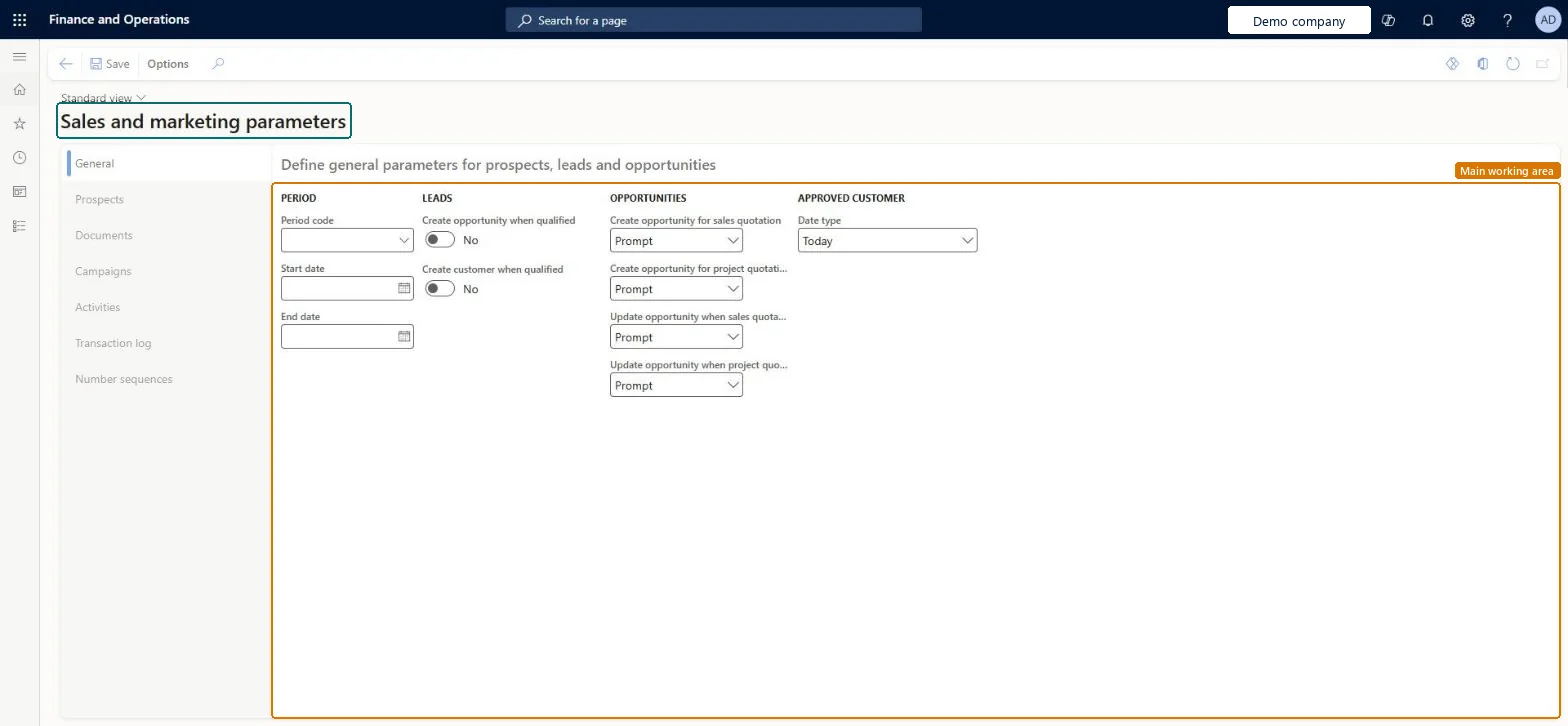
The parameters page of the Sales and marketing area. It holds the company-wide defaults for prospects, leads, opportunities, campaigns, activities, the transaction log and telephony, the Date type that approved customer lists are checked against, and the number sequences for prospects, campaigns and other relationship records.
Marketing manager, Information technology manager, Sales manager
Business process
Define order management policies for Dynamics 365 Supply Chain Management
Menu item
smmParameters
Main table
smmParametersTable
Data entity
smmMarketingMailPolicyEntity
Setup steps
1 on this page
Show what matters for
PAGE GUIDEWhat the page does and how to use it8 sections. Choose a role to highlight what matters to you.
Everyone
1What it is and why
What it is
The parameters page of the Sales and marketing area. It holds the company-wide defaults for prospects, leads, opportunities, campaigns, activities, the transaction log and telephony, the Date type that approved customer lists are checked against, and the number sequences for prospects, campaigns and other relationship records.
What you do here
Use it once per legal entity, before the sales team starts creating prospects, leads, campaigns and quotations, so that new records get the right defaults and numbers.
Example
BEAT converts prospect PRS-000418 to a customer. Because the Prospects tab sets customer group WHOLESALE as the default, the new customer account gets WHOLESALE without anyone typing it. The same week, a sales order SO-001234 for 4,800.00 has a requested ship date of 12/15/2026; with Date type set to Requested ship date, the approved customer list line that expires on 11/30/2026 blocks the item.
The page in Dynamics 365. page title tab to open what to set or check
About the examples: Examples and screenshots in this guide use BEAT, a demo company in a Dynamics 365 test environment. Use your own company's codes and values instead of copying them.
Step by step, with screenshots
Set up Sales and marketing parameters1 screen
Use this page to reduce manual data entry when new prospects, leads, opportunities and address book records are created.
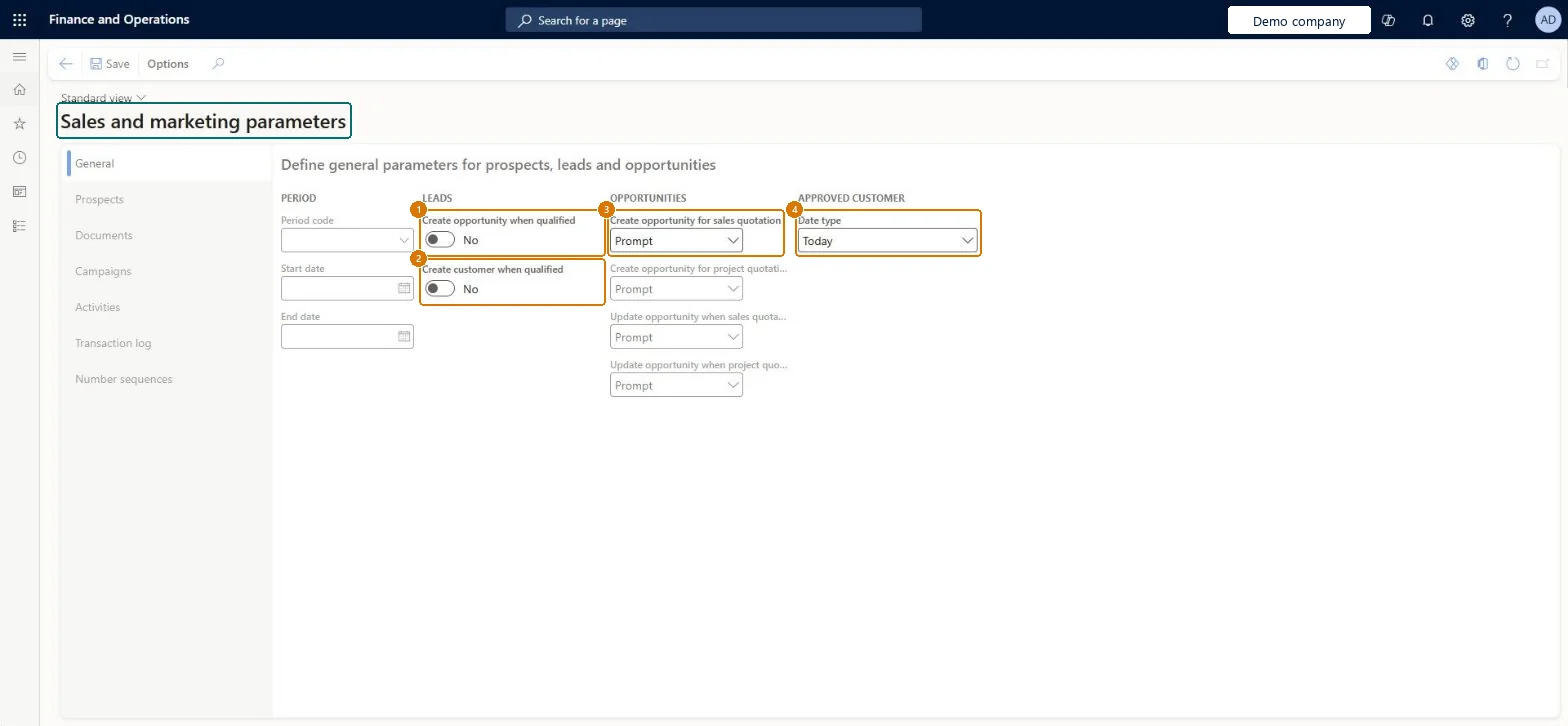
Screen 1
Review the sales and marketing parameters
Go to Sales and marketing > Setup > Sales and marketing parameters
Open the General tab
Decide whether qualifying a lead creates an opportunity or a customer
Choose whether sales and project quotations create or update opportunities
Review the other tabs, such as Prospects, Documents and Number sequences
1Create opportunity when qualified
No
2Create customer when qualified
No
3Create opportunity for sales quotation
Prompt
4Date type
Today
Update opportunity when sales quotation is updated
Prompt
Show the full screen page title tab to open what to set or check
Steps from Microsoft
Go to Sales and marketing > Setup > Sales and marketing parameters.
On the Prospects tab, set the default customer group that a prospect gets when it's converted to a customer.
On the General tab, decide whether qualifying a lead creates a customer and an opportunity, and in Date type select the date that approved customer lists are checked against.
On the Campaigns and Activities tabs, set the campaign defaults, Days campaign expires and the default activity category, type and phase.
On the Number sequences tab, give every reference (Prospect, Campaign ID and the others) a number sequence. If you integrate with Dynamics 365 Sales, make sure the prospect sequence doesn't overlap the customer account sequence.
Create a test prospect and convert it to a customer, and check the customer group and the account number that it gets.
Which date on a sales agreement, quotation or order is checked against the effective and expiration dates of the approved customer list: Today, Requested ship date, Requested receipt date or Order date. The check runs only when the check method is Warning only or Not allowed.Microsoft Learn
Requested ship date
QMSACLDateType
Days campaign expires
The number of days until a campaign expires. The total number of campaign days is always this number plus 1, because the start date counts in the length of the campaign.Microsoft Learn
30
CampaignNumOfDaysExpiryDate
Create activity
Whether activities are created automatically, not at all, or after a prompt.Microsoft Learn
Whether an opportunity record is created when a lead is qualified (General tab).Microsoft Learn
No
AutoCreateOpportunity
Create customer when qualified
Whether a customer is created automatically when a lead is qualified (General tab).Microsoft Learn
No
AutoCreateCustomer
Create opportunity for sales quotation
Whether an opportunity is created for a new sales quotation (for example Prompt, read on the live page); the General tab is where you specify when opportunity records are created.Microsoft Learn
Prompt
CreateOpportunityForSalesQuotation
Update opportunity when sales quotation is updated
Whether the opportunity linked to a sales quotation is updated when that quotation is updated, for example Prompt (read on the live page).Checked in Dynamics 365
Prompt
Common errors and fixes
Message
What to do
A prospect can't be converted to a customer in a Dynamics 365 Sales integration
The prospect keeps its number as the customer account number, so the prospect number sequence and the customer account number sequence must not overlap. Give them separate ranges or prefixes on the Number sequences tab. Microsoft Learn
An approved customer list line blocks or warns at an unexpected time
Check Date type on this page. The approved customer list effective and expiration dates are compared with that date on the document (Today, Requested ship date, Requested receipt date or Order date). Microsoft Learn
Test checklist
On the Prospects tab, set the default customer group to WHOLESALE.
Create prospect PRS-000418 of the Organization type and select Convert to customer.
Open the new customer and check that the customer group is WHOLESALE and that the account number is the prospect number PRS-000418.
Set Date type to Requested ship date, give an approved customer list line an expiration date before an order's requested ship date with check method Not allowed, and check that the order line is blocked.
Set Date type to the date your approved customer list is meant to protect (usually Requested ship date), set the default prospect customer group, and give prospects a number sequence that doesn't overlap the customer account sequence.The Date type decides which document date is checked against approved customer list effective and expiration dates. Converted prospects keep their number as the customer account and get the default customer group from the Prospects tab.
BEAT uses number sequence Sale_91. Checked in Dynamics 365
Relation account
Per company
BEAT uses number sequence Sale_95. Checked in Dynamics 365
Relation journal ID
Per company
BEAT uses number sequence Sale_99. Checked in Dynamics 365
Member ID
Per company
BEAT uses number sequence Sale_103. Checked in Dynamics 365
Campaign ID
Per company
BEAT uses number sequence Sale_107. Checked in Dynamics 365
Knowledge article item ID
Per company
BEAT uses number sequence Sale_111. Checked in Dynamics 365
Sales unit member ID
Per company
BEAT uses number sequence Sale_115. Checked in Dynamics 365
Key
Per company
BEAT uses number sequence Sale_119. Checked in Dynamics 365
Call list ID
Per company
BEAT uses number sequence Sale_123. Checked in Dynamics 365
Lead ID
Per company
BEAT uses number sequence Sale_127. Checked in Dynamics 365
Opportunity ID
Per company
BEAT uses number sequence Sale_131. Checked in Dynamics 365
Feature management and licence
Licence or add-in
On the live system, Marketing manager, Information technology manager and Sales manager use this page.
Checked in Dynamics 365
Solution architect
5Design impact
Shared or per company
Per company: each legal entity has its own Sales and marketing parameters, so the defaults, Date type and number sequences are set again in every company that uses Sales and marketing. Microsoft data model
Can it be undone
Reversible: Every setting can be changed later and acts on records and validations created afterwards. Number sequences are the exception to plan carefully: in a Dynamics 365 Sales integration, overlapping prospect and customer numbers stop conversions. Microsoft Learn
If you change it later
A new default customer group applies to prospects converted after the change. A new Date type is used for approved customer list validations done afterwards; sales quotations and sales agreements are validated when they are confirmed, sales orders when lines are added, so existing documents aren't revalidated. Microsoft Learn
Technical architect
6Technical
Menu item
smmParametersChecked in Dynamics 365
Form
smmParametersChecked in Dynamics 365
Table
smmParametersTableShown as “Sales and marketing parameters” in Record infoChecked in Dynamics 365
PrivilegesMaintain Sales and marketing parameters smmParametersMaintainView Sales and marketing parameters smmParametersViewDutiesInquire into Sales and marketing policies smmCRMPolicyInquireEnable the Sales and marketing process smmCRMProcessEnable3 security rolesMarketing manager CRMMarketingManagerInformation technology manager SysServerITManagerSales manager TradeSalesManagerChecked in Dynamics 365
Roles to set it up and use it
To set it up or change itSales manager TradeSalesManagerInformation technology manager SysServerITManagerTo use itMarketing manager CRMMarketingManagerGive people one of these roles. On this system, 3 roles can open this page.Checked in Dynamics 365
Actions on the page
Options: Personalize, Page options, Edit, ShareChecked in Dynamics 365
smmProspectCreationPolicyEntity Covers one group of these parameters, as its name says; one record per company.smmLeadProcessingPolicyEntity Covers one group of these parameters, as its name says; one record per company.smmOpportunityMaintenancePolicyEntity Covers one group of these parameters, as its name says; one record per company.smmCampaignCreationPolicyEntity Covers one group of these parameters, as its name says; one record per company.smmSalesActivityCreationPolicyEntity Covers one group of these parameters, as its name says; one record per company.smmMarketingMailPolicyEntity Covers one group of these parameters, as its name says; one record per company.smmTransactionLoggingPolicyEntity Covers one group of these parameters, as its name says; one record per company.smmProspectStatisticsDefaultsEntity Covers one group of these parameters, as its name says; one record per company.Load order: No single entity loads the whole page: load all eight policy entities for each company, after the number sequences and the groups and codes they point to (customer groups, campaign types and groups, activity types). Number sequence references are set on the page itself.Load first: Number sequences, Prospect customer groups, Campaign setup codes, Activity typesChecked in Dynamics 365
Checked in a working Dynamics 365 system, version 10.0.49: the menu item, form, table and security, the page, the demo records and the values in the screenshots.