PAGE GUIDEWhat the page does and how to use it8 sections. Choose a role to highlight what matters to you.
Everyone
1What it is and why
What it is
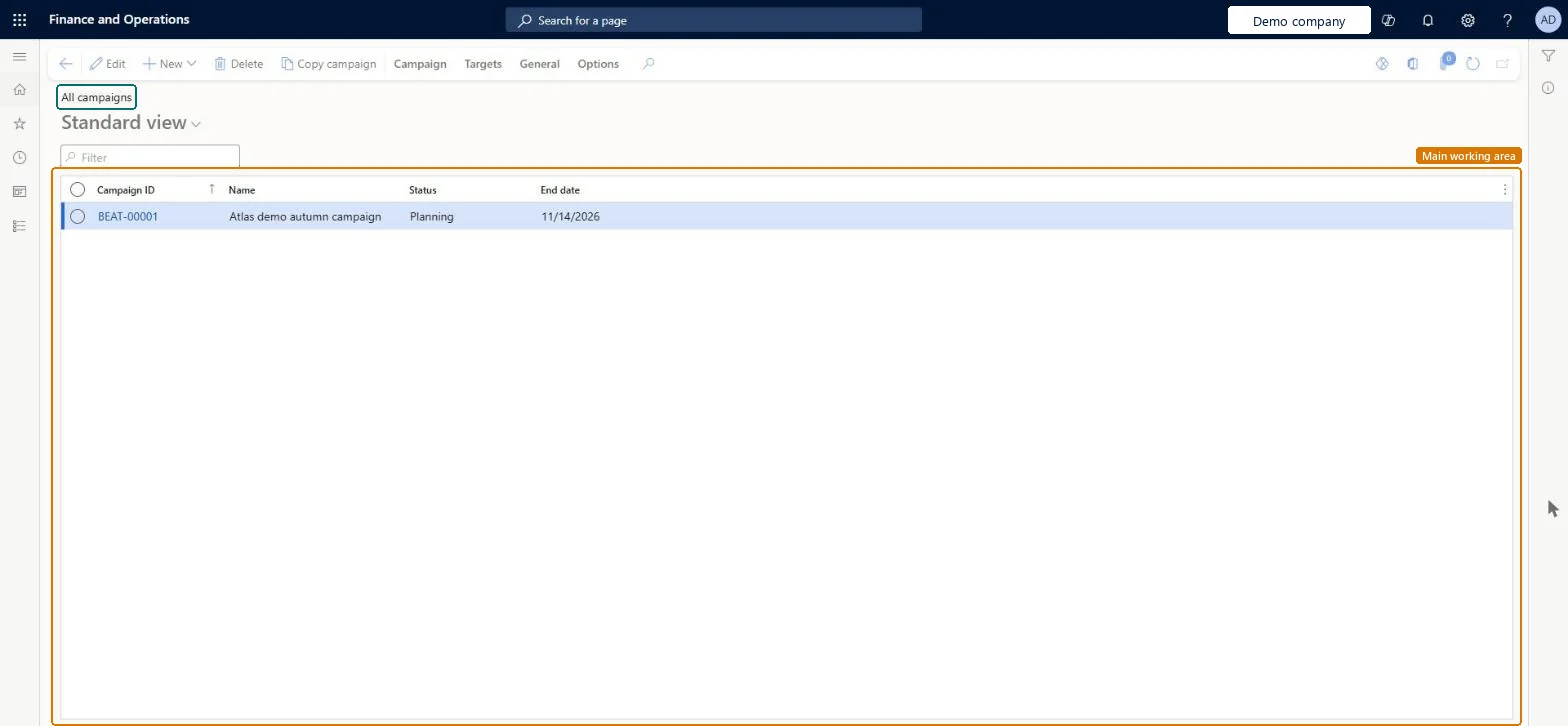
A list page of marketing campaigns, each aimed at selected contacts of prospects, leads, opportunities and customers.
What you do here
Use this page to create campaigns and subcampaigns and to follow each campaign's progress.
Example
For example, BEAT creates campaign 1003 for its spring pump offer with subcampaign ID format -##, so its regional subcampaigns get the numbers 1003-01 to 1003-03, and links it to call list CL-000045.
The page in Dynamics 365. page title tab to open what to set or check
About the examples: Examples and screenshots in this guide use BEAT, a demo company in a Dynamics 365 test environment. Use your own company's codes and values instead of copying them.
Setup steps on this page
Set campaign defaults and numbering before the first campaign
Use this page to create campaigns and subcampaigns and follow their progress.
Steps from Microsoft
Go to Sales and marketing > Marketing > Campaigns > All campaigns.
On the Action Pane, on the Campaign tab, select Campaign, and select Status, Type, Group and Target.
Enter a unique Name; to create subcampaigns later, select a format such as -## in Subcampaign ID format.
Check Start date and End date, which default from the campaign parameters in Sales and marketing parameters, then save.
To follow the campaign's costs, on the General tab, in the Set up group, connect the campaign to an existing or new project.
Set the campaign defaults in Sales and marketing parameters and agree a Subcampaign ID format before the first campaign is created.Start and end dates default from the parameters, and subcampaign numbers are built from the parent number with the format, so both shape every campaign that follows.
New records on this page take their Project from the ProjId reference; BEAT uses number sequence Proj_3. Checked in Dynamics 365
Call list ID
Per company
New records on this page take their Call list ID from the smmTMCallListID reference; BEAT uses number sequence Sale_123. Checked in Dynamics 365
Feature management and licence
Licence or add-in
On the live system, the roles that use this page include Sales manager, Marketing manager and Marketing coordinator.
Checked in Dynamics 365
Solution architect
5Design impact
Shared or per company
Per company: each legal entity has its own campaigns, campaign numbers and campaign setup. Microsoft data model
Can it be undone
Reversible with effort: Campaign details can be edited later; subcampaigns take their base data from the parent when they are created. Microsoft Learn
If you change it later
A campaign targets the contacts for prospects, leads, opportunities and customers selected for it; its responses start the sales process. Connecting it to a project brings its costs into that project. Microsoft Learn
Technical architect
6Technical
Menu item
smmCampaignsListPageChecked in Dynamics 365
Form
smmCampaignTableChecked in Dynamics 365
Table
smmCampaignTableShown as “Campaigns” in Record infoKey field: CampaignId, CampaignParentId, CampaignTypeId, CampaignName, CampaignGroupId, CampaignTargetId, ProjId, KMCollectionId, TMCallListIDChecked in Dynamics 365
PrivilegesMaintain my campaigns smmCampaignsListPage_MyCampaignMaintainView my campaigns smmCampaignsListPage_MyCampaignsViewMaintain campaign records smmCampaignTableMaintainView campaigns smmCampaignTableViewDutiesInquire into campaign progress smmCampaignProgressInquireMaintain campaigns smmCampaignsMaintain3 security rolesMarketing coordinator CRMMarketingCoordinatorMarketing manager CRMMarketingManagerSales manager TradeSalesManagerChecked in Dynamics 365
Roles to set it up and use it
To set it up or change itSales manager TradeSalesManagerMarketing manager CRMMarketingManagerMarketing coordinator CRMMarketingCoordinatorGive people one of these roles. On this system, 3 roles can open this page.Checked in Dynamics 365
Actions on the page
Campaign: Maintain, Process, AttachmentsTargets: Create, Mass create, BroadcastGeneral: Set up, Related information, Activities, PromotionsOptions: Personalize, Page options, ShareChecked in Dynamics 365
DimAttributeSmmCampaignTableEntity Exposes campaigns as values for financial dimensions; it covers only that use, not campaign details.Load order: Campaign details have no data entity in Data management: Microsoft's list of standard Sales and marketing entities has campaign setup entities (groups, types, targets, cancellation reasons) but none for campaigns. Load the setup entities, then enter campaigns on this page.Load first: smmCampaignGroupEntity, smmCampaignTypeEntity, smmCampaignTargetEntityMicrosoft data model