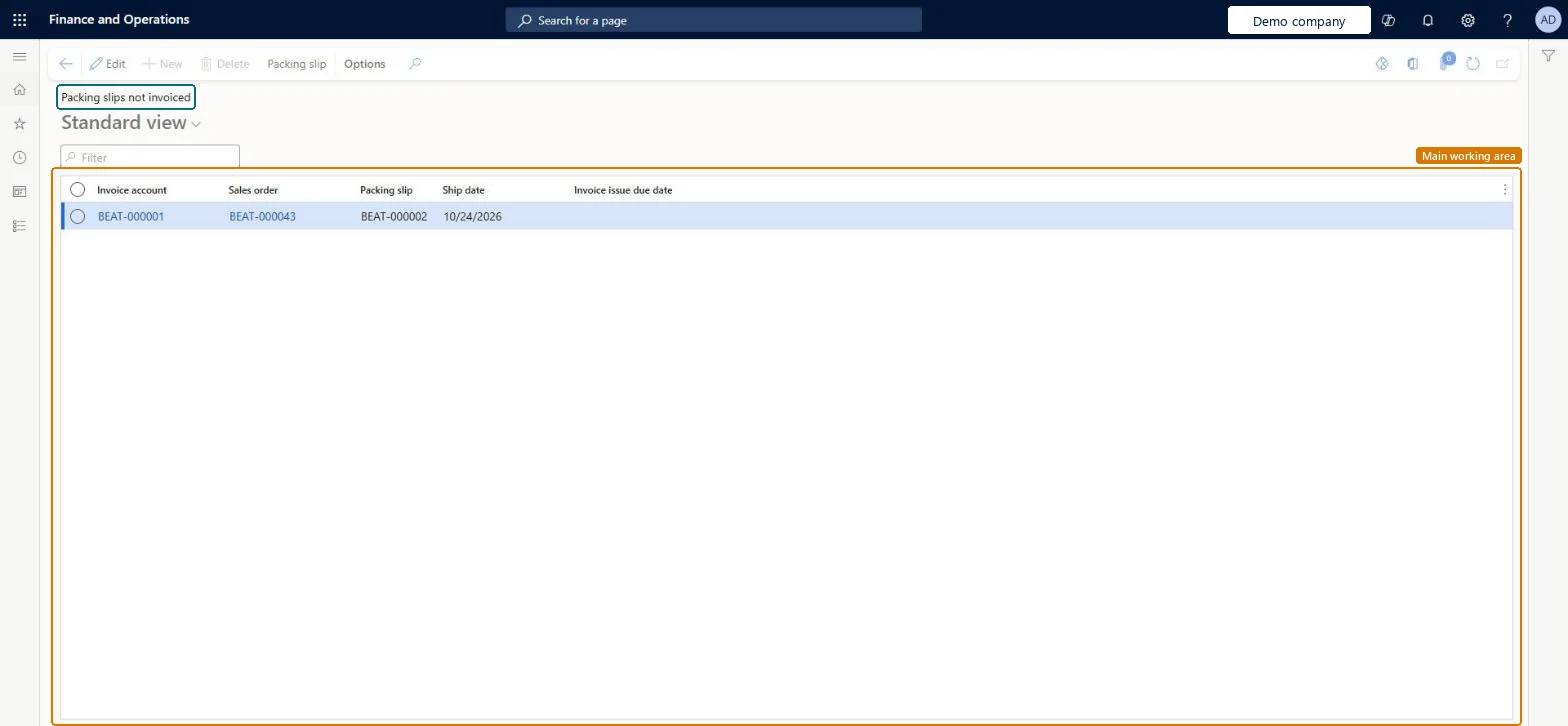
An inquiry page, part of the European invoice issue deadline localization, that lists posted packing slips not invoiced yet, with their invoice issue due date.
PAGE GUIDEWhat the page does and how to use it8 sections. Choose a role to highlight what matters to you.
Everyone
1What it is and why
What it is
An inquiry page, part of the European invoice issue deadline localization, that lists posted packing slips not invoiced yet, with their invoice issue due date.
What you do here
Use this page in a legal entity whose primary address is in an EU member state to follow up deliveries that still need an invoice before the invoice issue due date.
Example
For example, BEAT's German company ships PS-000930 to a French customer on 2026-11-20; with date interval 15-NM the invoice issue due date is 2026-12-15, and on 2026-12-10 the page still lists it, so the clerk invoices it that day.
The page in Dynamics 365. page title tab to open what to set or check
About the examples: Examples and screenshots in this guide use BEAT, a demo company in a Dynamics 365 test environment. Use your own company's codes and values instead of copying them.
Setup steps on this page
Follow up packing slips not invoiced
Invoice deliveries before the invoice issue due date.
Steps from Microsoft
Go to Sales and marketing > Sales orders > Order shipping > Packing slips not invoiced.
Sort by Invoice issue due date so the deliveries due first are on top.
Check the Invoice account, Sales order and Ship date of each packing slip.
Filter on one invoice account to invoice its deliveries together.
Post the invoice for the sales orders before the invoice issue due date.
The date by which the delivery must be invoiced, calculated when the packing slip is posted.Microsoft Learn
2026-12-15
InvoiceIssueDueDate_W
Packing slip
The posted packing slip still waiting for an invoice.Microsoft Learn
PS-000930
Common errors and fixes
Message
What to do
The Invoice issue due date is empty on a packing slip.
The date is calculated when the packing slip is posted, from a calculation rule for the country/region type. Set up the date interval and the rule (with a start date) before posting; the legal entity's primary address must be in an EU member state. Microsoft Learn
Test checklist
Check the legal entity's primary address is in an EU member state.
Create date interval 15-NM (To date: Month, End, +15 Days) on General ledger > Ledger setup > Date intervals.
On Set up calculation for invoice issue due date, add a line for country/region type EU with a start date and date interval code 15-NM.
Post a packing slip for an intra-EU customer without invoicing it.
Open Packing slips not invoiced and check the Invoice issue due date is the fifteenth day of the month after delivery.
Sort by Invoice issue due date and invoice the oldest first.EU rules require intra-EU shipments to be invoiced by the fifteenth day of the month after delivery.
On the live system, Sales manager, Accounts receivable clerk, Accounts receivable manager and Rental manager use this page. The invoice issue due date functionality needs the legal entity's primary address in an EU member state.
Reversible: This is an inquiry; it changes nothing. The invoice issue due date it shows comes from the calculation rule (a date interval code per country/region type). Each rule line has a start date, so a new rule is added as a new line valid from a new date. Microsoft Learn
If you change it later
An inquiry. The due date it shows is calculated when the packing slip is posted, from the rule for the country/region type; a changed rule applies to later packing slips. Microsoft Learn
Technical architect
6Technical
Menu item
CustPackingSlipNotInvoicedJour_WChecked in Dynamics 365
Form
CustPackingSlipNotInvoicedJour_WChecked in Dynamics 365
Table
CustPackingSlipJourShown as “Customer packing slips” in Record infoChecked in Dynamics 365
Data entities
ScpHistoricalSalesDemandEntityHistorical Sales Demand Entity Checked in Dynamics 365
Roles to set it up and use it
To use itSales manager TradeSalesManagerRental manager RentalManagerRental coordinator agent RentalCoordinatorAgentAccounts receivable clerk CustInvoiceAccountsReceivableClerkAccounts receivable manager CustInvoiceAccountsReceivableManagerGive people one of these roles. On this system, 21 roles can open this page.Checked in Dynamics 365
Actions on the page
Options: Personalize, Page options, ShareChecked in Dynamics 365
ScpHistoricalSalesDemandEntity data entity Checked in Dynamics 365
Data migration
Load order: Packing slips not invoiced has no data entity in Data management. No entity in the Common Data Model is built on its table (CustPackingSlipJour); it lists posted packing slips, which are created by posting.Checked in Dynamics 365