Collections manager, Marketing coordinator, Marketing manager and 11 more roles
Business process
Maintain contacts and accounts
Menu item
smmBusinessRelationsListPage_MyBusRel
Main table
smmBusRelTable
Data entity
smmProspectEntity
Setup steps
1 on this page
Show what matters for
PAGE GUIDEWhat the page does and how to use it8 sections. Choose a role to highlight what matters to you.
Everyone
1What it is and why
What it is
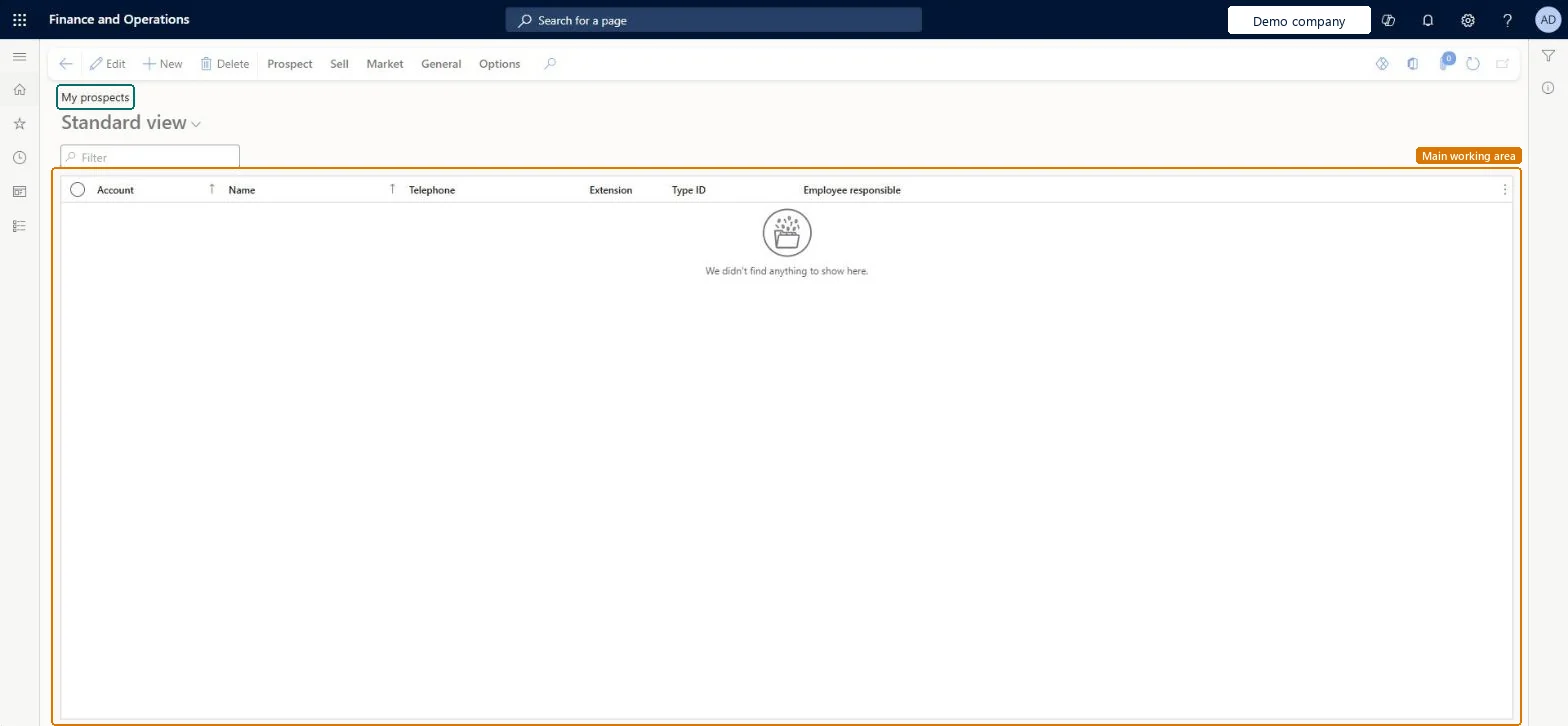
A list page of prospects, filtered to the prospects you are responsible for.
What you do here
Use this page to work only on the prospects where you are the employee responsible: follow them up, quote them and convert them when they buy.
Example
For example, a BEAT salesperson sees the 9 prospects he is responsible for, sends quotation QT-000877 to BEAT-P-000322 and converts it to a customer the day it is confirmed.
The page in Dynamics 365. page title tab to open what to set or check
About the examples: Examples and screenshots in this guide use BEAT, a demo company in a Dynamics 365 test environment. Use your own company's codes and values instead of copying them.
Setup steps on this page
Fill Employee responsible on prospects
Use this page as a salesperson's own prospect list.
Steps from Microsoft
Go to Sales and marketing > Relationships > Prospects > My prospects.
Sort on Type ID or Status to see which of your prospects need a follow-up.
To quote a prospect, go to All quotations, create a quotation with Account type Prospect and select the prospect.
After the quotation is sent, on the Follow up tab select Convert to customer, then Confirm to create the sales order.
Confirming the quotation for a prospect doesn't give the customer you expect.
Convert the prospect to a customer first (Follow up > Convert to customer); the customer keeps the prospect's number and gets the default customer group from Sales and marketing parameters. Microsoft Learn
Test checklist
Create a prospect of the Organization type and set yourself as Employee responsible.
Open My prospects and check the prospect is listed.
Create a sales quotation for it (Account type Prospect), select Send quotation, then on the Follow up tab select Convert to customer.
Check the customer is created with the prospect's account number and the default customer group from Sales and marketing parameters.
Fill Employee responsible on every prospect, then sort your list on Status to plan follow-ups.Only prospects that belong to you appear here; a prospect nobody is responsible for is easy to forget until it is converted or lost.
Enable prospects in Sales quotation lifecycle with Dynamics 365 Sales
Licence or add-in
On the live system, the roles that use this page include Marketing manager, Marketing coordinator, Customer service representative, Customer service manager and Rental manager. Prospect integration with Dynamics 365 Sales uses the feature Enable prospects in Sales quotation lifecycle with Dynamics 365 Sales, mandatory from version 10.0.43.
Hard to reverse: Same records as All prospects. Editing is free, but Convert to customer creates a customer with the prospect's account number and retires the prospect; Learn gives no way back, so treat conversion as final. Microsoft Learn
If you change it later
A view on the same prospects as All prospects. Converting a prospect from here or from its quotation retires it and creates a customer with the same number. Microsoft Learn
Technical architect
6Technical
Menu item
smmBusinessRelationsListPage_MyBusRelChecked in Dynamics 365
Form
smmBusRelTableChecked in Dynamics 365
Table
smmBusRelTableShown as “Prospects” in Record infoKey field: BusRelAccount, Party, Party_NameChecked in Dynamics 365
PrivilegesView my prospects smmBusinessRelationsListPage_MyBuViewMaintain my prospect records smmBusinessRelationsListPage_MyMaintainDutiesMaintain prospect master RentalsmmBusinessRelationMaintainInquire into prospect master RentalsmmBusinessRelationMasterInquireInquire into prospect master smmBusinessRelationMasterInquireMaintain prospects smmBusinessRelationsMaintain15 security rolesCollections manager CollectionLetterCollectionsManagerMarketing coordinator CRMMarketingCoordinatorMarketing manager CRMMarketingManagerMCRTestUserRoleRental clerk RentalClerkRental coordinator agent RentalCoordinatorAgentRental manager RentalManagerRental purchasing manager RentalPurchasingManagerRental representative RentalRepresentativeRental sales manager RentalSalesManagerCustomer service manager TradeCustomerServiceManagerCustomer service representative TradeCustomerServiceRepresentativeSales clerk TradeSalesClerkSales manager TradeSalesManagerSales representative TradeSalesRepresentativeChecked in Dynamics 365
Roles to set it up and use it
To set it up or change itRental manager RentalManagerRental coordinator agent RentalCoordinatorAgentRental sales manager RentalSalesManagerSales representative TradeSalesRepresentativeSales clerk TradeSalesClerkTo use itSales manager TradeSalesManagerMarketing manager CRMMarketingManagerRental representative RentalRepresentativeCustomer service manager TradeCustomerServiceManagerRental clerk RentalClerkGive people one of these roles. On this system, 14 roles can open this page.Checked in Dynamics 365
Actions on the page
Prospect: Maintain, Accounts, Statistics, AttachmentsSell: New, Related informationMarket: Automation, Telemarketing, MailingsGeneral: New, Setup, Maintain, Convert, Related information, Activities, Catalog, RelatedOptions: Personalize, Page options, ShareChecked in Dynamics 365
smmProspectEntity (Prospects): loaded for each company; the same entity as All prospects.Load order: Load the prospect setup first, then prospects, then their contacts.Load first: Segments, Sales districts, Company chainsMicrosoft Learn