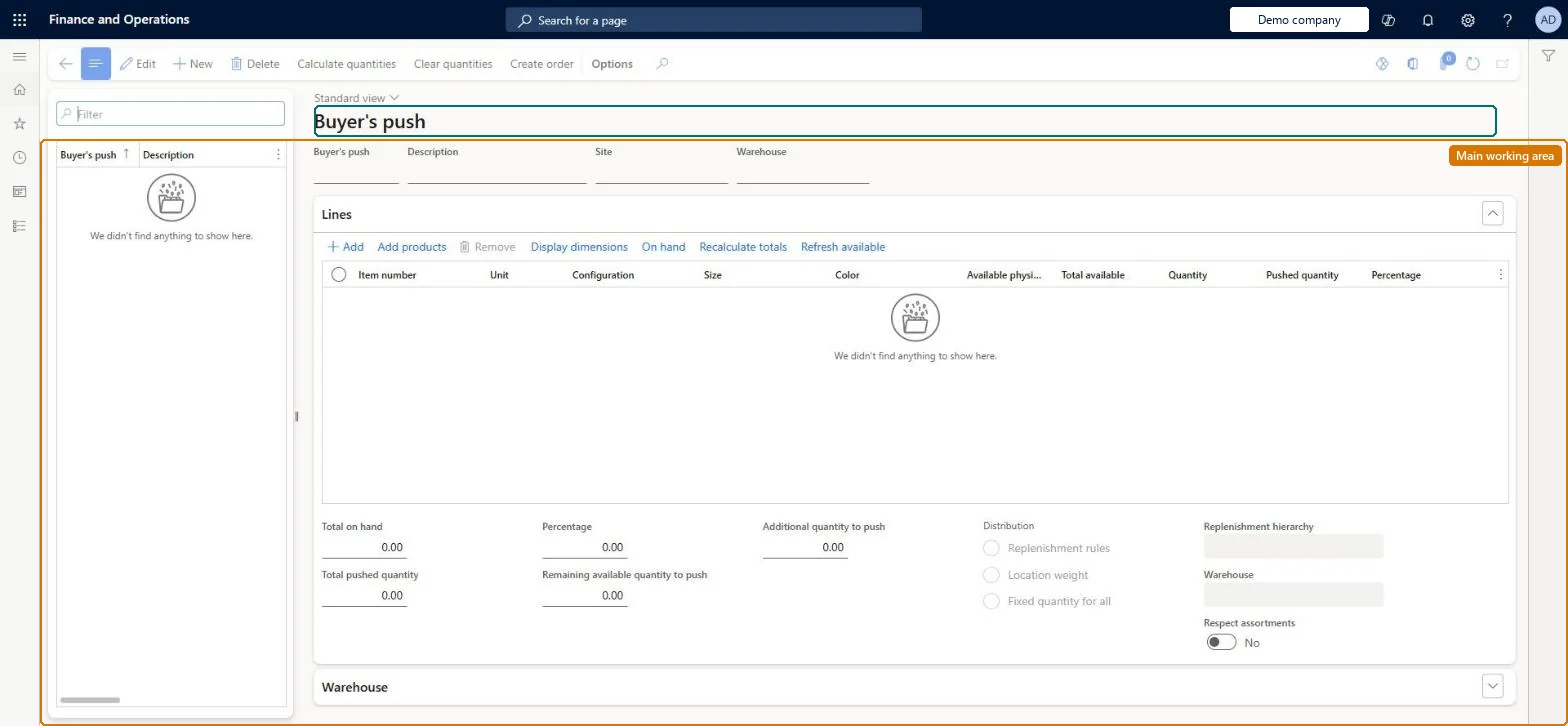
A page where products already on hand at a site and warehouse are pushed out to one or many stores by creating transfer orders, with quantities entered manually or calculated by distribution rules.
Retail and CommerceInventory managementReplenishment
RetailBuyersPush
Used by
Retail operations manager, Retail service
Business process
Define retail store replenishment flow in Dynamics 365 Supply Chain Management
Menu item
RetailBuyersPush
Main table
RetailBuyersPushTable
Data entity
RetailBuyersPushEntity
Show what matters for
PAGE GUIDEWhat the page does and how to use it7 sections. Choose a role to highlight what matters to you.
Everyone
1What it is and why
What it is
A page where products already on hand at a site and warehouse are pushed out to one or many stores by creating transfer orders, with quantities entered manually or calculated by distribution rules.
What you do here
Use this page to create a buyer's push: choose the source warehouse, add products and quantities, pick a distribution method and hierarchy, calculate the split and create the transfer orders.
Example
For example, push stock held at a distribution center to the stores in a replenishment hierarchy according to their location weights.
The page in Dynamics 365. page title tab to open what to set or check
About the examples: Examples and screenshots in this guide use BEAT, a demo company in a Dynamics 365 test environment. Use your own company's codes and values instead of copying them.
Steps from Microsoft
Go to Retail and Commerce > Inventory management > Replenishment > Buyer's push.
Select New and type a Description.
Select the Site and a Warehouse that has on-hand quantities.
Select Add and enter an Item number for each product or variant to push.
Enter Pushed quantity and, if needed, Additional quantity to push.
Set Distribution (for example Location weight), Replenishment hierarchy and Respect assortments.
Select Calculate quantities and review the Warehouse rows.
Hard to reverse: Create order generates the transfer orders to the stores. Buyer's push is the same replenishment feature as cross-docking, where the distribution settings lock once orders are created, so review the calculated quantities first. Microsoft Learn
If you change it later
Creating the order generates one transfer order per receiving store; where the receiving stores belong to another legal entity, sales orders and purchase orders are created instead. Microsoft Learn
Technical architect
5Technical
Menu item
RetailBuyersPushChecked in Dynamics 365
Form
RetailBuyersPushChecked in Dynamics 365
Table
RetailBuyersPushTableShown as “BUYER'S PUSH TABLE” in Record infoKey field: BuyersPushIdChecked in Dynamics 365
PrivilegesMaintain retail replenishment RetailReplenishmentMaintainDutiesMaintain retail replenishment RetailReplenishmentMaintain2 security rolesRetail operations manager RetailOperationsManagerRetail service RetailServiceChecked in Dynamics 365
Roles to set it up and use it
To set it up or change itRetail service RetailServiceRetail operations manager RetailOperationsManagerGive people one of these roles. On this system, 2 roles can open this page.Checked in Dynamics 365
Actions on the page
(Action Pane without tabs): Calculate quantities, Clear quantities, Create orderChecked in Dynamics 365