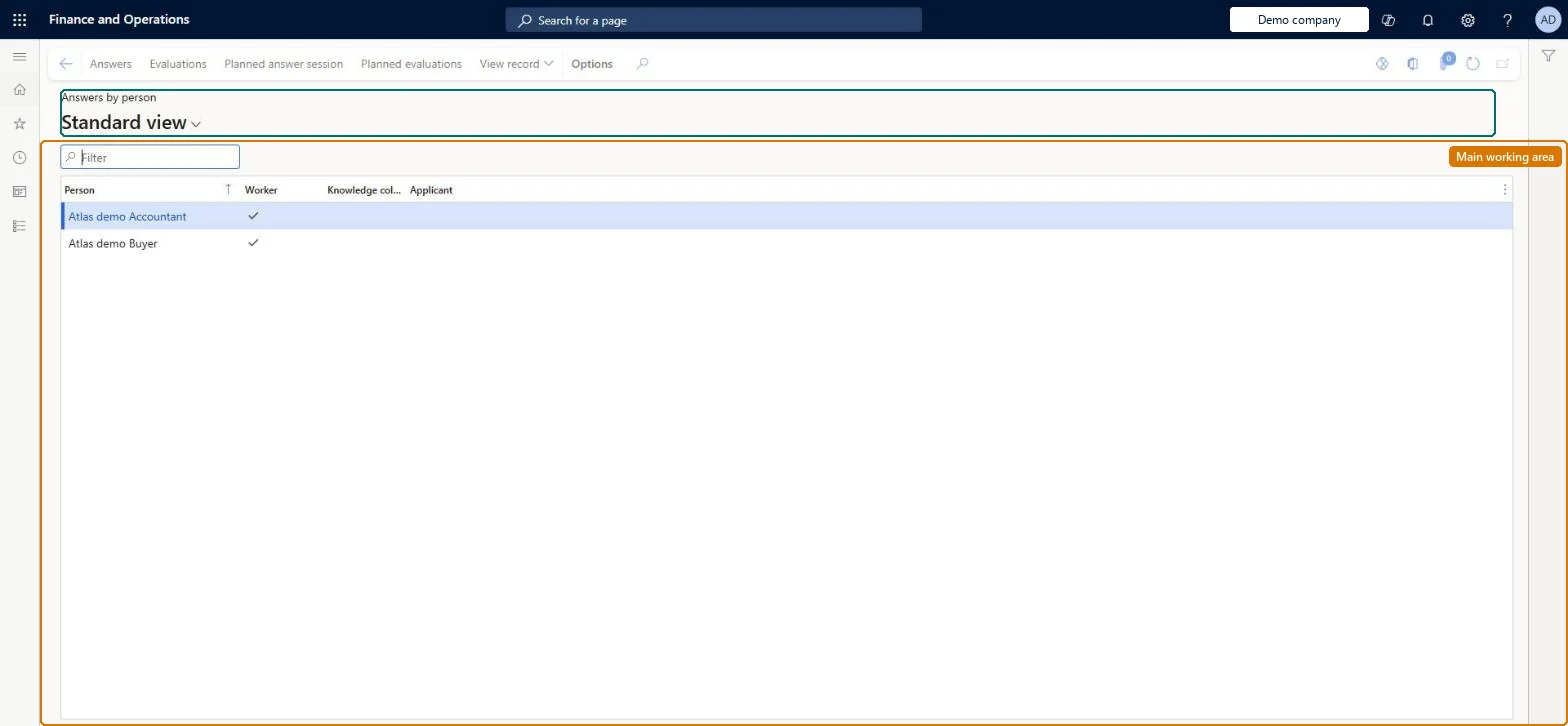
An inquiry page that lists the people who have answered questionnaires (workers, contacts and applicants) and opens their answer sessions, evaluations and planned sessions.
Vendor account manager, Marketing coordinator, Marketing manager and 5 more roles
Business process
Configure and manage surveys
Menu item
KMKnowledgeCollectorPerson
Main table
KMTmpKnowledgeCollectorPerson
Data entity
None for this page's own settings
Setup steps
1 on this page
Show what matters for
PAGE GUIDEWhat the page does and how to use it8 sections. Choose a role to highlight what matters to you.
Everyone
1What it is and why
What it is
An inquiry page that lists the people who have answered questionnaires (workers, contacts and applicants) and opens their answer sessions, evaluations and planned sessions.
What you do here
Use this page to start from a person and see all the questionnaires they have answered, been evaluated by, or still have to answer.
Example
For example, BEAT's HR manager selects applicant APP-0042, who answered 3 recruitment tests, and opens Answers to compare her scores before the interview.
The page in Dynamics 365. page title tab to open what to set or check
About the examples: Examples and screenshots in this guide use BEAT, a demo company in a Dynamics 365 test environment. Use your own company's codes and values instead of copying them.
Setup steps on this page
Look up a person's questionnaires
Use this page to start from a person and see all the questionnaires they have answered, been evaluated by, or still have to answer.
Steps from Microsoft
Go to Questionnaire > View and analyze results > Answers by person.
Filter on the person; the Worker and Applicant marks show what kind of person it is.
Select Answers to see the person's completed answer sessions and results, or Evaluations for the self-evaluations they completed.
Select Planned answer session or Planned evaluations to see the questionnaires still waiting for them.
Filter on the person and use Answers for results and Planned answer session for what is still open.The page starts from the person, so it shows all of their questionnaires at once, which Answers shows only when filtered.
No Feature management feature is needed for questionnaires; Microsoft Learn describes them without one. Questionnaires belong to the Human resources area, and in this system the same pages are also granted through procurement (vendor and RFQ questionnaires), sales and marketing (campaigns, telemarketing) and case management duties, as the Security section shows. HR managers and recruiters look up a person's questionnaires here.
One person at a time, across all questionnaires they answered or were planned for. Microsoft Learn
Can it be undone
Reversible: Inquiry only: it shows the completed answer sessions filtered to one person and changes no data. Microsoft Learn
If you change it later
None on data; the buttons open Answers and Planned answer session filtered to the person. Microsoft Learn
Technical architect
6Technical
Menu item
KMKnowledgeCollectorPersonChecked in Dynamics 365
Form
KMKnowledgeCollectorPersonChecked in Dynamics 365
Table
KMTmpKnowledgeCollectorPersonShown as “KNOWLEDGE COLLECTOR PERSON” in Record infoKey field: Person_NameChecked in Dynamics 365
Data entities
KMAnswersByPersonEntityPerson answers to questionnaire (the answers of each person (party number, questionnaire, question, answer text, comment); this page itself is a list built from people) Microsoft data model
Who can open it
PrivilegesView person questionnaire results KMKnowledgeCollectorPersonViewDutiesInquire into employee cases CaseEmployeeCaseInquireInquire into questionnaire transactions HcmQuestionnaireTransactionInquireInquire into campaigns smmCampaignInquireMaintain campaigns smmCampaignsMaintainInquire into telemarketing smmTelemarketingInquireMaintain telemarketing smmTelemarketingMaintainInquire into vendor questionnaire progress VendVendorQuestionnaireInquire8 security rolesMarketing coordinator CRMMarketingCoordinatorMarketing manager CRMMarketingManagerHuman resource assistant HcmHumanResourceAssistantHuman resource manager HcmHumanResourceManagerPurchasing manager TradePurchasingManagerSales manager TradeSalesManagerSales representative TradeSalesRepresentativeVendor account manager VendVendorAccountManagerChecked in Dynamics 365
Roles to set it up and use it
To use itHuman resource assistant HcmHumanResourceAssistantMarketing manager CRMMarketingManagerPurchasing manager TradePurchasingManagerSales manager TradeSalesManagerHuman resource manager HcmHumanResourceManagerGive people one of these roles. On this system, 8 roles can open this page.Checked in Dynamics 365
Actions on the page
(Action Pane without tabs): Answers, Evaluations, Planned answer session, Planned evaluations, View recordChecked in Dynamics 365
KMAnswersByPersonEntity (Person answers to questionnaire): shared by all companies.Load order: The page reads a temporary list of people (KMTmpKnowledgeCollectorPerson); the people come from the global address book and their answers from answer sessions. Person answers to questionnaire exports those answers per person.Load first: People (global address book), Answer sessionsChecked in Dynamics 365