BeyondERP.Newsletter
Menu

Page · Project management and accounting

My projects

A personal view of the project list: the same projects table and form as All projects, opened through its own menu item so you start from the projects you work on.

Used by
Auditor, Budget clerk, Budget contributor and 14 more roles
Business process
Plan projects
Menu item
ProjProjectsListPage_MyProjects
Main table
ProjTable
Data entity
ProjProjectV2Entity
Setup steps
1 on this page
Show what matters for
PAGE GUIDEWhat the page does and how to use it8 sections. Choose a role to highlight what matters to you.
Everyone

1What it is and why

What it isA personal view of the project list: the same projects table and form as All projects, opened through its own menu item so you start from the projects you work on.
What you do hereUse it as a project manager or team member to reach your own projects quickly and open their plan, forecasts and transactions without searching the whole company list.
ExampleFor example, a BEAT project manager who runs PRJ-0042 and PRJ-0051 opens My projects on Monday, sets Show projects to the open ones and goes straight to PRJ-0051's forecast of 36,500.00.
My projects page in Dynamics 365
The page in Dynamics 365. page title tab to open what to set or check
Functional consultant · Solution architect

2Where it fits

Business processPlan projects
Menu pathProject management and accounting › Projects › My projects
Set up firstAll projects Microsoft Learn
Used next byMy posted project transactions Microsoft Learn
Related pagesMy pending project transactions Microsoft Learn
End user · Functional consultant

3How to do it

About the examples: Examples and screenshots in this guide use BEAT, a demo company in a Dynamics 365 test environment. Use your own company's codes and values instead of copying them.

Setup steps on this page

Use My projects as the project manager's start page

Start each review from your own projects with the right filters.

Steps from Microsoft

  1. Go to Project management and accounting > Projects > My projects.
  2. Set the Show projects, Show levels and Legal entity fields to narrow the list.
  3. Select the project you work on.
  4. On the Plan tab, open Forecast or Work breakdown structure to review the plan.
  5. On the Manage tab, open Posted transactions to compare the actuals with the plan.

Source: Microsoft Learn

Fields on the page

FieldWhat it meansExample
Show projectsNarrows the list by project status, for example to the projects still in progress.Checked in Dynamics 365In process
Show levelsChooses whether subprojects are listed under their parent project or as a flat list.Checked in Dynamics 365All levels
Legal entityChooses which legal entity's projects are listed.Checked in Dynamics 365BEAT
Project typeThe project type of each project in the list; it can't be changed after creation.Microsoft Learn Fixed price

Common errors and fixes

MessageWhat to do
A project you expect is missing from My projects.Check the Show projects and Legal entity fields first; then open All projects, which lists every project in the company. Checked in Dynamics 365

Test checklist

  1. Create a project from My projects and select its project group and contract.
  2. Check the project then shows in the list for your user and in All projects.
  3. Post an hour journal line to it and check it appears in Posted project transactions.

Source: Microsoft Learn

Functional consultant

4Setup decisions

Setup stepRecommended value and whyDecision, common mistake and test
Use My projects as the project manager's start pageSet Show projects to the open projects and Legal entity to your company before you read the list.The list can hold closed projects and other legal entities' projects, which changes what you see as your workload.Which project list should project managers open daily?Reading a missing project as not existing: it may be filtered out by status or legal entity, or not linked to you; All projects shows every project.Test: Check My projects shows the manager's projects

Feature management and licence

Licence or add-inOn the live system, Project manager, Project accountant, Field Service Integration User and Sales manager use this page.

Checked in Dynamics 365

Solution architect

5Design impact

Shared or per companyPer company: each legal entity has its own records. Microsoft data model
Can it be undoneOne-way: Warning: these are the same project records as All projects. You can change a project and its contract later, but not its project type. Microsoft Learn
If you change it laterYou can change a project and its contract later, but not the project type. Microsoft Learn
Technical architect

6Technical

Menu itemProjProjectsListPage_MyProjects Checked in Dynamics 365
FormProjProjectsListPage Checked in Dynamics 365
TableProjTableShown as “Projects” in Record infoKey field: ProjId, JobIdChecked in Dynamics 365
Data entitiesProjProjectV2EntityProjects V2 Microsoft data model ProjectEntityProjects Microsoft data model ProjCDSProjectEntityIntegration entity for project Microsoft data model
Who can open itPrivilegesMaintain projects ProjTableMaintainView projects ProjTableViewDutiesMaintain budget plans BudgetPlanMaintainView budget plans BudgetPlanViewInquire into project master ProjProjectMasterInquireMaintain project master ProjProjectMasterMaintain
17 security rolesAuditor AuditPolicyManagerBudget clerk BudgetBudgetClerkBudget contributor BudgetBudgetContributorBudget manager BudgetBudgetManagerChief financial officer CompanyChiefFinancialOfficerField Service Integration User FieldServiceIntegrationUserManager HcmManagerAccountant LedgerAccountantAccounting manager LedgerAccountingManagerAccounting supervisor LedgerAccountingSupervisorFinancial controller LedgerFinancialControllerProject accountant ProjProjectAccountantProject assistant ProjProjectClerkProject manager ProjProjectManagerProject supervisor ProjProjectSupervisorService delivery manager SMAServiceDeliveryManagerSales manager TradeSalesManager
Checked in Dynamics 365
Roles to set it up and use itTo set it up or change itProject manager ProjProjectManagerProject accountant ProjProjectAccountantField Service Integration User FieldServiceIntegrationUserSales manager TradeSalesManagerTo use itProject supervisor ProjProjectSupervisorChief financial officer CompanyChiefFinancialOfficerProject assistant ProjProjectClerkService delivery manager SMAServiceDeliveryManagerAccounting manager LedgerAccountingManagerGive people one of these roles. On this system, 17 roles can open this page.Checked in Dynamics 365
Actions on the pageProject: New, Maintain, Set up, Cost prices, Sales prices, JournalsPlan: Activities, Item requirements, Forecast, Maintain forecast, Budget, ValidationManage: New, Process, Bill, Related informationControl: Statements, Control, Project tracking, Utilization, RetentionOptions: Personalize, Page options, ShareChecked in Dynamics 365
Developer

7Developer

Open it by URLhttps://<your-environment>/?mi=ProjProjectsListPage_MyProjects
Integrate withProjProjectV2Entity data entity Microsoft data model
Data migrationProjectEntity (Projects): loaded for each company, in Microsoft's default template 650 - Project accounting.ProjProjectV2Entity (Projects V2): loaded for each company.Load order: Microsoft's default template 650 - Project accounting loads Projects at execution unit 1, level 650, sequence 20. Lower levels load first, and entities at the same level load in sequence order.Load first: the default templates at lower levels (System setup to Expense management)Microsoft Learn
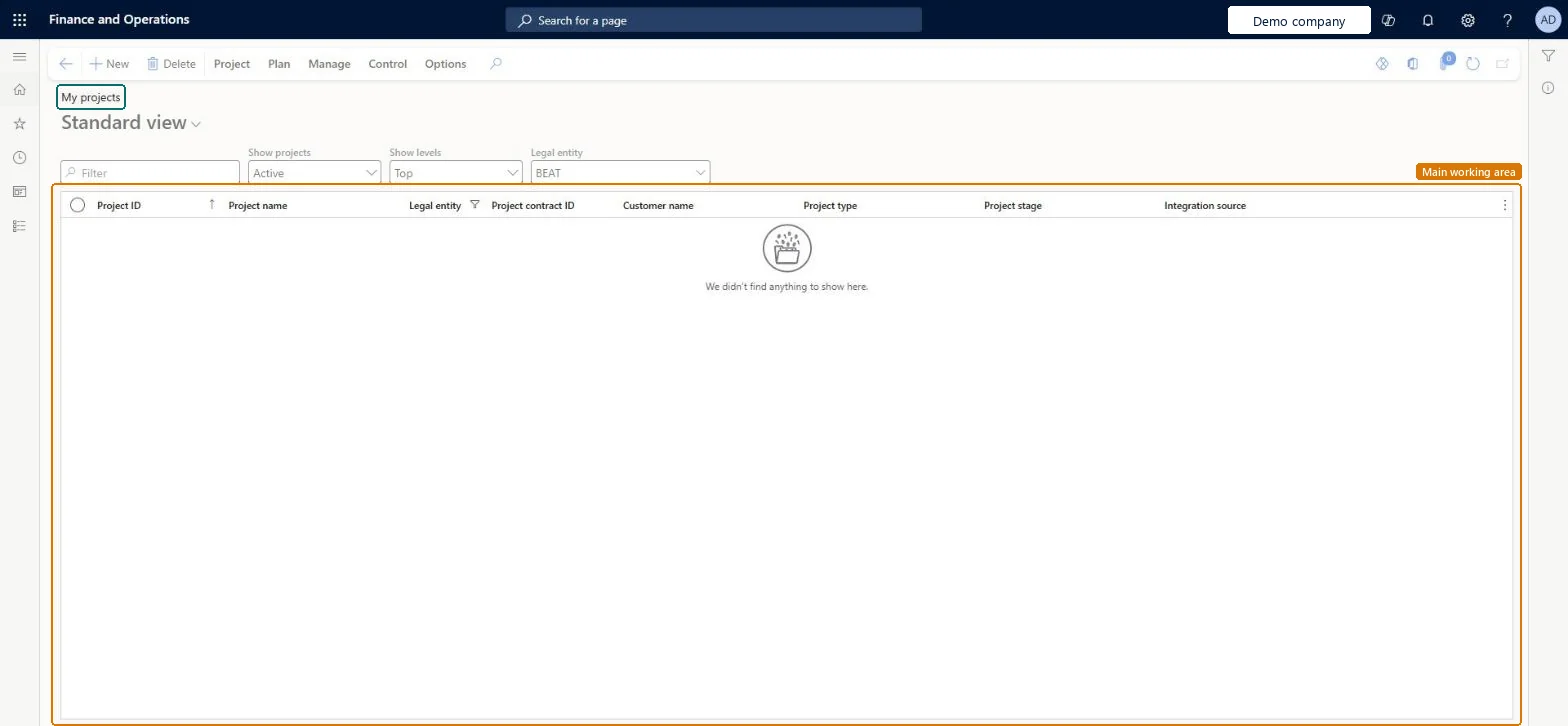
Table definitionProjTable columns and relations Microsoft data model
Everyone

8Sources